24
ZKH1 Trim Kit (For 1/4" Panels)
Support for Custom Handles
OPTION 2
For dispenser model
using full-width
trim
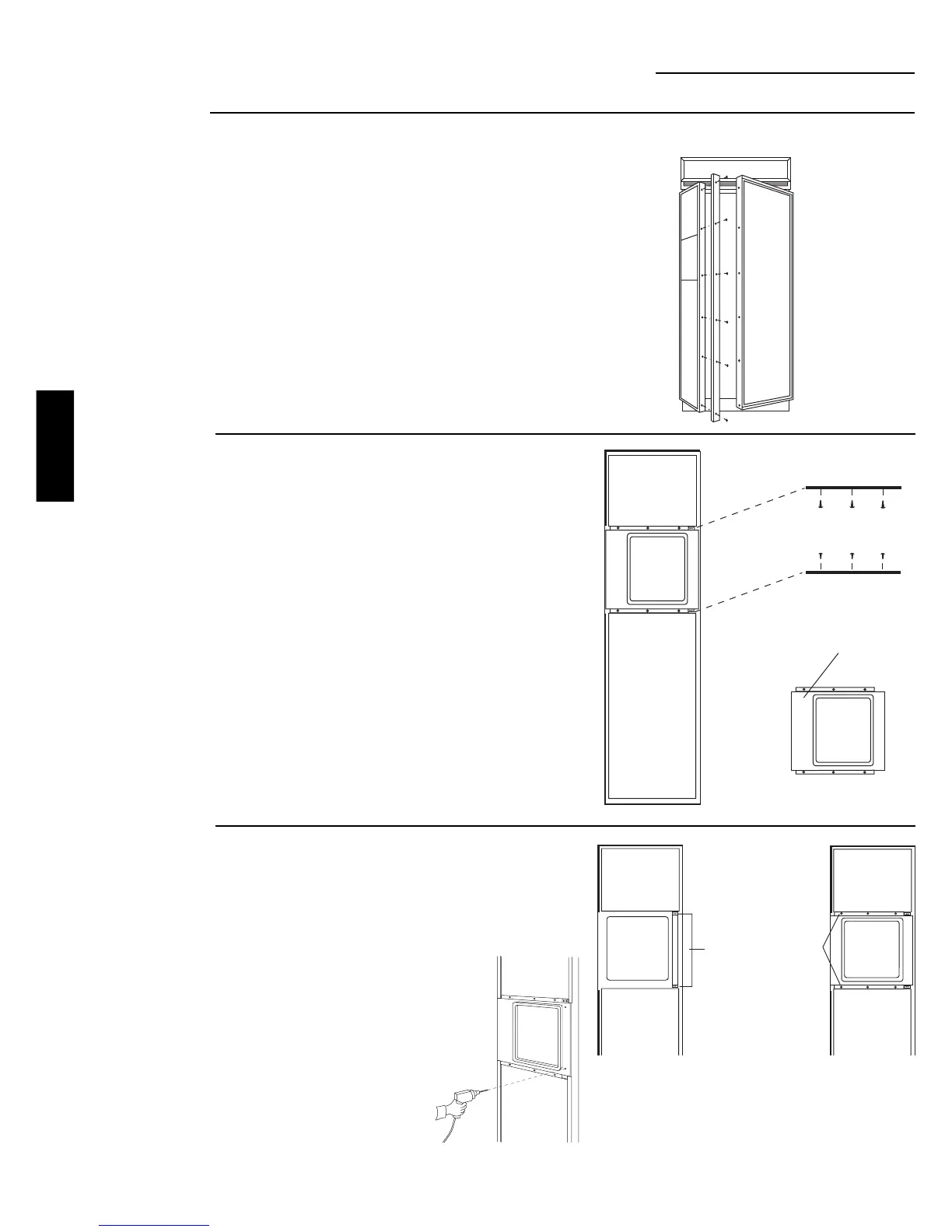
Step 1
Remove handles
• Carefully remove the Phillips head screws from the
door handle endcaps, top and bottom.
• Open door to 90°. Remove the screws from the
full-length aluminum handle of the freezer door.
• Retain screws, discard handle and endcaps.
Remove door panel trim above and below dispenser.
Lift off dispenser trim. Retain screws and trim.
Step 2
Remove trim
Remove
Trim
Remove
Dispenser Trim
Temporarily
Secure
Handle
Bracket
With
Screws
Temporarily
Secure
Dispenser
Trim
With
Screws
Step 3
Locate
position
of handle
• Position the handle bracket onto the steel door by
matching existing screw holes on the door and
bracket. Temporary secure with screws.
• Re-install dispenser trim, temporarily.
• Determine the desired location of the custom handle
and carefully mark centerlines of the screw holes.
• Drill 1/16" pilot hole
through the trim until it
starts into the handle
bracket. This will mark
the matching location for
drilling a clearance hole
when assembling the
handle, bracket and
dispenser trim.
• Remove dispenser trim
and bracket.
ZKH1
INSTALLATION








 To Next Page