- 30 -
2. Navigation et familiarisation
a) Navigation à l’aide des touches et de la molette
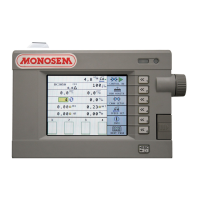
Touches de navigation : (Fig.1)
A chaque touche de fonction A correspond l’icône B situé à
gauche de la touche.
Molette de navigation : (Fig.2)
Pour se déplacer dans l’écran d’affichage tourner la molette
de navigation C.
Validation : (Fig.3)
Valider la sélection en appuyant simplement sur la molette.
2. Navigation and familiarization with the system
a) Navigation via keys and thumbwheel
Navigation keys : (Fig.1)
Each function key A is related to the icon B located on the
left of the key.
Navigation : (Fig.2)
To move through the display screen, turn the navigation
thumbwheel C.
Validation : (Fig.3)
Just push the thumbwheel to confirm the selection.
Fig. 1
Mode programmation/Programming mode
Programmiermodus/Programmeermodus
Modo de programación/Modalità di programmazione
Fig. 2
Fig. 3


 To Next Page
 Loading...