- 42 -
b) Programmation du seuil d’alarme
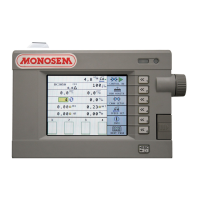
Aller à la page travail 2/3 (Fig.1), appuyer sur la touche
correspondante à l’icône paramètres semoir.
Vous pouvez modifier le niveau du seuil d’alarme A
(Fig.1) (nombre de graines par seconde en dessous duquel
l’alarme se déclenche).
Remarque :
Dans la majorité des cas, le réglage de 2 graines par seconde
convient (réglage usine).
c) Programmation du semoir
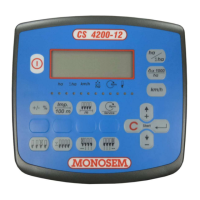
Appuyer sur la touche (Fig.2) paramètres
supplémentaires semoir
.
Vous pouvez ainsi modifier l’écartement des rangs B
(Fig.3).
En vérifiant parallèlement la largeur de l’outil.
(Calcul automatique = Ecartement x Nombre de rangs)
Remarque :
Le nombre de rangs est calculé par la console en fonction de
la détection des cellules.
b) Programming the alarm threshold
Go the the work page 2/3 (Fig.1). Press the key
corresponding to the icon seeder parameters.
You can modify the level of the alarm threshold A (Fig.1)
(number of grains per second under which the alarm
triggers).
Note:
In most cases, the 2-grain per second adjustment is suitable
(factory-adjusted).
c) Programming the seeder
Press the key (Fig.2) seeder additional parameters
.
This way you can modify the B row spacing (Fig.3).
Checking in parallel the width of the tool.
(automatic calculation = spacing x number of rows)
Note:
The number of rows is calculated by the console according
to the detection of the cells.
Mode programmation/Programming mode
Programmiermodus/Programmeermodus
Modo de programación/Modalità di programmazione
Fig. 1
Fig. 3
Fig. 2


 To Next Page
 Loading...