- 62 -
d) Variation de la population en cours de travail
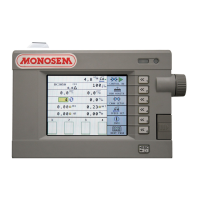
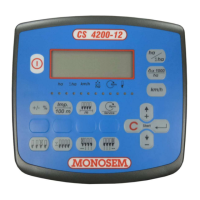
Pour augmenter la population en cours de travail, appuyer
sur la touche (Fig.1) correspondante au symbole
.
De la même façon, appuyer sur la touche (Fig.2)
correspondante au symbole
pour diminuer la
population.
Chaque impulsion fera varier la dose objective en + ou en –
d’un pas définit en % de la population objective.
Pour remettre à zéro l’écart A appuyer sur la touche
(Fig.2) correspondante au symbole .
d) Variation of the population during the work
To increase the population during the work, press the key
(Fig.1) corresponding to the symbol .
In the same way press the key
(Fig.2) corresponding to
the symbol
to decrease the population.
Each pulse will vary the objective dose in + or in – by a
pitch set in % of the objective population.
To reset the difference A press key
(Fig.2)
corresponding to the symbol
.
Mode utilisation/Use mode
Einsatzmodus/Gebruiksmodus
Modo de uso/Modo d’uso
Fig. 1
Fig. 2
A
B


 To Next Page
 Loading...