Set-up
Tilting Feet
Beatbox
™
is designed to rest level. However, Beatbox comes with two
tilting feet if you’d rather it rest on a slightly back-tilting angle. This is
ideal if you’re going to be placing Beatbox in a low position and you
want sound to be projected upward. To install, simply push the pegs
on the feet into the holes on the front corners of Beatbox.
Power
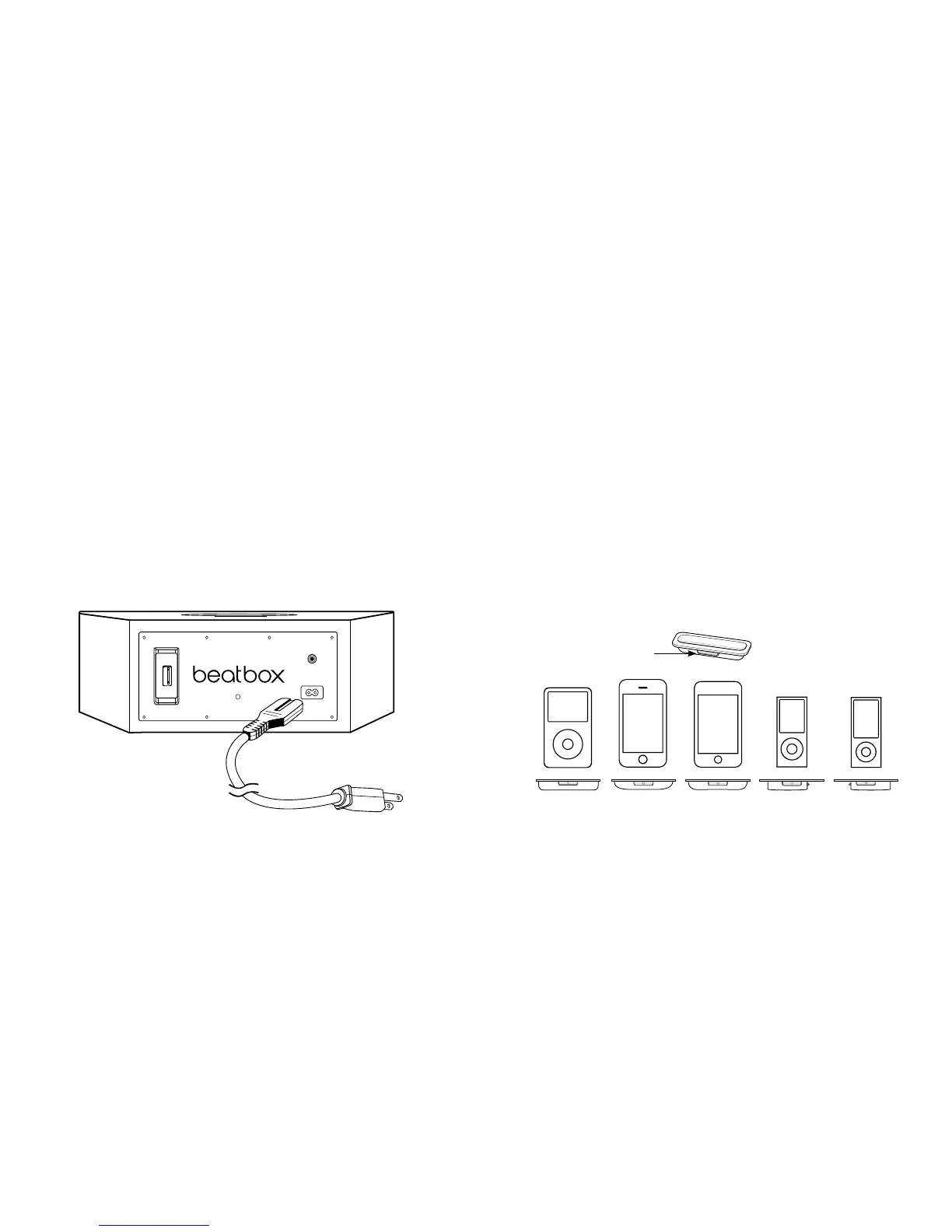
Plug the AC power cord into the back of Beatbox,
™
as shown.
Plug the two-pronged plug end into a 120-volt power outlet.
Connecting Audio Devices
Connecting to iPod
®
/iPhone
®
Beatbox
™
features a built-in dock for iPod and iPhone
for an easy, direct connection. This will also give you the ability
to control playback with the included remote control.
Using iPod/iPhone Dock Adaptors
Beatbox includes multiple Dock Adaptors that fit iPod nano
(4th and 5th generations), iPod touch (2nd generation), iPod
classic (80GB and 120GB/160GB), iPod with video (30GB)
and iPhone 3G and 3GS.
To install, simply push the adaptor plate that fits your model
into the iPod/iPhone dock.












 To Next Page