1
2
3
4
7
6
5
SuperStar
™
BackFloat
™
Features and Controls
The SuperStar
™
BackFloat™ is the world’s rst audiophile
quality oating wireless speaker. The durable, oating,
splash resistant design makes the SuperStar
™
BackFloat™
perfect for outdoor use in the pool, tub, shower or any other
situation where things might get wet and wild.
Please Note:
SuperStar
™
BackFloat™ oers audio feedback when you use
the controls. When you hear the tone the unit is performing
the function you’ve initiated.
Functions that include audio feedback include:
• Power On
• Power O
• Bluetooth
®
pairing available
• Bluetooth pairing completed
• Incoming phone call
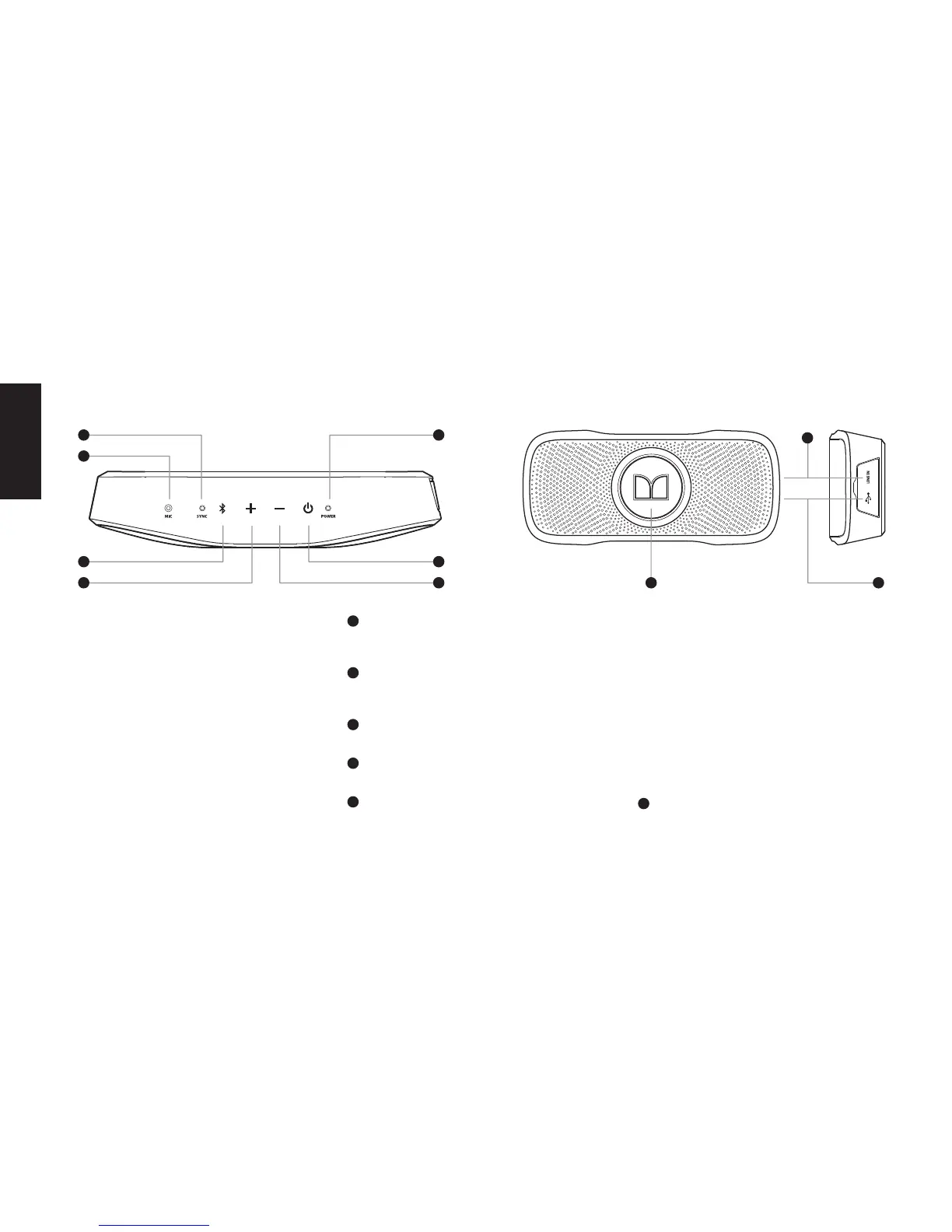
1
Bluetooth Sync Indicator
Blinks blue when ready to pair. Solid blue when paired.
Bluetooth LED is o when the device is not paired.
2
Built-In Microphone for Speakerphone Use
For use when SuperStar
™
BackFloat
™
is connected to
your smartphone or tablet.
3
Bluetooth Control
Hold for about 3 seconds to initiate pairing mode.
4
Volume Up
Press and hold to increase volume.
5
Volume Down
Press and hold to decrease volume.
Note:
When playing music, SuperStar
™
BackFloat
™
is initially
set at maximum audio level. We recommend that you
control the volume from you music source device (music
player, smartphone, computer).
When in phone mode, use the volume controls on your
SuperStar
™
BackFloat
™
to control the volume of your call.
When you reach the maximum volume using the
controls on your SuperStar
™
BackFloat
™
, the Power
Indicator LED will rapidly ash red. Likewise, when you
reach the minimum volume using the controls on your
SuperStar
™
BackFloat
™
, the Power Indicator LED will
rapidly ash red.
6
Power
Press and hold for about 3 seconds to turn the power
On/O.
8
9 10
ENGLISH











 To Next Page