FCC ID: RJE191011-00
This device complies with Part 15 of FCC Rules. Operation
is subject to the following two conditions: (1) This device
may not cause harmful interference, and (2) This device must
accept any interference received, including interference that
may cause undesired operation. Changes or modication
not expressly approved by the party responsible for
Compliance could void the user’s authority to operate the
equipment. Connecting of peripherals requires the use of
grounded shielded signal cables. The socket-outlet shall be
installed near the equipment and shall be easily accessible.
Note: This equipment has been tested and found to comply
with the limits for a Class B digital device, pursuant to Part
15 of the FCC Rules. These limits are designed to provide
reasonable protection against harmful interference in a
residential installation. This equipment generates, uses and
can radiate radio frequency energy and, if not installed
and used in accordance with the instructions, may cause
harmful interference to radio communications. However,
there is no guarantee that interference will not occur in a
particular installation. If this equipment does cause harmful
interference to radio or television reception, which can be
determined by turning the equipment o and on, the user is
encouraged to try to correct the interference by one or more
of the following measures:
• Reorient or relocate the receiving antenna.
• Increase the separation between the equipment
and receiver.
• Connect the equipment into an outlet on a circuit
dierent from that to which the receiver is connected.
• Consult the dealer or an experienced radio/TV
technician for help.
Caution
Changes or modications not expressly approved by the
party responsible for compliance could void the user’s
(or your) authority to operate the equipment.
Avoid storage in extreme heat or cold. Avoid temperature
extremes and high humidity. The product’s working
temperature range is 0–45°C (32–113°F).
Industry Canada
This device complies with Industry Canada license-exempt
RSS standard(s). Operation is subject to the following
two conditions: (1) this device may not cause interference,
and (2) this device must accept any interference, including
interference that may cause undesired operation of the
device. Under Industry Canada regulations, this radio
transmitter may only operate using an antenna of a type
and maximum (or lesser) gain approved for the transmitter
by Industry Canada. To reduce potential radio interference
to other users, the antenna type and its gain should be so
chosen that the equivalent isotropically radiated power
(e.i.r.p.) is not more than that necessary for successful
communication.
Operation
Power
SuperStar
™
BackFloat
™
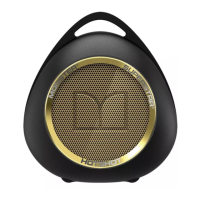
comes with a lithium-ion polymer
battery. For best results, fully charge SuperStar
™
BackFloat
™
before use. (Recommended output of charging device is 2A)
To charge, plug the micro USB cable into SuperStar
™
BackFloat
™
and plug the standard USB connector into your
power source. (Wall adapter. Laptop. Desktop. External
battery etc.) While charging the red power LED will blink.
When charging is complete, the light will be solid red.
Audio Connection
There are three ways to connect to audio sources.
• Bluetooth
• USB Cable
• Direct AUX In 3.5mm
Bluetooth Connection
To use Bluetooth for your audio connection rst pair
SuperStar
™
BackFloat
™
with your audio source (music
player, smartphone, laptop, or other Bluetooth equipped
device that can act as a source of music).
First press and hold the Bluetooth button for three seconds
or until you hear the tone. The blue Sync LED will come
on and blink. This means SuperStar
™
BackFloat
™
is in pairing
mode. Make sure Bluetooth is enabled on your audio source
and in a few moments “Monster SuperStar
™
BackFloat”
will appear on your list of possible Bluetooth connections.
Press “pair” or “connect” on your music player and when the
connection is made, the blue LED on SuperStar
™
BackFloat
™
will turn solid blue.
You are paired.
ENGLISH











 To Next Page