10
Tuner
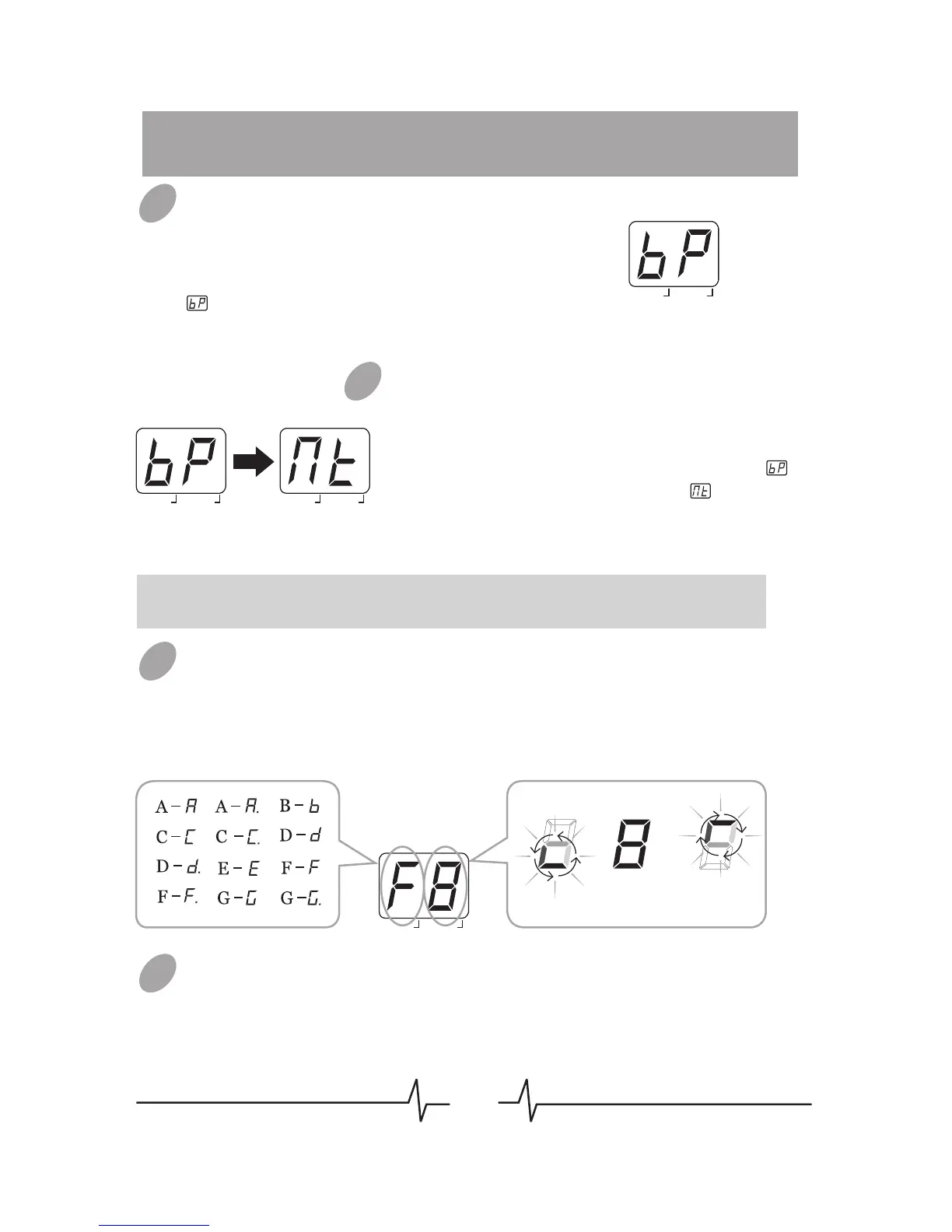
Entering Bypass Tuning Mode
When in PLAY mode, press both [PATCH –]
and [PATCH +] footswitches together to
enter bypass tuning mode. LED will display
for 1 second, then begin to show tuning
indication.
Entering Mute Tuning Mode
When in PLAY mode, hold both [PATCH –]
and [PATCH +] footswitches together longer
than 2 seconds to enter mute tuning mode. In
course of this operation, LED will display
for 1 second then turn to display , when
releasing the footswitch, LED begin to show
tuning indication.
Note: In mute tuning mode, no sound will phonate through the output of
GEM Box.
Tuning
Play one guitar string at a time, and adjust the guitar pitch as
LED’s instruction.
Quit Tuner
When in tuning mode, press both [PATCH –] and [PATCH +]
footswitches together or anyone of these 2 footswitches to quit
tuning state. GEM Box will return to PLAY mode.
01
03
03
02
BANK PATCH
# EDIT
BANK PATCH
# EDIT
BANK PATCH
# EDIT
#
#
#
#
#
BANK PATCH
# EDIT
The left side shows the current pitch.
The right side indicates how much the tuning
is off.
The indication rolls faster, the more the
pitch is off.
SharpCorrectFlat



 To Next Page