EasyManua.ls Logo

MOOKA GL-FS32 - Initial Setup and Filter Change

MOOKA GL-FS32
20 pages
Print Icon
To Next Page IconTo Next Page
To Previous Page IconTo Previous Page
Loading...
1 2
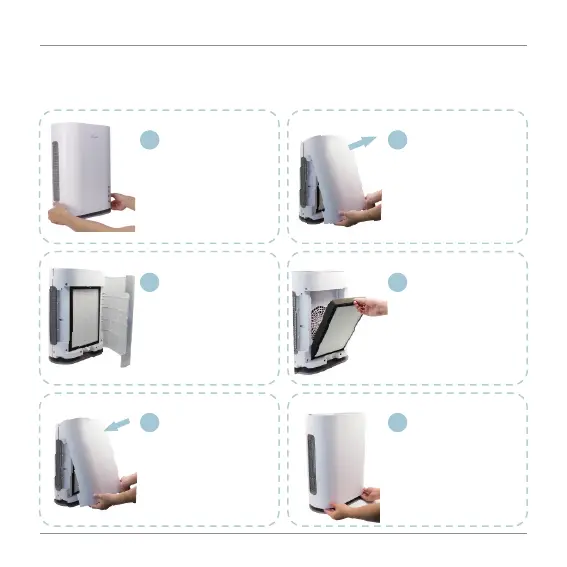
Hold the lower left and
right corner of the
cover and pull on both
sides with force.
Pull up the the cover
as shown in the
picture.
3 4
Remove the front
cover.
Remove used filter and
then place the new filter
into the air purifier
housing. Ensure that
the pull straps are facing
outward.
5 6
Replace the cover by
placing the tabs on the
top of the cover into the
slots on the unit.
Push the bottom of
the cover into place,
then press the lower
left and right corners
until you hear a
clicking sound.
support@mooka.co
- 16 -
BEFORE YOU GET STARTED
- Please remove the plastic bag surrounding filter before using.

Related product manuals