MOON Nova CD Player
Rear Panel Connections
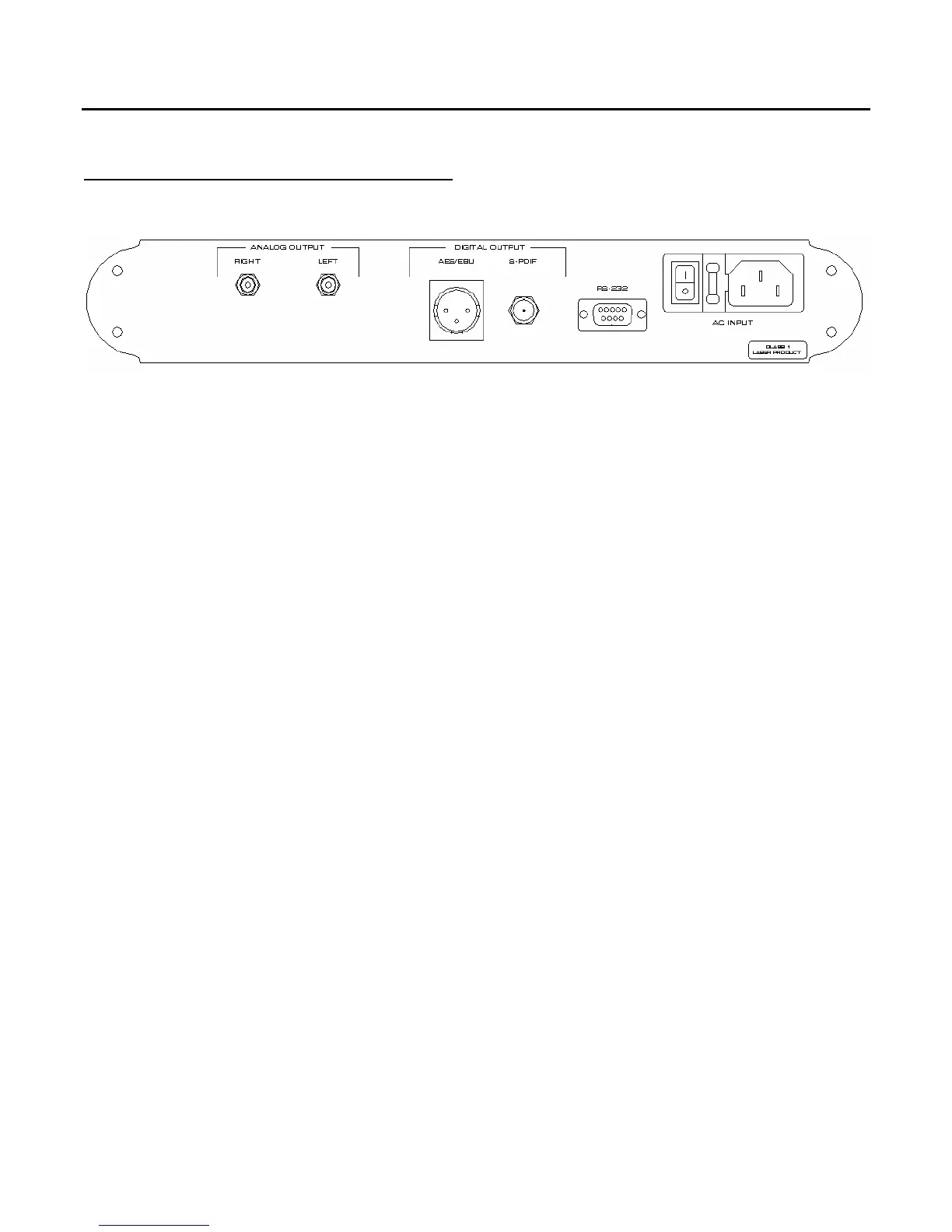
Figure 2: Rear panel of Moon Nova CD Player
The rear panel will look similar to Figure 2 (above). On the left side is the analog audio output. There
is one pair of RCA analog audio output connectors that you should connect to a stereo analog input on
your preamplifier or integrated amplifier. Don’t hesitate to use good quality interconnect cable.
There are two (2) digital audio outputs located on the center of the rear panel. One is a BNC
connector labeled “S/PDIF” which allows you to use the Nova as a CD transport whereby, digital signal
processing will be handled externally by another DAC or surround processor such as the MOON
Attraction. You should use a 75Ω digital audio cable with BNC connectors. In the event that this
isn’t available, you may use a digital audio cable terminated with RCA connectors and RCA-to-BNC
adaptors. It is better to use a BNC-to-BNC connection, but it should not be of a concern if you need to
use adaptors. A second digital audio output uses an AES/EBU connector which is intended for use with
DACs and surround processors that have this type of input. Use a dedicated AES/EBU digital audio
cable for this output.
The MOON Nova is equipped with full-function bi-directional RS-232 port control and status for
custom integration or automation. This is located to the right of the digital audio outputs and uses a
DB9 connector. All information about the RS-232 codes are available upon request or in PDF file
format on our website: www.simaudio.com.
Finally on the far right side is the AC connector to plug the unit into a wall outlet. Use the included AC
power cord. Alternatively, if you wish, you may use a dedicated high-performance AC cable designed
for CD Players.
These rear panel connectors have been chosen because they provide the best possible connections for
your unit. A poor contact will degrade the signal substantially, and plugs and sockets should all look
clean and free of dirt and corrosion. The easiest way to clean them is to remove the cables from their
sockets and push them back in again. This procedure requires that your CD Player and the rest of your
components be completely turned off. Not heeding this warning may result in serious damage to your
equipment. Special contact cleaning fluids and enhancers should not be used, as they deposit a difficult
to remove residue which degrades the performance of your components.
____________________________________________________________________________________
Rear Panel Connections 10



 To Next Page