MOON Nova CD Player
Front Panel Controls
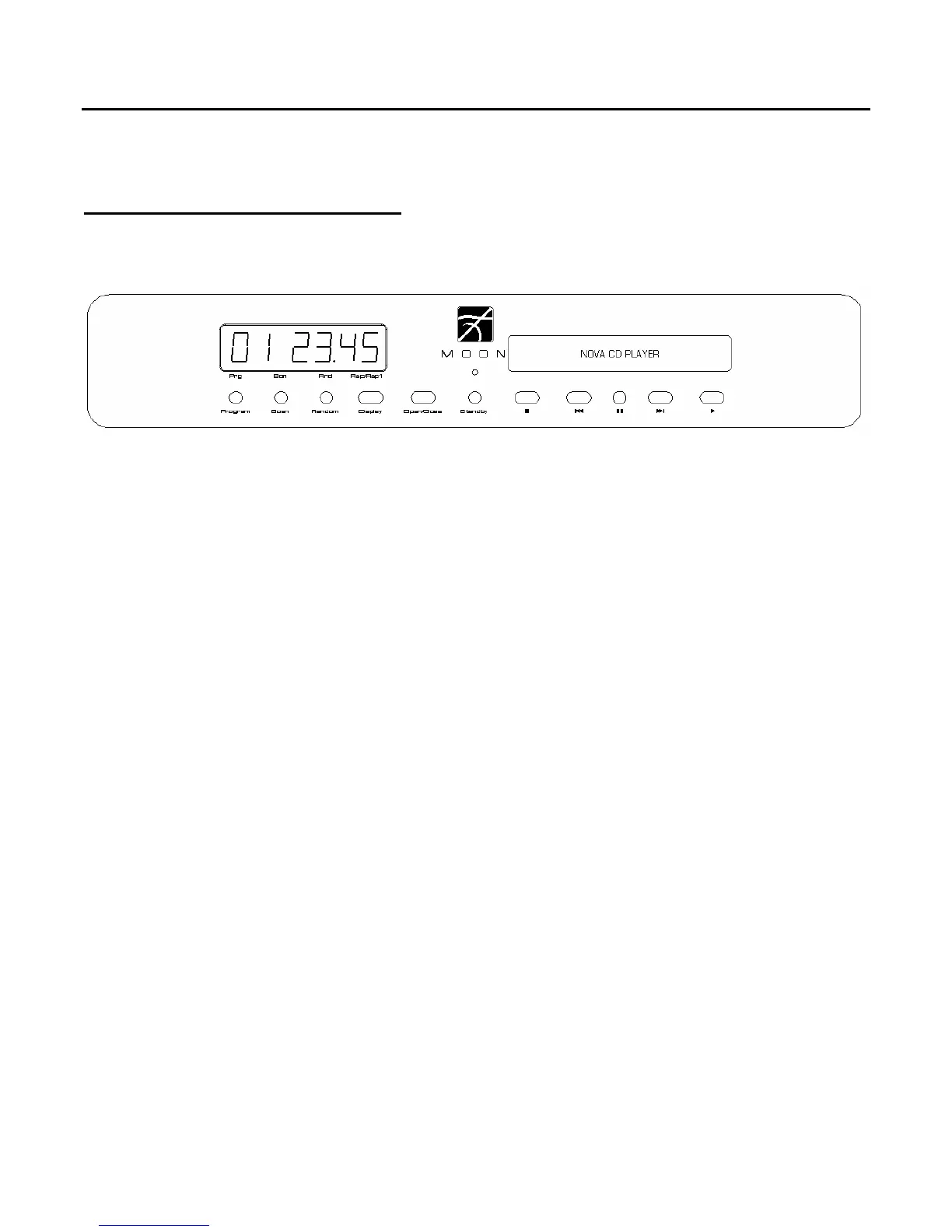
Figure 1: Front panel of Nova CD Player
The front panel will look similar to Figure 1 (above). The large digital display window indicates the
track number of the compact disc currently playing (or the total number of tracks in stop mode) and
time information. There are four (4) different display modes for time information; the one engaged is
dependant on the “Display” button which is described in detail on the next page of this section. On the
bottom of the display window, from left to right, are five (5) indicator LED’s that will illuminate as
follows:
‘Prg’ - when Program mode is engaged
‘Scn’ - when Scan mode is engaged
‘Ran’ - when “Random” play mode is engaged
‘Rep’ - when repeat mode is engaged for the entire compact disc
‘Rep1’ - when repeat mode is engaged for one (1) specific track
Each of these functions is described in detail on page 9
The “Standby” button disengages the transport mechanism from the rest of the Nova’s circuitry and
turns off the digital display. However, when in “Standby” mode, all digital and analog audio circuitry
remains powered up to help maintain optimal performance. The blue LED on the Nova will no longer
be illuminated when the player is in “Standby” mode.
To load a compact disc into the Nova, press “Open/Close’, put the CD in the drawer with the label side
facing up and press “Open/Close” again. When a CD is first loaded into the Nova, the total number of
tracks, and total playing time will appear in the display. In the event that you load a CD that contains
no musical tracks (i.e. data only), the word ‘DATA’ will appear in the large digital display window and
the drawer will automatically open to eject this unplayable CD.
____________________________________________________________________________________
Front Panel Controls 7



 To Next Page