10
User Manual
Motor Connect
STARTING THE CRADLE BOUNCER MANUALLY
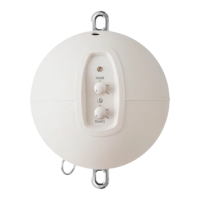
• First turn the ‘TIMER’ button and set the desired time.
• Then turn the ‘TEMPO’ button and set the desired rocking speed.
When both knobs are set to your desired settings and the LED lights up
green, put one hand on the crossbar and start the baby hammock by
gently pressing down once or twice. The cradle is started by carefully
pulling down on the spring once or twice.
The cradle bouncer will now take over and will begin to rock. You can
use the knobs to increase or decrease the pace throughout the baby’s
nap.
When the time is up, the cradle bouncer will slow down and then stop
completely.
STARTING THE CRADLE BOUNCER WITH THE MOONBOON
APP
If the cradle bouncer is in standby-mode, simply choose a Sleep Program
or choose your own settings and press ‘START’ in the app.
If the cradle bouncer is turned off, turn it on by turning the ‘TIMER’ and
‘TEMPO’ buttons to the left until you hear a ‘click’ sound. You might need
to reconnect the bluetooth, which is done by clicking the bluetooth button
once.
When the LED lights up green, the cradle bouncer is ready to be controlled
via the Moonboon App. You can either set the time and tempo yourself
or choose one of Moonboon’s preset sleep programs.
With the app, you can adjust both the duration and pace of your baby’s
nap continuously, ensuring the cradle bouncer rocks at precisely the
speed that best suits your baby’s preferences.
When the time is up, the cradle bouncer will slow down and then stop
completely.
Please note
After a normal use, the motor will
turn the light off after use and go into
standby mode. You can wake it up
again using the Moonboon App.


 To Next Page