5
User Manual
Motor Connect
MOUNTING
Start by assembling and installing your Moonboon mounting system.
If you hang your Motor Connect from a ceiling hook, it is important you
read the section on WEIGHT first.
Attach the two carabiners to your cradle bouncer in accordance with the
ASSEMBLY instructions on page 4.
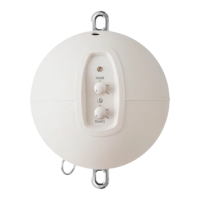
Hang the Motor Connect with the top carabiner and plug in the power
supply to the small hole at the top of the cradle bouncer. The cradle
bouncer requires a constant power supply to operate.
Make sure that the cable does not trail down next to the cradle bouncer,
but is routed away from the setup. Otherwise, the cable can create
unwanted oscillations.
Your Moonboon product comes with an included spring. Attach the spring
to the carabiner at the bottom of the Motor Connect, and then mount the
baby hammock or cradle onto the spring. Be sure to securely lock the
safety carabiners once your product is properly mounted.
Next, the motorwire with the small s-hook must be mounted onto the baby
hammock or cradle. The motorwire is the connection that ensures continuous
movement between the Motor Connect and your chosen product.
The motorwire is located at the bottom of the Motor Connect and must be
pulled out manually. The last part of the wire consists of a short nylon cord
with a s-hook. Mount the motorwire by leading the nylon cord and s-hook
down and around the top of the baby hammock or cradle. It is important
that the nylon cord is firmly attached before you release it.
Continued on the next page...
Please note
If the Motor Connect is suspended
from the ceiling, it is important to use
a stainless steel hook without coating.
4
3
1
2


 To Next Page