MOONEY INTERNATIONAL CORPORATION
M20V SERVICE AND MAINTENANCE MANUAL
Date
MAR 2017
Rev Date
Page
8
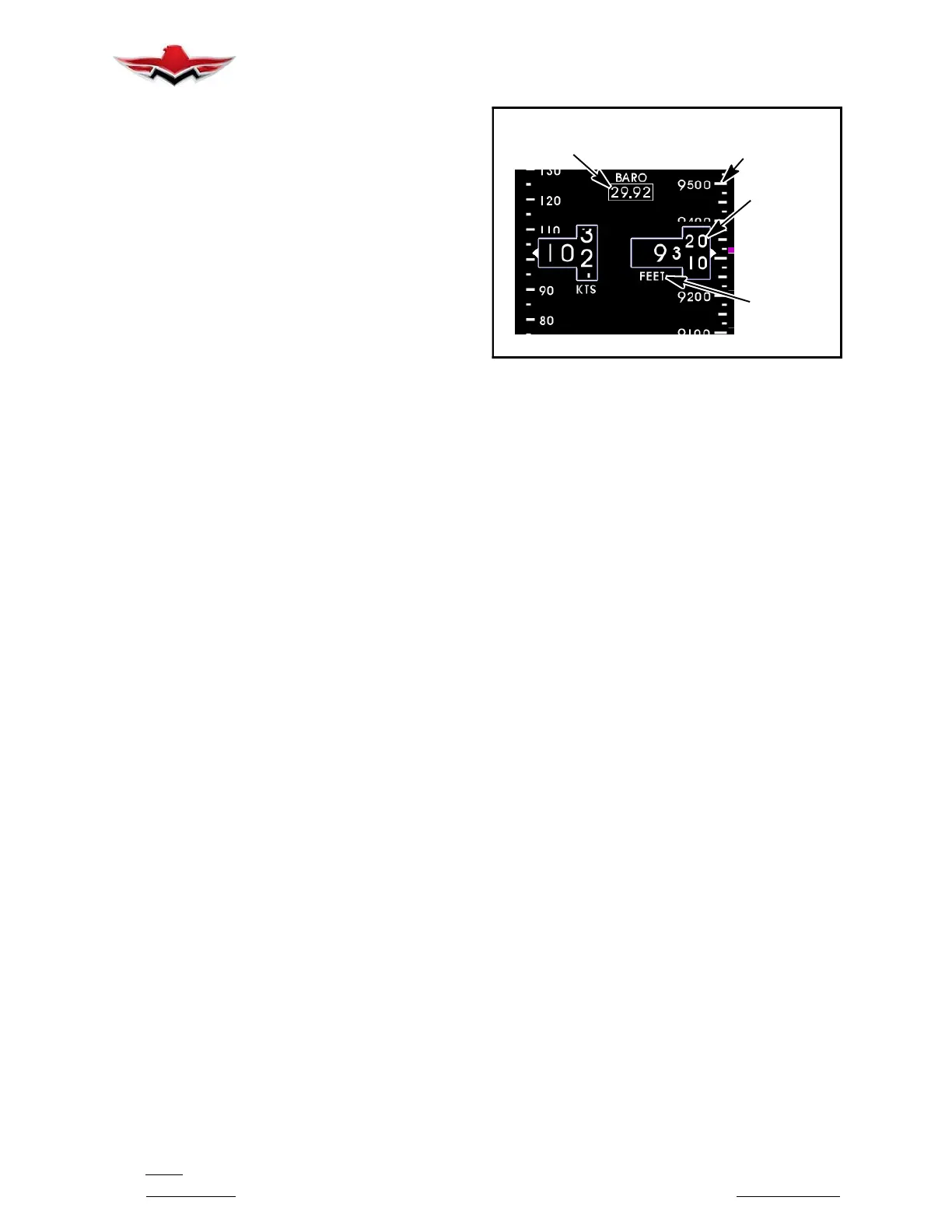
The altitude window displays the current, barometric
adjusted altitude. The indicated digits of the display are
every ten (10) units and the window is expanded over
this portion of the number to display a minimum of (20)
units. The units will “roll” or scroll to assist in quick refer-
ence as to the increasing or decreasing nature of the
aircraft’s altitude. The hundreds, thousands and ten-
thousands digits appear to the left of the tens digits with
the thousands and ten- thousand digits slightly larger
than the others. The altitude pointer (triangle) to the
right of the window points to the associated position on
the altitude tape of the current altitude. Altitude units
appear below the altitude window and can be changed
during Flight Mode using the Options Menu, ref: Mid-
Continent Instruments Manual Number 9017782
Dated Oct 31, 2013 Rev B or later revision.
The altitude tape is a vertical scale along the right mar-
gin of the display. The current altitude is always in the
middle of the tape and indicated by the triangular point-
er on the right side of the altitude window. The tape has
numeric indications every one- hundred (100) units
with minor graduations every fifty (50) units and sub-
graduations every twenty- five (25) units. In horizontal
installations, the tape spans approximately 400 units
from top to bottom and in vertical installations, the tape
spans approximately 500 units from top to bottom. The
tape will “roll” or scroll to assist in quick reference as to
the increasing or decreasing nature of the aircraft’s alti-
tude.
The barometer window shows the currently set baro-
metric pressure, is identified by the abbreviation
“BARO” and is located at the top center of the airspeed/
altitude display. Setting the current barometric pres-
sure compensates the altitude for the appropriate en-
vironmental conditions. The barometric setting can be
adjusted with a simple turning of the control knob while
in Flight Mode. When adjusting the barometric pres-
sure, the window will increase in size and the digits will
turn green. When finished setting the pressure, the win-
dow will return to its original size and color. Barometric
pressure units can be selected during Flight Mode us-
ing the Options Menu, ref: Mid- Continent Instruments
Manual Number 9017782 Dated Oct 31, 2013 Rev B or
later revision.
ALTITUDE
WINDOW
ALTITUDE
TAPE/SCALE
BAROMETER
VALUE
ALTITUDE
UNITS
ALTITUDE
TREND BAR
ALTITUDE OPERATION (SAM)
FIGURE 34-3
The altitude trend bar is located along the right margin
of the altitude display. This feature is optional and can
be turned on or off using the Options Menu. The trend
bar is magenta in color and originates at the current alti-
tude on the altitude tape (always from the middle of the
display, directly across from the altitude pointer). The
height of the trend bar, above or below the current alti-
tude, indicates the altitude of the aircraft on the altitude
tape if the current vertical speed or “altitude trend” is
maintained over a period of six (6) seconds. For ex-
ample, in Figure 34-3, the current altitude is approxim-
ately 9,315 feet. The trend bar is at approximately
9,325 feet, indicating that the aircraft’s altitude will be
9,325 feet in 6 seconds if the current vertical speed or
climb is maintained constant. The length of the trend
bar will increase with increased dive or climb rates and
approach zero or disappear entirely as the vertical
speed reaches zero in level flight.
G1000 ALTIMETER DISPLAY
The Altimeter provided in the Garmin G1000 PDF dis-
plays barometric altitude values in feet on a rolling num-
ber gauge. The Altimeter displays the following infor-
mation:
Altitude values
Altitude reference bug
Altitude trend vector
Altitude reference box
Barometric setting box
Altitude alerter
Metric display
The altitude calculated by G1000 GPS receivers is
geometric height above Mean Sea Level and could
vary significantly from the altitude displayed by pres-
sure altimeters.
Refer to G1000 Line Maintenance and Configuration
Manual for service and troubleshooting information.
34-20-00


 To Next Page
 Loading...