22
23
Rev:5.0
6/08/2010
Rev:5.0
6/08/2010
MSST5/10-S UserManual
MSST5/10-S UserManual
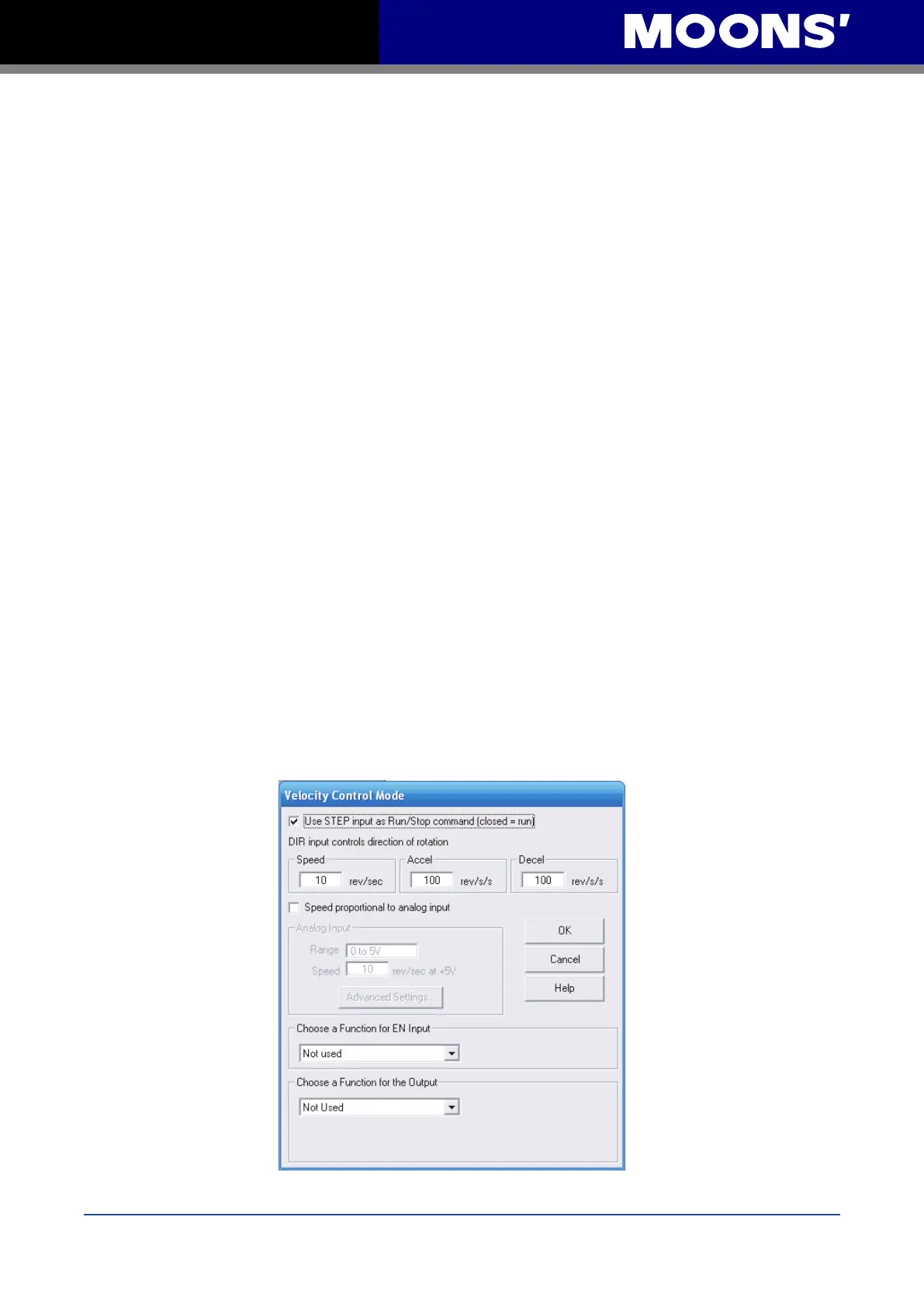
Options for the EN Input include:
▪ Enable motor when closed - current is owing through the input enables the motor and has no
power when the input is open
▪ Enable motor when open - opposite of above
▪ Reset alarm when closing – an alarm or fault can be cleared by closing the input
▪ Reset alarm when opening - an alarm or fault can be cleared by opening the input
▪ Not Used – there is no function for the input ,but its state can be read using the SCL IS, FS or
FY commands.
Options for Output are:
▪ Closed on fault – the output will close if a fault occurs
▪ Open on fault – the output will open if a fault occurs
▪ Closed to release brake – the output controls a fail safe brake relay
▪ Open to release brake - the output opens to release the brake
▪ Closed when moving – the output closes whenever the motor is moving
▪ Open when moving – the output opens whenever the motor is moving
▪ Tach out – the output produces pulses relative to the motor position
▪ Not Used – there is no function for the output , but it can be controlled using the SCL SO
,FO,IH, and IL commands.
Velocity Mode
In velocity mode, the motor’s speed is controlled by analog and digital inputs.


 To Next Page