Need help?
Do you have a question about the Moons' SRX04 and is the answer not in the manual?
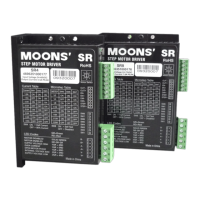
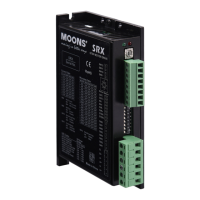
The MOONS' SRX04 is a 2-phase step motor drive designed for motion control applications, offering a blend of performance, quality, and economy. It is available in two connector types: the SRX04-S with a screw-type terminal block connector and the SRX04-H with a no-screw plug-in type connector, allowing for flexibility in wiring and installation.
The SRX04 drive operates from a 24 to 48 volt DC power supply and provides advanced digital current control for excellent high-speed torque. It supports a wide range of microstep resolutions, selectable via a position switch, offering 16 settings from 200 to 25000 steps/rev. This allows for precise control over motor movement, from coarse steps to very fine micro-steps, enhancing the smoothness and accuracy of motion. The drive is capable of achieving speeds up to 3000 rpm, making it suitable for applications requiring both high precision and dynamic performance.
A key feature of the SRX04 is its anti-resonance capability, which raises the system-damping ratio to eliminate midrange instability. This ensures stable operation across the motor's entire speed range, preventing unwanted vibrations and improving overall system reliability. The drive also includes an auto-setup function that measures motor parameters and automatically configures motor current control and anti-resonance gain settings upon power-on. This simplifies the initial setup process and optimizes performance for the specific motor being used.
The SRX04 supports two control modes: Step & Direction or CW/CCW pulse, providing compatibility with various control systems. It incorporates digital filters for high-speed inputs, with selectable settings of 2 MHz and 150 KHz, to reduce external noise and ensure reliable signal processing. A 16-bit rotary switch allows for the selection of a desired motor database, which is pre-loaded at the factory, further streamlining configuration for recommended MOONS' motors.
For power management, the drive offers an idle current reduction feature, which can be switch-selected to reduce running current by 50% or 90% one second after the motor stops. This helps to minimize motor and drive heating, extending the lifespan of components and improving energy efficiency.
The SRX04 includes a self-test function, selectable via a switch, which performs a 2-revolution, 1 rps, CW/CCW move test. This allows for quick verification of drive and motor functionality during installation or troubleshooting.
Connecting the SRX04 involves a power supply (24-48 VDC), pulse and direction signals, and a compatible step motor. It is crucial to install a fast-acting fuse (4 amp) in line with the positive power supply lead if the power supply lacks output fusing or short-circuit current limiting. Proper connection of the power supply to the "V+" and "V-" terminals is essential, and reversing the wires should be avoided. The drive is designed for optimal performance between 24-48 VDC, but can operate within an extended range of 18VDC to 53VDC. However, operating below 18VDC can lead to instability and trigger an undervoltage alarm, while exceeding 53VDC can cause an overvoltage fault. If a regulated power supply is used near the maximum voltage, a voltage clamp like the MOONS' RC880 Regeneration Clamp may be necessary to prevent overvoltage issues during rapid deceleration.
Motor connection is straightforward, with specific wiring diagrams provided for 4-lead bipolar, 6-lead series, 6-lead center tap, 8-lead parallel, and 8-lead series configurations. It is critical to power off the drive before connecting the motor and ensure that motor windings do not short with other components. Disconnecting the motor while the drive is powered on or connecting motor wires directly to ground or power supply should be avoided. For 8-wire motors, series connection offers more torque at low speeds (with attention to running current to prevent overheating), while parallel connection provides more torque at high speeds.
The SRX04's high-speed STEP and DIR inputs accept 5 to 24 volt single-ended or differential signals, up to a maximum of 28 volts. The pulse input signal is effective on the falling edge. The motor's running direction is determined by the DIR input level: open or low level for clockwise, and high level for counter-clockwise. The Enable (EN) input, an optically isolated input accepting 5 to 24 volt signals (max 28V), activates or deactivates the drive amplifier. When EN is closed, the amplifier is deactivated, MOSFETs shut down, and the motor is free. When EN is open, the drive is activated. A falling signal into the EN input can also reset error status and reactivate the amplifier after a fault.
Drive parameters are set using switches. Running current is configured via SW1, SW2, and SW3. It is generally recommended to set the running current to the motor's rated current, but it can be reduced to mitigate heating or increased for higher torque in non-continuous operation (not exceeding 1.5 times the rated current). After changing motor selection on the rotary switch (setting "0"), the drive power supply must be cycled. The idle current reduction feature, controlled by SW4, can reduce current to 50% or 90% of the running value when the motor is stopped, minimizing heat.
Microstep resolution is set using SW5, SW6, SW7, and SW8, offering 16 different settings. SW9 enables or disables the self-test feature, which performs a 2-revolution CW/CCW move test at 1 rps. SW10 controls the Step Smoothing Filter, which softens immediate changes in velocity and direction for smoother motion and reduced mechanical wear, though it may introduce a slight delay. SW11 selects the control mode (CW/CCW or Pulse/Direction), requiring a power supply recycle for changes to take effect. SW12 sets the digital signal filter for STEP and DIR inputs, with 150 KHz (ON) recommended for low microstep operation and 2 MHz (OFF) for high microstep operation, to reduce external noise.
The SRX04 includes several protection features to ensure reliable operation and prevent damage. These include protection against overvoltage, undervoltage, over-temperature, overcurrent, and open winding. The drive's status is indicated by a red and a green LED. Different combinations of LED states (solid green, flashing green, red/green patterns) correspond to various operational statuses or alarm codes, allowing for quick diagnosis of issues. For instance, solid green indicates no alarm and motor disabled, while flashing green indicates no alarm and motor enabled. Specific red/green patterns signal faults such as drive over-temperature, internal voltage out of range, power supply overvoltage or undervoltage, overcurrent/short circuit, or open motor winding. Items in bold italic in the alarm code table represent drive faults that automatically disable the motor, providing a clear indication of critical issues.
Proper mounting of the drive is crucial for maintenance and longevity. The SRX04 can be mounted on either the wide or narrow side of its chassis using M3 screws. Due to heat generation by the amplifiers, continuous operation at maximum power requires forced air cooling, such as from a fan. It is important to avoid installing the drive in spaces without airflow, where ambient temperatures exceed 40°C, or where it might get wet or exposed to metal particles, as these conditions can lead to overheating or damage. The drive's physical specifications, including ambient temperature range (0-40°C when mounted to a suitable heat sink) and humidity (90% non-condensing), should be adhered to for optimal performance and lifespan.
 General
| Output Current | 4A |
|---|---|
| Operating Modes | Speed, Torque, Position |
| Communication | RS485, CANopen |
| Feedback | Incremental Encoder |
| Protection Features | Overcurrent, Overtemperature |
| Operating Temperature | 0°C |

 To Next Page