9
DRAINAGE METHOD
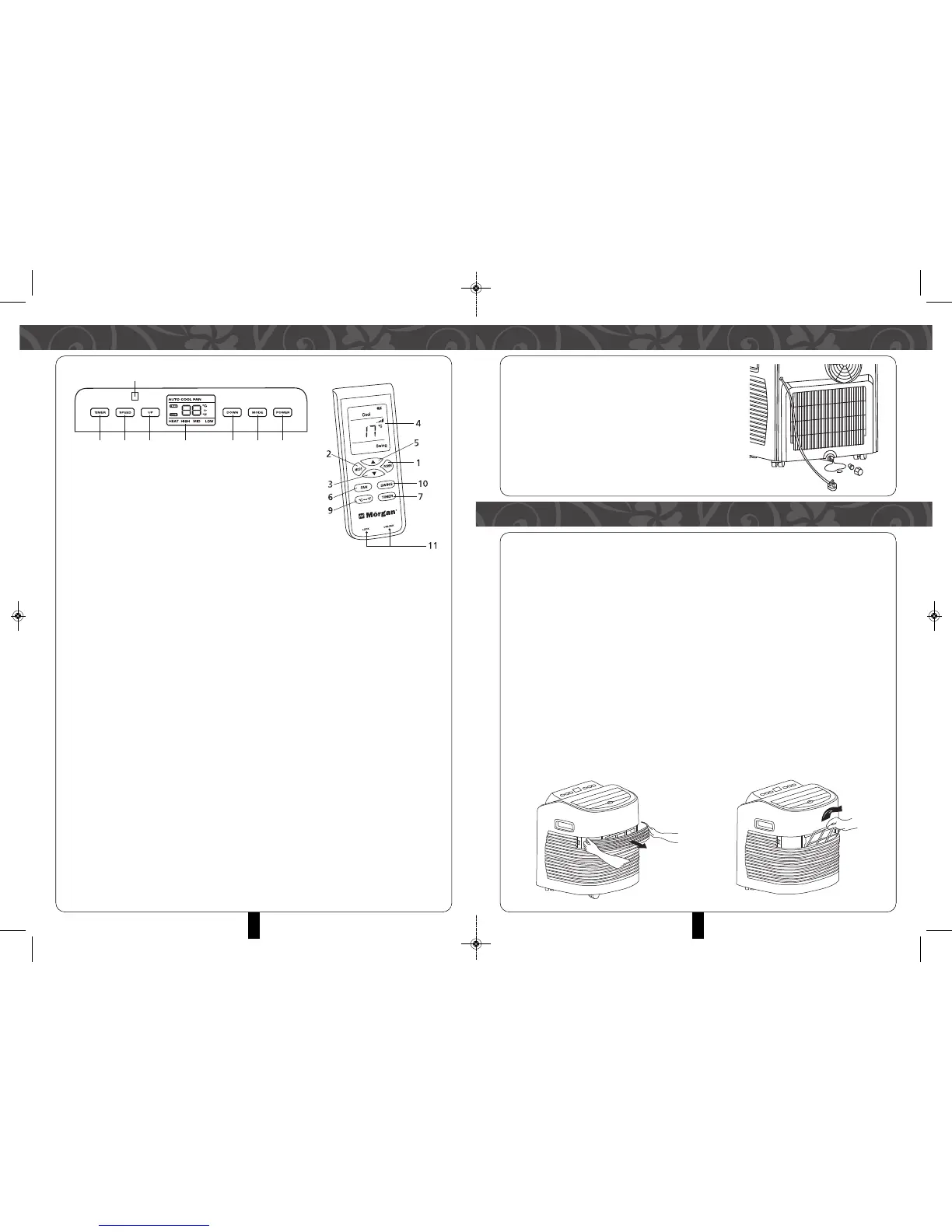
This product is equipped with automatic water
evaporative system. The condensing water is used
recycle to cool condenser, which improves cooling
efficiency while conserving energy.
• If the internal vessel is full of water, the display
Screen will display “FL”, and the compressor
stops working automatically. After powering off,
unscrew the water cover, pull and drain out water.
Restart.
MAINTENANCE
Notice: Turn off the A/C unit and unplug from the power supply before carrying out
maintenance or repair works to prevent electric shocks.
CLEANING
• Unplug before cleaning.
• Wipe with soft semi-dry cloth. DO NOT use chemical cleaning agents, such as
benzene, alcohol, gasoline and so forth to prevent damaging the A/C unit’s surface
and other components.
• Ensure water is not spattered into the A/C unit.
FILTER
• Wash and clean the filter once every two weeks. If it is obstructed by dust,
efficiency of the A/C will be reduced.
• To clean, remove both bigger and smaller filters as shown in the picture below.
• Immerse the filters into warm water (about 40°C) added with neutral detergent.
Allow to dry naturally.
4
1. Power key
Press the power key to turn ON/OFF the A/C.
2. Mode key
Press the key to choose cooling, fan and
auto-modes.
3. “DOWN” key
Press the key at cooling mode to reduce the temperature settings. Press the
timing mode to adjust timing ON/OFF times. Press “Up” and “Down” keys
simultaneously to switch between Fahrenheit (°F) and Centigrade (°C) degree
temperature.
4. Temperature/ time display window
This window displays the adjusted temperature and time.
5. “UP” key
Press the key at cooling mode to increase the temperature setting. Press the
timing mode to adjust timing ON/OFF times.
6. Fan Speed key
Press the Fan speed key to select from high/ mid/low fan speeds.
7. Timer key
Press the key at standby mode to set TURN-ON time. Press this key set TURN-
OFF time when the unit is on.
8. Remote controller receiving window
This window displays the adjusted temperature.
9. ºC/ºF switching key
Press the key to switch between (centigrade) and (Farenheit).
10. Auto-swing key
Press this key at any time after turning on the A/C unit to swing the wind louvers
automatically.
11. Lock Key
Press this key to lock /unlock the control panel button.
CONTROL PANEL & REMOTE CONTROL UNIT


 To Next Page