Page17
FOLDER
DocuFoldMk2
ROLLERADJUSTMENT
TheuniquefoldrollerdesignofyourMorganaDocufoldwillfoldmostpaperstockswithoutthe
needforadjustment.Ifyouhavearequirementtofoldverydelicateorthickerstockorre-
feedingtoproduceacross-foldthefoldrollergapcanbeeasilyadjustedasfollows: -
1. Removetherollerassemblyfromthemachineasdescribedabove.
2. LoosentheCapHeadScrewontheoperatorssideoftherollerthatyouwishtoadjust(any
ofthe3outerrollers)usingthe5mmBondus‘L’wrenchpro vided&releasetheM8lock
nutonthenon-operatorssidewiththe13A/Fspannerprovided.
3. Insertthe4mmhexballdriverintothesocketscrewattheendoftherollershaftandrotate
intherequireddirectiontoadjusttherollergap.
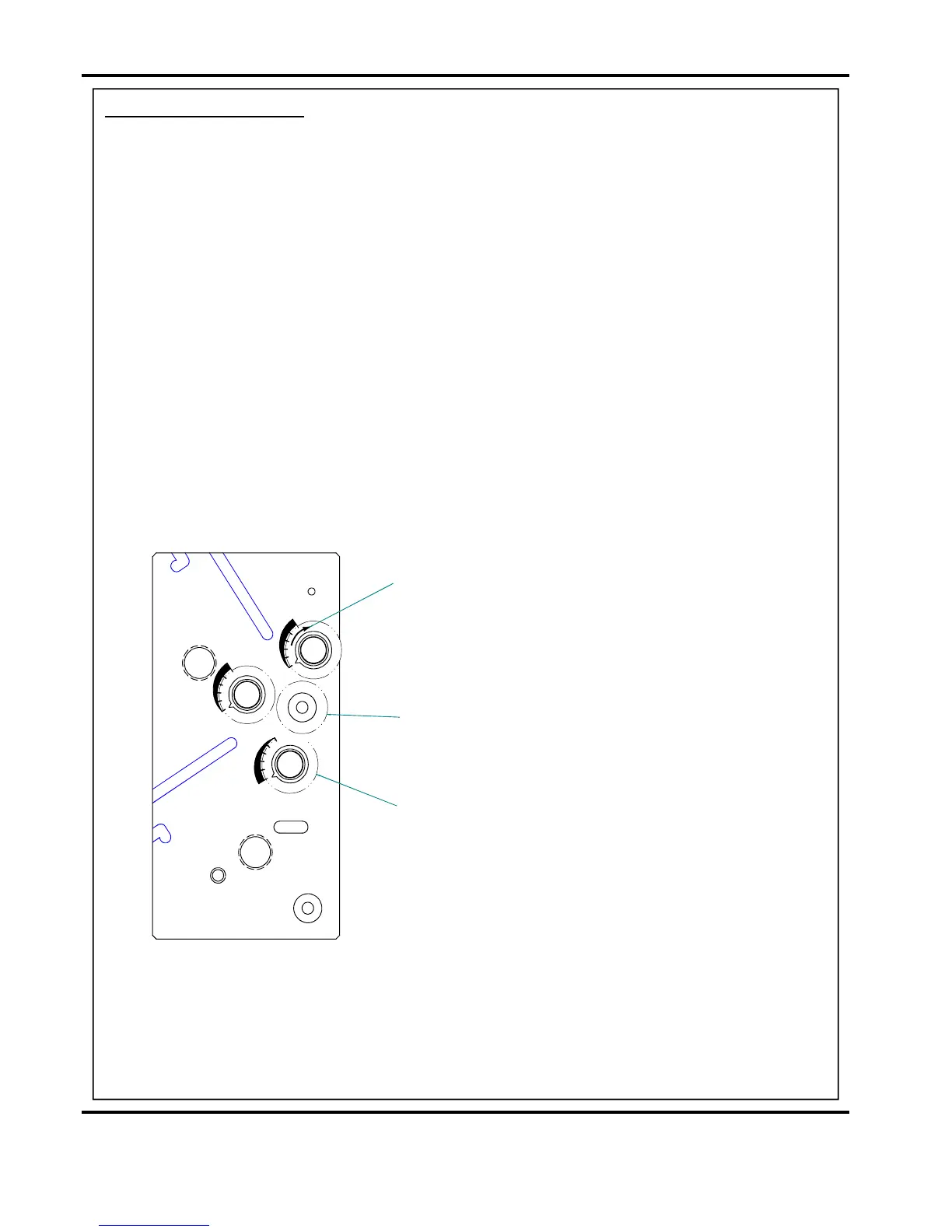
4. Thegraphicson theinsideoftherollersideplateshowwhichwaytoturntherollertoadjust
thegaprelativetothecentreroller.
5. Re-tightenthehalfnuts&capheadscrewstolocktherollerintoposition.
6. Repeatprocedureforeachrollerthatyouwishtoadjustand thenreplacetherollerassembly
intothemachine.
7. Resettherollertiltknob(AA)backtothezerocentralpositionandscrewintheClamping
knobs(Y).
RotateRollerinthisdirectiontoincreaseGap
(eachgraduationequals0.1mmofgapadjustment)
SectionThroughRollerAssembly
RotateRollerinthisdirectiontoincreaseGap
(eachgraduationequals0.1mmofgapadjustment)
RotateRollerinthisdirectiontoincreaseGap
(eachgraduationequals0.1mmofgapadjustment)
CentreRoller
3OuterRollers(Adjustable)



 To Next Page