Page4
PAPER
OPERATORSINTRODUCTIONTOTHEMORGANADOCUFOLDMk2
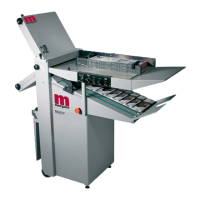
TheMorganaDocufoldisabrandnewconceptpaper-foldingmachine.Designedtobeusedin
today'senvironmentofdocumentproduction,theMorganaDocufoldcanbeusedbynon-skilled
personnelbyfollowingthiseasytouseoperatorsguide.Thereareveryfewoperator
adjustmentsrequiredonthemachineandour KWIKSTART sectionwillgetyoustartedvery
quickly,butwedorecommendthatyoutakealittletimetoreadthismanual,toensurethatyou
fullyunderstandthemachine.WehavealsoincludedaTIPS&TROUBLESHOOTING
section.Besuretoreadthissection before callingaserviceengineertoavoidanyunnecessary
expense.
OntheDocufoldthefoldplatesandDeliveryRollerwillmoveautomaticallyaccordingtothe
typeoffoldselected.Pleasebeawarethatdifferentweights,humidity,temperatureorthegrain
directionofthepapermaymakethepaperfoldinadifferentpositionaccordingtothematerial.
Somemanualadjustmentmaysometimesbenecessarytoobtaintheexactfoldplatepositionfor
eachtypeofpaper.
KWIKSTARTGUIDE:
1. Setthepapergategap(knobB)totwothicknessofthepapertobefolded.
2. Placethepapertobefoldedontotheloadingtableagainstthefixedsidelay.
3. Unclampthemovingsidelay(knobsA)andslideupagainstthesideofthepaperbutallow
approximatelya1/2mmor1/64inchgapbetweenthemovingsidelayandthepaper.
4. Clampthebackstop(F)ontothemovingsidelayatthebackofthepaperstack.
(Note)Donotattempttoloadtoomanysheetsontotheloadingtableduringsetupasthis
mayaffectthefeedingoperation.
5. Makesureyouhavepowertothemachineandthatknob(S)isturnedontotheONposition.
6. Pushswitch(W)downwardtosetupposition.
7. Slidethesheet-measuringdevice(BB)uptotheblockofpapertobefolded.
8. Lookatthediagramonthemovingside(G)layshowingthevariousfoldtypes.Selectthe
typeoffoldthatyourequiretomakebyturningknob(V),forexampleselectSLforLetter
fold.
9. Liftswitch(W)tothemiddleposition(Run)
10. Pressthesystemswitch(T)andallowthemachineafewsecondstoreachitsoptimumspeed.
11. Pressthefeedswitch(U)downtopulseandthemachinewillfeedthreesheetsforchecking.



 To Next Page