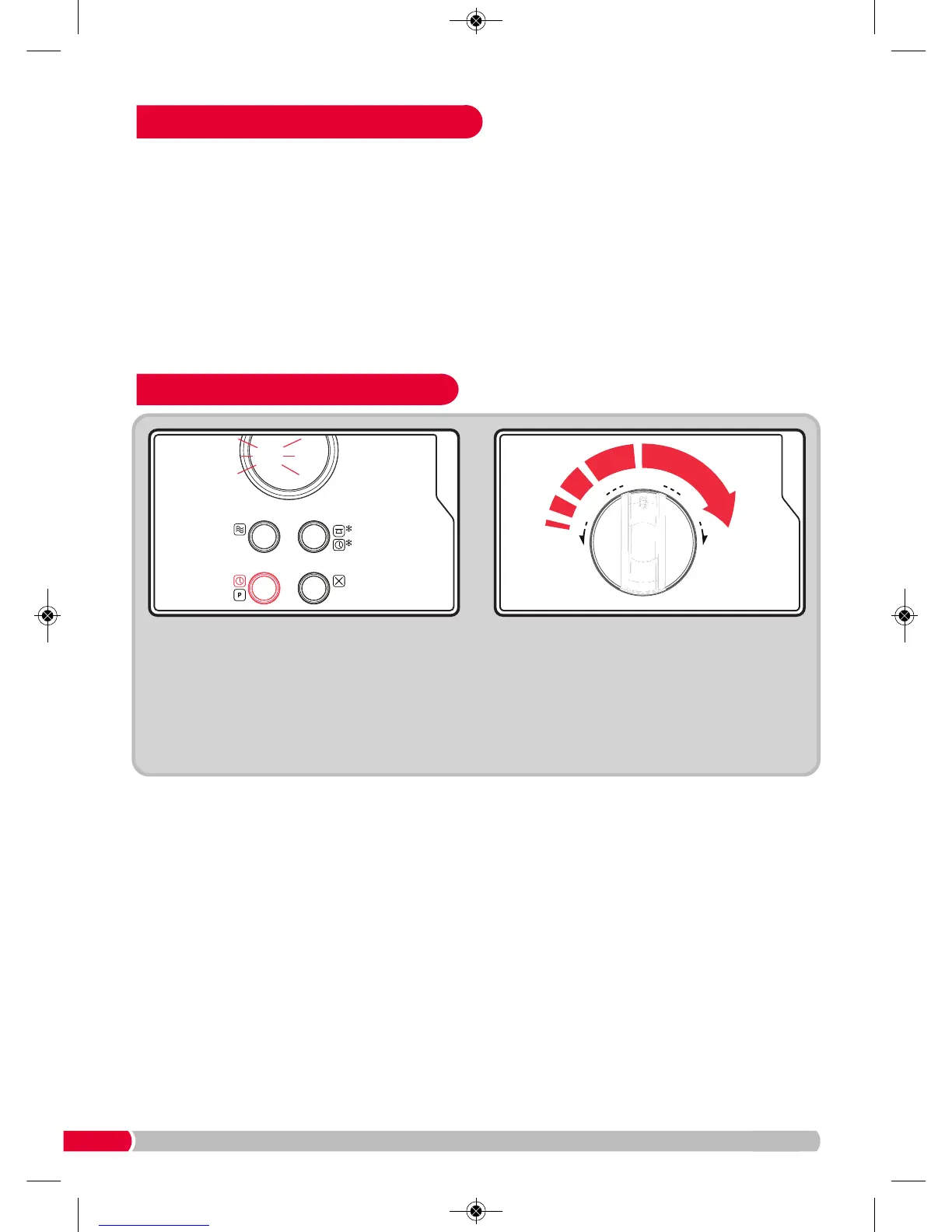
Turn the Time Dial (11) to adjust the hour. Press
the Clock Button (8) again to move onto the
minutes figure and turn the Time Dial (11) to
adjust. Press the Clock Button (8) to finish.
Note: During the process of clock setting, if you
press the Stop/Clear (9) button your Microwave
Oven will go back to the previous status
automatically.
Clock Setting
Press Clock Button (8) once, the hour figure will
flash.
Place the Turntable Ring Assembly
(12) in the
c
entre of the oven to support the Glass Turntable
(13). Place the Glass Turntable (13) on the
T
urntable Ring Assembly
(
12)
w
ith the centre
f
itting onto the Turntable Shaft
(
4)
.
Never place the
Glass Turntable
(13) upside down. Both the Glass
Turntable (13) and the Turntable Ring Assembly
(
12)
m
ust always be used during cooking.
T
he Glass Turntable
(
13)
r
otates clockwise or
anti-clockwise randomly, this is normal.
Setting Up Your Microwave Oven



 To Next Page