5
Re-filling
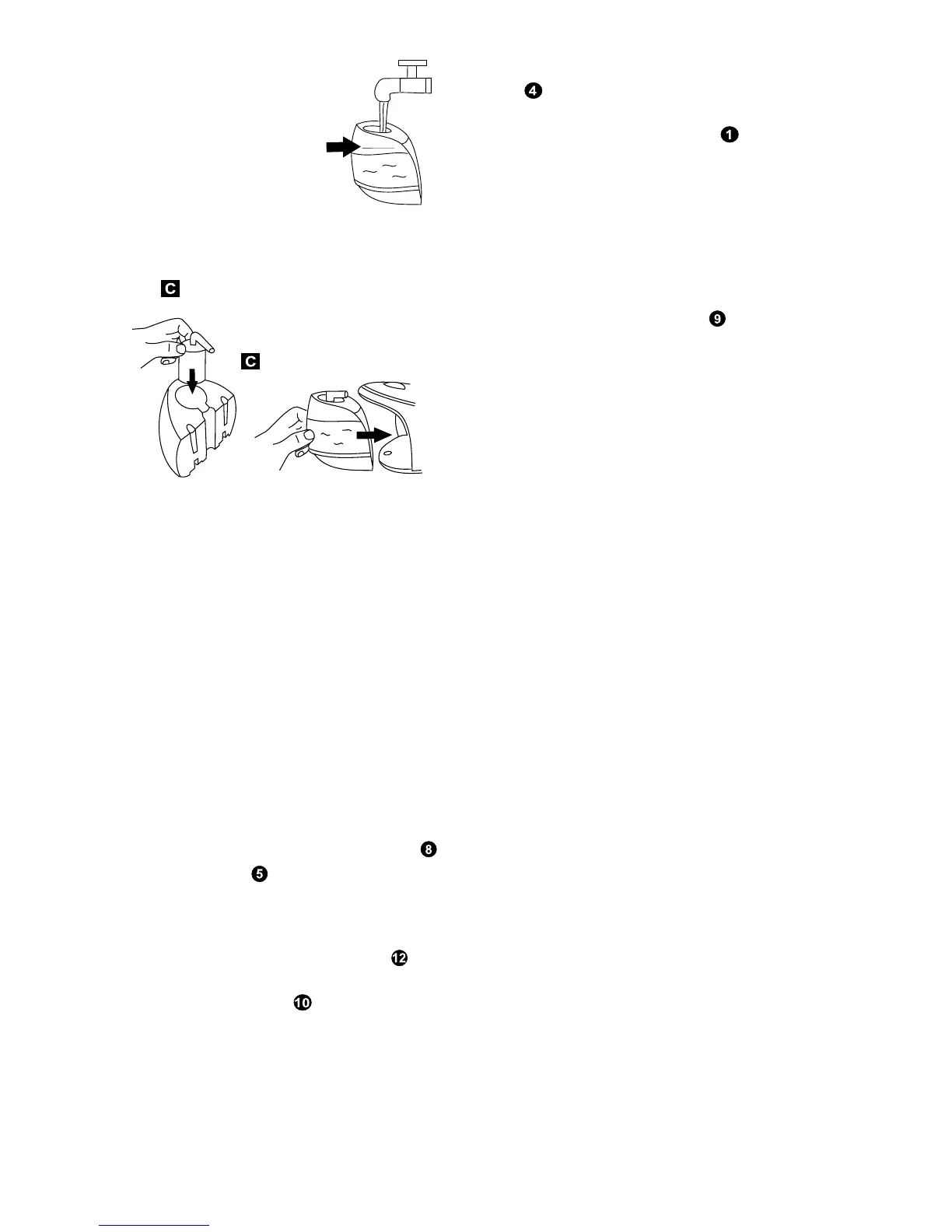
1 When the water level reaches a low level,
the pump begins to emit a loud noise. This is
due to air being pumped instead of water
and is quite normal. Refilling can be done
whilst the appliance is in operation. It is not
necessary to wait for the appliance to cool
down.
2 Slide out the water tank and fill (see filling
instructions).
Steam ironing
1 Unwind and straighten the power cord
and supply cord .
2 Fill the water tank with tap water (see
filling).
3 Connect the appliance to a suitable mains
outlet. Three steam level indicators will
light up indicating maximum steam. The
green power indicator will flash until the
boiler is at full temperature, when it will light
continuously.
4 Turn the temperature dial on the iron in a
clockwise direction, select dot-1, dot-2 or
dot-3 according to the recommendation of
the garment label.
5 The iron’s temperature indicator light
goes off when the required temperature
is reached.
6 Depress the steam button for 1 minute
to clean the steam generating system (for
first time use).
7 Begin first time ironing with an old towel.
Note: If you press the steam button before
the steam generator reaches its required
temperature a warning double bleep will
sound. It takes about 1 minute to reach the
required temperature.
8 Press the power switch to choose
the steam level from ‘steam off’, ‘low
steam’, ‘medium steam’ and ‘maximum
steam’.
9 The appliance is ready for use.
10 Press the steam button for steam ironing.
11 To switch the unit off turn the temperature
dial on the iron in an anticlockwise direction
to ‘Min’.
12 Depress and hold the power switch for 2
seconds, the base console will switch to
‘standby mode’ with a beep sound. The
indicator will change to ‘red’.
Dry ironing
1 Connect the appliance to a suitable mains
outlet.
2 Press the power switch 3 times until all
three steam level indicators go off (steam
off mode).
3 Turn the temperature dial on the iron in a
clockwise direction, select dot-1, dot-2, or
dot-3 according to the recommendation of
the garment label.
4 The temperature indicator light glows on the
iron indicating that it is switched on.
5 When the required temperature is reached,
the temperature indicator light on the iron
goes off. The iron is ready to use.
It is always a good idea to begin with ‘cool’
fabrics and work up to higher settings.
An iron heats up quicker than it cools down
so you’ll save time and electricity.
An auto shut off system will activate if the
steam is not used for over 15 minutes. The
indicator will flash between green and red
indicating the unit is in ‘sleep mode’. When this
occurs, press the steam button or power
switch once, the appliance will switch on
immediately.
4 Fill the tank upto the ‘fill to
here’ line with clean tap
water.
Never use battery
topping-up fluid or
water containing any
substances like
starch or sugar, or
defrosted water from a refrigerator.
5 Re install the anti-scale cartridge and
replace the water tank on the base
unit.
6 Always pour out the remaining water after
use.
FILL TO HERE
FILL TO HERE



 To Next Page