14 Motion Computing LE-Series and LS-Series Tablet PCs User Guide
LS-Series Tablet PC Buttons, Slots, and Ports
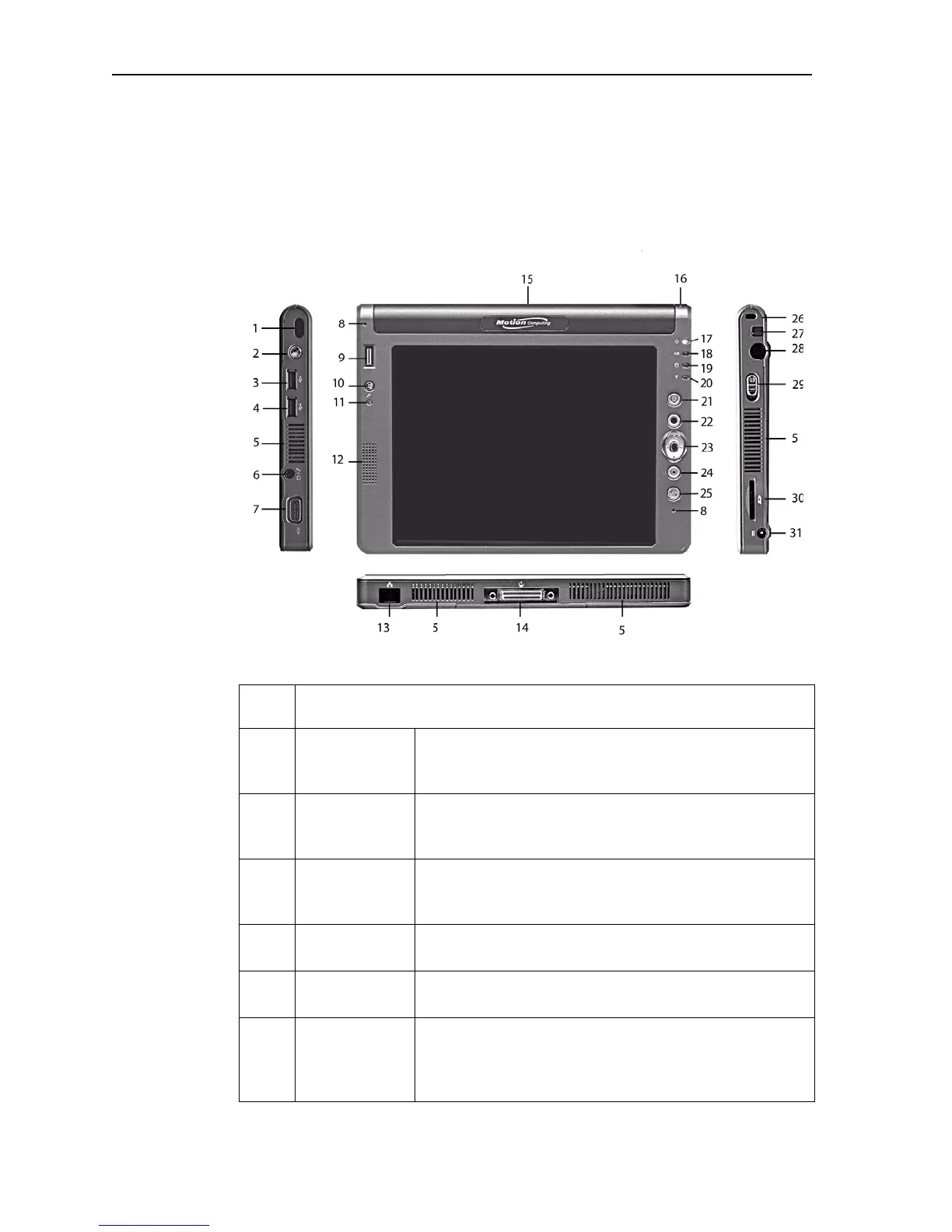
The following illustration shows the buttons, slots, and ports on the Motion LS-
Series Tablet PC. Refer to the table following the illustration for a description of
each item.
Item LS-Series Tablet PC indicator lights, buttons, slots, ports, and other
components
1 Infrared (IrDA)
transceiver
An infrared transceiver built into the Tablet PC. Allows
communication with other devices compliant with the
IrDA standard. Effective range is approximately 3 feet.
2 Wireless On/Off Alternately turns wireless on and off; makes it easy to
disable wireless on airplanes (button must be pressed
and held for 1/2 second to take affect)
3,4 USB port (2) Universal Serial Bus; for connecting USB 2.0 devices,
such as a storage device, mouse, printer, digital camera,
or optical disk drives
5 Air vents Active cooling system vents on the sides and back of the
Tablet PC, dissipate heat from the Tablet PC
6 Audio input/
output (1)
Configurable microphone or headset plug; 3.5 mm plug
7 VGA port A standard DB-15 monitor port for an external monitor,
projector, or other VGA device. Motion Computing does
not provide a VGA cable; refer to the information that
came with your display for the type of cable to use.
LS-Series Tablet PC



 To Next Page