44 Motion Computing LE-Series and LS-Series Tablet PCs User Guide
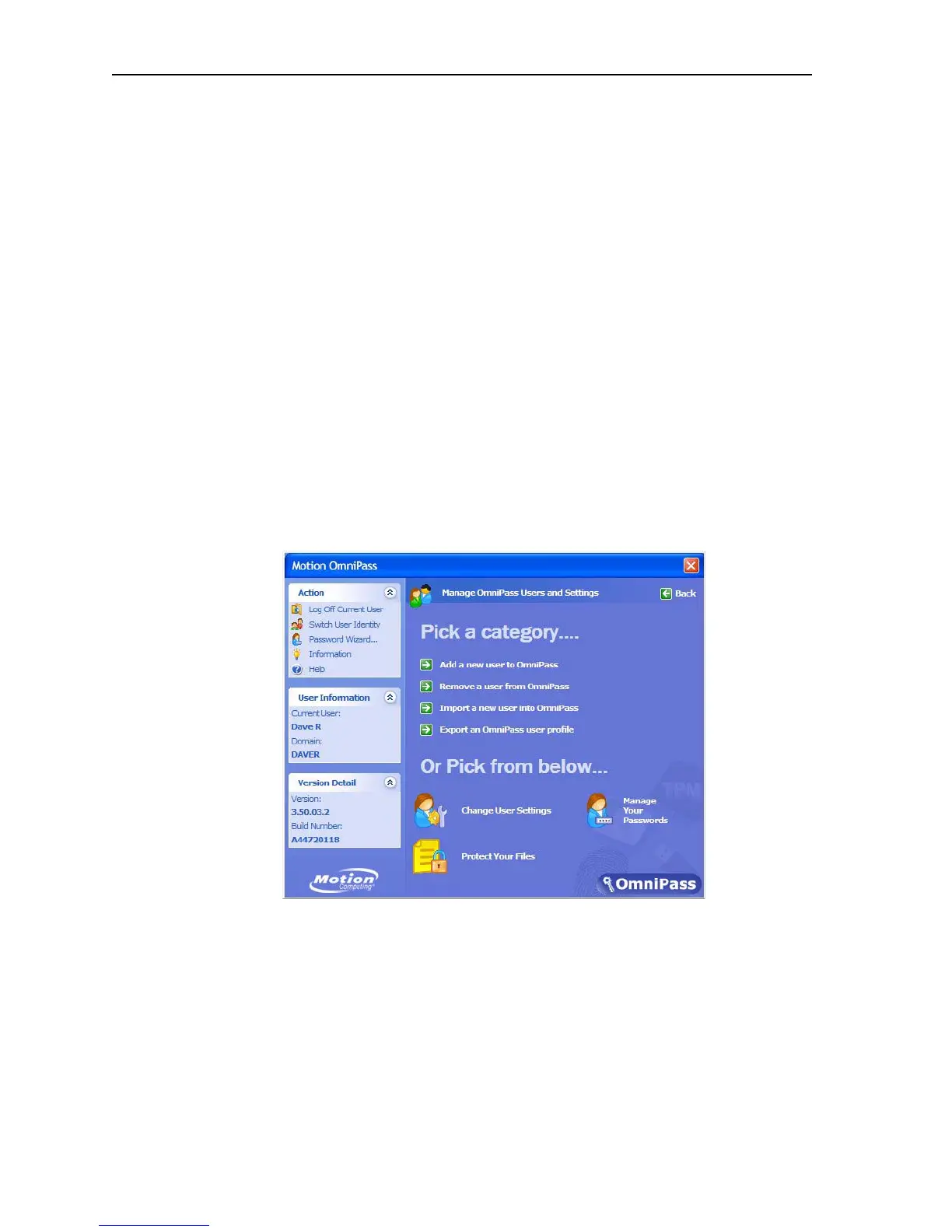
• Action panel
• Log Off Current User
• Switch User Identity
• Password
• Information
• Help
• User Information panel
• Shows current user information
• Version Detail panel
• Shows version and build Information
Manage OmniPass users and settings. When you select this action you are
presented with the following options:
• Add a new user to OmniPass
• Remove a user from OmniPass
• Import a new user into OmniPass
• Export an OmniPass profile
These are advanced operations and may not be part of your typical work flow. If you
need more information about this aspect of the Motion OmniPass application, refer
to the OmniPass Help by tapping Help in the Action panel.
Other Motion OmniPass set-up functions. You can also tap the Change User
Settings icon; the Change User Settings window is opened where you can select
from the following operations:
• Audio Settings
• Use radio buttons to set the desired audio setting
• Taskbar Tips
• Use radio buttons to set the desired taskbar tip level
• Encrypt/Decrypt
• Select digital certificate or select an algorithm for encryption



 To Next Page