Motion Computing LE1600 and LS800 Tablet PC User Guide 13
LS800
TABLET PC
BUTTONS,
SLOTS AND
PORTS
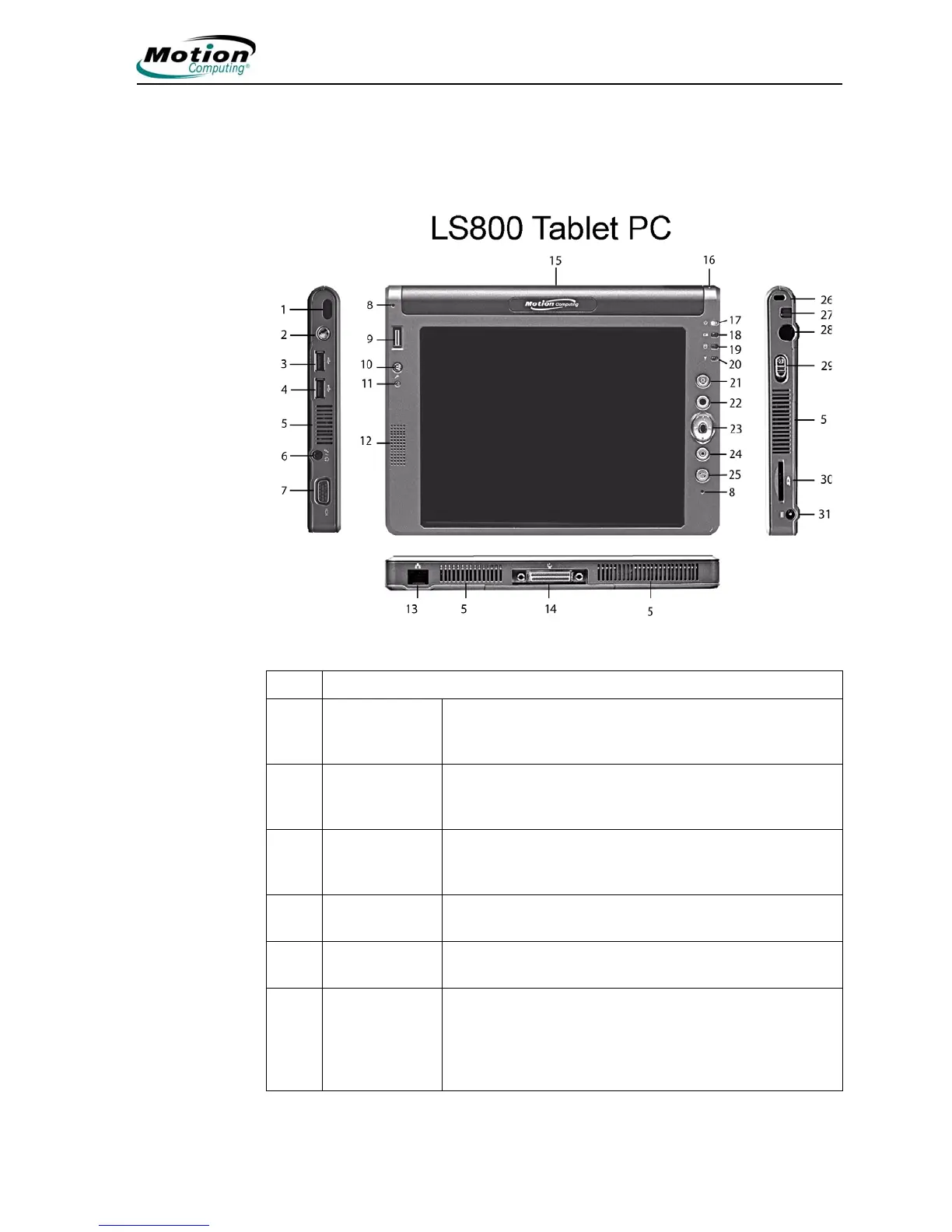
The following illustration shows the buttons, slots, and ports on the Motion
LS800 Tablet PC. Refer to the table following the illustration for a description
of each item.
Item LS800 Tablet PC LEDs, Buttons, Slots, Ports, and Other Components
1 Infrared (IrDA)
transceiver
An infrared transceiver built into the Tablet PC. Allows
communication with other devices compliant with the
IrDA standard. Effective range is approximately 3 feet.
2 Wireless On/Off Alternately turns wireless on and off; makes it easy to
disable wireless on airplanes (button must be pressed
and held for 1/2 second to take affect)
3,4 USB connector
(2)
Universal Serial Bus; for connecting USB 2.0 devices,
such as a storage device, mouse, printer, digital camera,
or optical disk drives
5 Air vent Active cooling system vent, dissipates heat from the
Tablet PC edges
6 Audio input/
output (1)
Microphone or headset plug; 3.5 mm plug.
7 VGA connector A standard DB-15 monitor connector for an external
monitor, projector, or other VGA device. Motion
Computing does not provide a VGA cable; refer to the
information that came with your display for the type of
cable to use.



 To Next Page