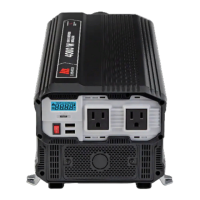
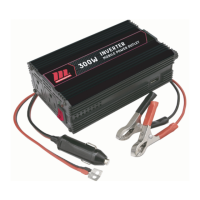
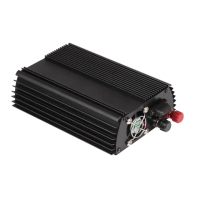
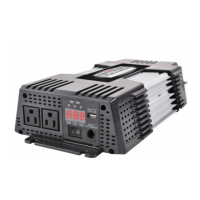
This document describes the MotoMaster Eliminator Mobile Digital Power Inverter (Model 299-5299-0), a device designed to convert 12V DC battery power into 120V AC household power for recreational vehicles (RVs) and truck applications.
Function Description
The Mobile Digital Power Inverter provides continuous AC power from a DC battery source, allowing users to operate various AC appliances and equipment in mobile settings. It features a modified sine wave output, suitable for most common loads. The inverter is equipped with a digital display to show DC input voltage, AC output voltage, and AC output power, as well as a remote control for convenient operation.
Important Technical Specifications
Electrical Performance:
- Output Power (at 77°F/25°C ambient temperature and 12V DC input):
- Maximum Continuous Output Power: 1500 W
- Maximum Surge Power: 3000 W
- Output Voltage: 120 V AC RMS
- Output Waveform: Modified sine wave
- Output Frequency: 60 +/- 1 Hz
- Input Voltage: 11.0-15.0 V DC
- Nominal Current at Full Load: <115A
- Maximum Input Current (Peak): <230A
- Low Voltage Alarm: 10.5 V-11.5 V
- Low Voltage Cut Out: 10.0 V-11.0 V
- High Voltage Shutdown: 15.0 V-16.3 V (Note: Damage can occur if input voltage exceeds 16.3 V)
- Optimum Efficiency: 90%
- No Load Current Draw: <2 A DC
- USB Output: 5 V 2.1 A charge
Physical Specifications:
- Weight: 6 lb 3 oz (2.8 kg)
- Dimensions: 16 3/16 x 7 7/16 x 3" (41.1 x 18.9 x 7.7 cm)
DC Input Wire Size & Lengths (Recommended for RV/Recreational Vehicle):
- Cable Length (Battery to Inverter, one way): Less than 5' (1.5m)
- Minimum Cable Size: No. 2 AWG
- Minimum Battery Fuse Size: 150 A DC
- Note: DC cables longer than 5' (1.5m) are not recommended due to potential heat generation and poor inverter performance.
Usage Features
Installation:
- The inverter must be connected to a 12V battery system. Connecting to a 6V battery will prevent operation, and connecting to a battery with 16V or more will damage the unit.
- It should be installed in a dry, cool (32°F to 105°F / 0°C to 40°C), and well-ventilated location, allowing at least 3" (7.5cm) of clearance around the inverter for airflow.
- Ventilation openings must not be obstructed.
- Do not install in compartments containing batteries or flammable materials, or in zero-clearance compartments, to prevent fire or explosion.
- Avoid mounting where it will be exposed to corrosive battery gases.
- DC input cables should be as short as possible to minimize wire resistance and voltage drop.
- DC power connections must be positive to positive and negative to negative. Reverse polarity connection will blow internal fuses and may permanently damage the inverter, voiding the warranty.
- DC input terminals should be tightened to a torque of 9–10 ft-lb (12.2–13.6 N-m) to prevent excessive voltage drop and overheating.
Operation:
- ON/OFF Switch: Located on the front panel, it controls the inverter's control circuit. It is not a power disconnect switch; AC and DC power must be disconnected before working on connected circuits.
- Remote Control: A 1.8 m wired remote control is included for external operation. It functions when the power switch on the inverter is in the OFF position and the cable is securely connected.
- Digital Display (LED Display): Shows DC input voltage (V), AC output voltage (V), and AC output power (KW). For small loads, the display may show zero for power out, which is normal.
- Power Light (Green): Indicates the ON/OFF switch is on and AC voltage is present at the outlets.
- Fault Light (Red): Indicates a shutdown due to low/high battery voltage, unit overload, or over temperature. To restart after a fault, turn the unit off, wait 3-5 seconds, then turn it back on.
- AC Outlets: Provides a combined total of 1500 W of continuous AC power across two 3-prong outlets.
- Cooling Fan: Activates when loads draw significant power or when internal temperature exceeds ambient operating temperature. Turns off when loads are removed or temperature returns to ambient.
- Operating Multiple Loads: Turn loads on one at a time after turning on the inverter to prevent overload shutdown from high starting currents.
- Turning Off Between Uses: Turn the inverter off when not in use to prevent unnecessary battery discharge, as it draws less than 2A from the battery even with no load connected.
Protection Features:
- Low Battery Alarm: Alerts when battery voltage is 10.5 V - 11.5 V.
- Low Battery Voltage Shutdown: Shuts down automatically at 10.0 V - 11.0 V to protect the battery from over-discharge.
- High Battery Voltage Shutdown: Shuts down automatically at 15 V - 16.3 V to protect the inverter from excessive input voltage.
- Overload Shutdown: Shuts down automatically if a short circuit is detected or if connected loads exceed operating limits.
- Over Temperature Shutdown: Shuts down automatically if internal temperature rises above an unacceptable level.
Load Compatibility:
- The inverter operates most AC loads within its 1500 W rating.
- High Surge Loads: Can handle many hard-to-start loads, including large TVs and small refrigerators. Normally starts single-phase induction motors rated at 1/2 horsepower or less. Can supply momentary surge power up to 3000 W.
- Trouble Loads (Not Recommended):
- Small battery-operated appliances (flashlights, razors, night lights) that plug directly into AC receptacles for recharging.
- Some chargers for battery packs used in power hand tools (especially those with warning labels about dangerous voltages at battery terminals).
- Electronics that modulate RF signals on the AC line.
- Speed controllers found in some fans, power tools, and kitchen appliances.
- Metal halide arc (HMI) lights.
- If unsure about device compatibility, contact the device manufacturer.
Maintenance Features
- Cleaning: Periodically clean the exterior with a damp cloth to prevent dust and dirt accumulation.
- Cable Connections: Ensure DC cables are secure and fasteners are tight.
- Ventilation: Make sure ventilation openings on the AC and DC panels and the bottom of the inverter are not blocked.
- User Serviceable Parts: The inverter contains no user-serviceable parts. Do not disassemble the unit, as this may result in electrical shock or fire. Internal capacitors remain charged after power disconnection. For service, refer to the warranty information.
Warranty:
- Coverage: 1-Year Limited Warranty covering defects in workmanship or materials from the date of purchase.
- Exclusions: Misuse, neglect, improper installation, physical damage, alteration, improper use, or use in an unsuitable environment. Reverse polarity damage is not covered.
- Service: Contact the toll-free helpline (1-877-466-8191) with dated proof of purchase. The item should not appear to have been opened, modified, or disassembled. MotoMaster Canada will repair or replace defective products at its option.


 To Next Page
 General