English
Your Quick Reference Guide
This Quick Reference Guide covers the basic
operation of your device.
For more operational details and
information, refer to the MN010351A01
MINITOR 7 User Guide at https://
learning.motorolasolutions.com.
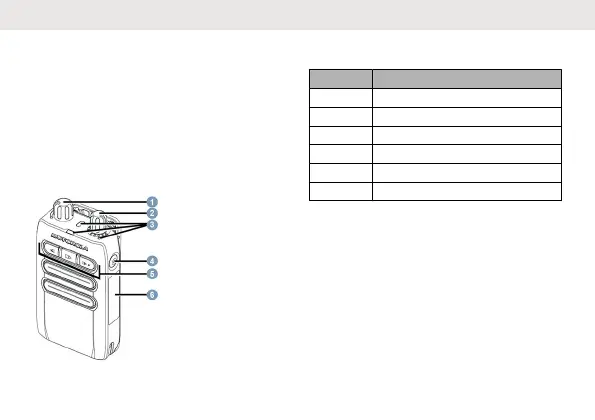
Device Overview
Table 1: Device Overview
No Description
1 On/Off/Volume Control Knob
2 Function Switch
3 LED Indicators
4 Reset Button
5 Stored Voice Operation Controls
6 Identification Label Area
Attaching or Removing the Belt
Clip
Attaching the Belt Clip
Align the rails on the clip to the grooves on the
back of your device. Press downward until you
hear a click.
English
1



 To Next Page
 Loading...


