6
English
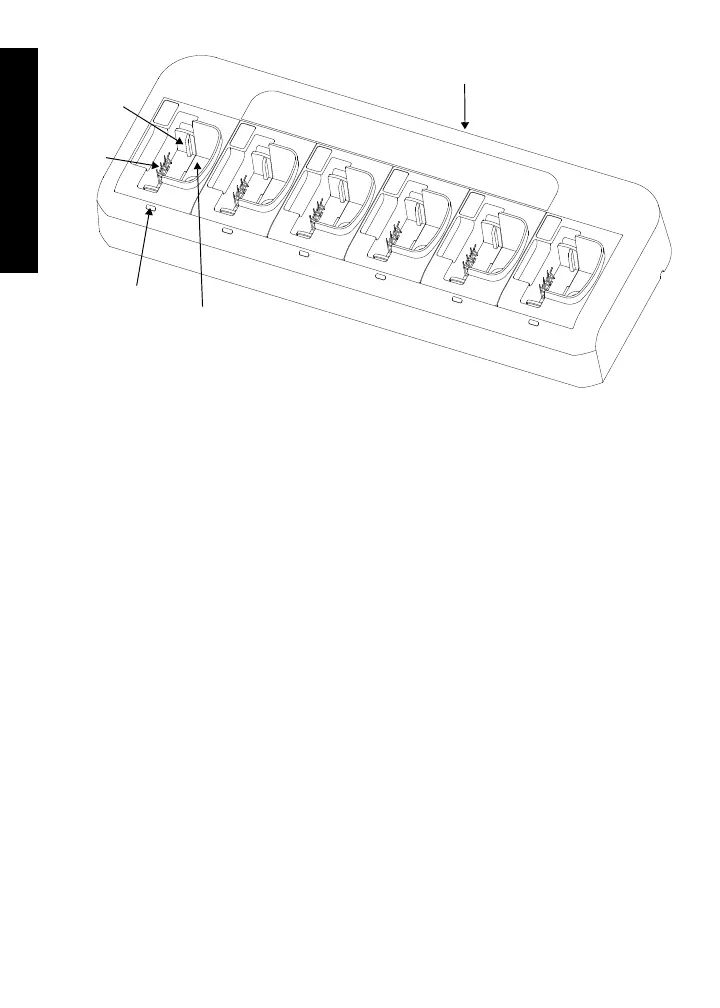
Figure 1: Multi-Unit Charger
Battery Locating Rail Adapter (applicable to CP/DEP/DP/EP/GP/
PR/XiR Commercial Radio Battery Charger Only)
The battery locating rail is a removable part which constitutes an adapter to
accommodate standard and slim batteries (refer to Figure 2).
The CP/DEP/DP/EP/GP/PR/XiR Commercial Radio Battery Charger is shipped
with the battery locating rail in the standard battery position.
To change to the slim battery position:
1. Remove the battery locating rail by pinching inward both sides while
pulling from the charger pocket.
2. Turn the battery locating rail around so the back faces the front.
3. Re-insert into the charger pocket.
Raised rail
Charging
contacts
Charging
indicator
Charging
pocket
Power receptacle
(located here)
68012009052_.book Page 6 Monday, July 19, 2021 4:02 PM


 To Next Page
 Loading...






