Need help?
Do you have a question about the Motorola moto e6 play and is the answer not in the manual?
Understand the physical components and layout of your phone.
Instructions for managing your SIM and optional microSD cards.
Transfer files and data from your previous iPhone or Android device.
Information on setting up and managing two SIM cards in your phone.
Configure and manage your voicemail service and greeting.
Instructions for adding personal and corporate email accounts.
Set up emergency information and lock screen messages.
Personalize your phone by customizing its appearance and settings.
Navigate and understand the elements of your phone's home screen.
Learn about the lock screen features and options.
Guidance for first-time smartphone users and iPhone switchers.
Understand the benefits and management of your Google account.
Learn the meaning of icons displayed in the status bar.
Definitions of common phone and network-related terms.
Understand touch, drag, swipe, and zoom gestures for navigation.
Quickly access the camera using the power button gesture.
Access and adjust frequently used settings from any screen.
 General
| Screen shape | Flat |
|---|---|
| Pixel density | 295 ppi |
| Display diagonal | 5.5 \ |
| Touch technology | Multi-touch |
| Touchscreen type | Capacitive |
| Display resolution | 1440 x 720 pixels |
| Native aspect ratio | 18:9 |
| Processor cores | 4 |
| Processor family | MediaTek |
| Processor frequency | 1.5 GHz |
| RAM capacity | 2 GB |
| Memory card slot type | Dedicated slot |
| Compatible memory cards | MicroSD (TransFlash) |
| Maximum memory card size | 256 GB |
| Internal storage capacity | 32 GB |
| Flash type | LED |
| Rear camera type | Single camera |
| Rear camera pixel size | 1.12 µm |
| Rear camera aperture number | 2.2 |
| Rear camera resolution (numeric) | 13 MP |
| Front camera resolution (numeric) | 5 MP |
| 4G standard | LTE |
| 2G standards | GSM |
| 3G standards | WCDMA |
| SIM card type | NanoSIM |
| Wi-Fi standards | 802.11b, 802.11g, Wi-Fi 4 (802.11n) |
| Bluetooth version | 4.2 |
| SIM card capability | - |
| Mobile network generation | 4G |
| Subscription type | No subscription |
| USB version | 2.0 |
| USB connector type | Micro-USB |
| Headphone connectivity | 3.5 mm |
| Multimedia Messaging Service (MMS) | Multimedia Messaging Service (MMS) is a standard way to send messages that include multimedia content to and from a mobile phone over a cellular network |
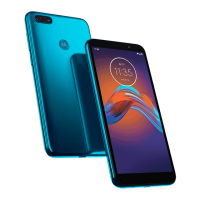
| Color name | Steel Black |
| Form factor | Bar |
| Product color | Black |
| Themes | Wallpapers |
| Graphics card | PowerVR GE8100 |
| Personalization | Icons, Menu, Shortcuts |
| Wireless charging | No |
| Personal info management (PIM) | Alarm clock, Calculator, Calendar |
| Video formats supported | H.263, H.264, MPEG4 |
| Platform | Android |
| Google applications | Google Maps, Google Play |
| App distribution platform | Google Play |
| Operating system installed | Android 9.0 |
| Talk time (3G) | - h |
| Battery capacity | 3000 mAh |
| Body SAR (EU) | 1.776 W/kg |
| Head SAR (EU) | 0.55 W/kg |
| Cables included | USB |
| Harmonized System (HS) code | 85171300 |
 Weight and Dimensions
| Depth | 8.3 mm |
|---|---|
| Width | 70.9 mm |
| Height | 146.5 mm |
| Weight | 140 g |











 To Next Page