EasyManua.ls Logo

Motorola V980 - User Manual

Motorola V980
84 pages
Print Icon
To Next Page IconTo Next Page
Loading...
Introduction 1
Introduction 1
1Introduction
Welcome to the world of Motorola digital wireless
communications! We are pleased that you have chosen the
Motorola V980 3G mobile phone.
Note: The graphic represented here and throughout this
manual may not accurately depict your specific phone.
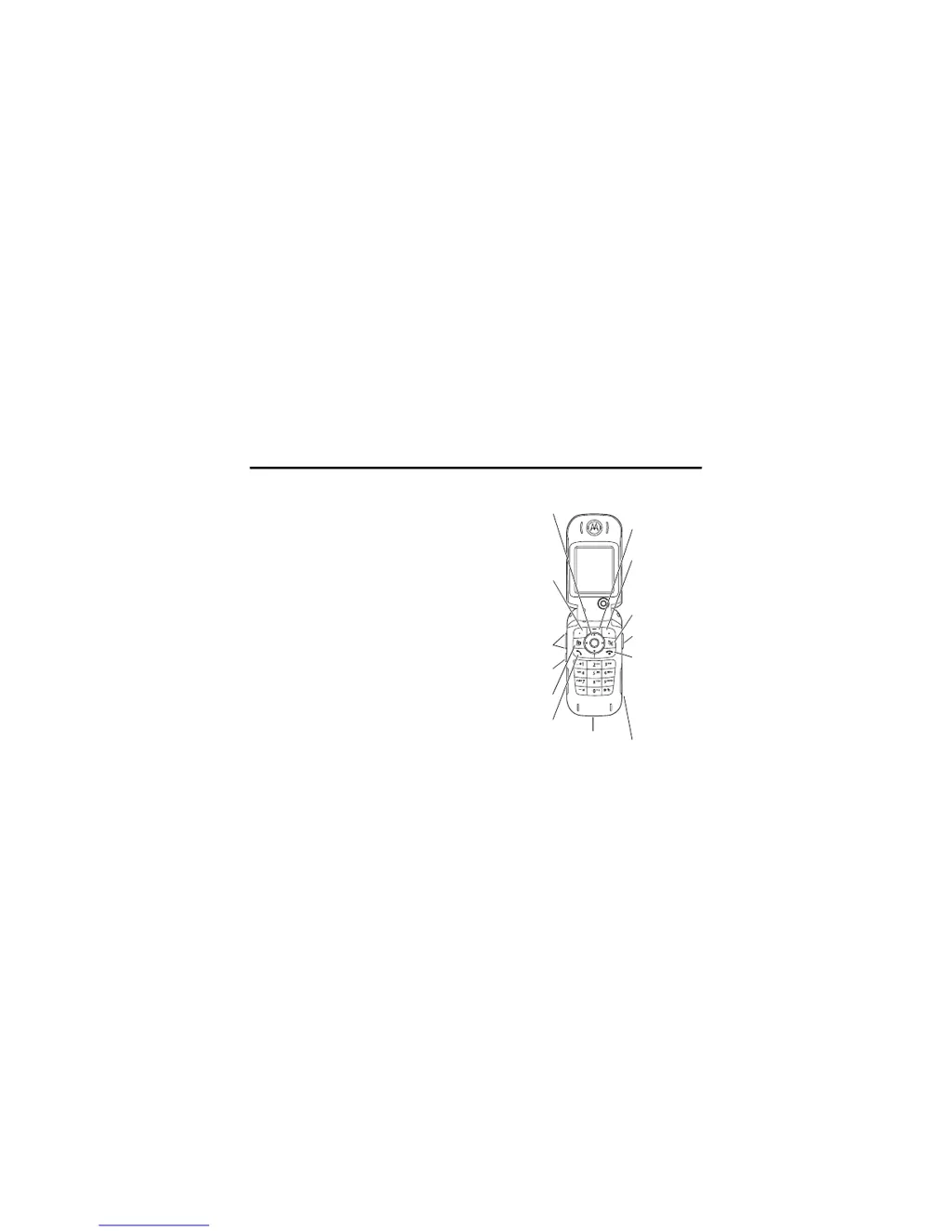
Menu Key
Right Soft Key
Perform function
in lower right
display
Clear/Back Key
Camera Key
Power & End Key
Turn phone on/
off, end calls, exit
menu system
Headphone
Connector
Accessory
Connector
5-Way
Navigation Key
Scroll & select
menu items
Left Soft Key
Perform function
in lower left
display
Volume Keys
Smart Key
Video Call
Voice Call
Make & answer
calls

Table of Contents

Other manuals for Motorola V980

Questions and Answers

  • G
    George DayAug 17, 2025
    Why Motorola V980 will not turn on?
    • T
      Taylor WareAug 17, 2025
      Your Motorola Cell Phone might not be turning on due to a discharged or defective battery. Try recharging the battery. If it doesn't recharge, it may need to be replaced. Another reason could be misaligned battery connectors. Check and realign them, and if necessary, replace the battery or seek assistance from a Level 3 Service Center. A defective transceiver board assembly or keyboard assembly failure can also prevent the phone from turning on, and in such cases, replacement of the corresponding assembly is required.
  • C
    Christina MartinezAug 20, 2025
    What to do if my Motorola V980 has poor reception?
    • C
      cynthia38Aug 20, 2025
      If your Motorola Cell Phone is experiencing poor reception, frequently dropped calls, or weak/distorted audio, the antenna assembly might be defective. Check if the antenna pin is properly connected to the transceiver board assembly. If it is, try substituting it with a known good antenna. Another cause could be a defective transceiver board assembly, which would require replacement.
  • J
    Joy ShieldsAug 23, 2025
    What to do if Motorola V980 transmit audio is weak?
    • V
      vasquezdaleAug 23, 2025
      If people have difficulty hearing you when you speak on your Motorola Cell Phone, the microphone connections to the transceiver board assembly might be defective. Check these connections. It could also be a defective microphone, in which case you should disconnect the current microphone and substitute it with a known good one to see if there's an improvement. The transceiver board assembly may also be defective, requiring replacement.
  • A
    amymclaughlinAug 26, 2025
    What to do if Motorola V980 receive audio is weak?
    • J
      James MccannAug 26, 2025
      If the audio from the earpiece speaker on your Motorola Cell Phone is weak or distorted, check the connections to and from the transceiver board assembly, including the flex and flex connector from the flip assembly. The flip assembly itself might be defective, so try temporarily replacing it with a known good one. Also, ensure the antenna is installed correctly. Finally, the transceiver board assembly could be defective and need replacing.
  • N
    Nicole IrwinAug 28, 2025
    Why Motorola V980 internal charger not working?
    • T
      taradorseyAug 28, 2025
      If the internal charger on your Motorola Cell Phone is not working, it could be due to a faulty charger circuit on the transceiver board assembly. Test a selection of batteries in the rear pocket of the desktop charger and check the LED display for charging indications.
  • C
    chapmansusanAug 31, 2025
    What to do if Motorola V980 Cell Phone display is erratic?
    • M
      Matthew JonesAug 31, 2025
      If the display on your Motorola Cell Phone is erratic, partial, or completely blank, it could be due to faulty transceiver board connections. Remove the rear chassis assembly and check the condition of the flex cable. If the flex cable is in good condition, ensure that the flex connector is fully pressed down. Another potential cause is a defective flip assembly, which can be temporarily replaced with a known good assembly to test. A defective transceiver board assembly could also be the reason, requiring its replacement.
  • A
    Ashley MaysSep 3, 2025
    Why Motorola V980 will not recognize SIM?
    • T
      Todd RomeroSep 3, 2025
      If your Motorola Cell Phone isn't recognizing the SIM card, start by checking the SIM contacts for dirt and clean them if necessary. If cleaning doesn't work, the flip assembly might be defective, and you can temporarily replace it with a known good assembly to test. The transceiver board assembly could also be the issue, requiring replacement.
  • J
    Judy MayerSep 5, 2025
    What to do if Motorola Cell Phone does not sense flip?
    • R
      Robert SmithSep 5, 2025
      If your Motorola Cell Phone isn't sensing when the flip is opened or closed, it could be due to a defective flip assembly. Try temporarily replacing it with a known good assembly. Alternatively, the transceiver board assembly might be defective and require replacement.
  • S
    Sheryl PughSep 8, 2025
    What to do if incoming call alert transducer audio distorted on Motorola V980?
    • J
      James NguyenSep 8, 2025
      If the incoming call alert transducer audio on your Motorola Cell Phone is distorted or the volume is too low, the transceiver board assembly might be faulty, requiring replacement.
  • J
    Jacqueline CastilloSep 12, 2025
    Why Motorola V980 vibrator feature not functioning?
    • K
      Katelyn SchneiderSep 12, 2025
      If the vibrator feature on your Motorola Cell Phone is not functioning, the transceiver board assembly might be defective and require replacement.

Motorola V980 Specifications

General IconGeneral
ModelMotorola V980
Form FactorClamshell
Network TechnologyGSM / UMTS
2G bandsGSM 900 / 1800 / 1900
3G bandsUMTS 2100
GPRSClass 10
EDGEClass 10
StatusDiscontinued
SIMMini-SIM
TypeTFT, 256K colors
Resolution176 x 220 pixels
Memory Card slotNo
Internal Memory5 MB
CameraVGA, 640 x 480 pixels
VideoYes
Alert typesVibration; Downloadable polyphonic, MP3 ringtones
LoudspeakerYes
3.5mm jackNo
BluetoothYes
GPSNo
RadioNo
USBYes
BrowserWAP 2.0/xHTML
GamesYes
JavaYes, MIDP 2.0
Predictive text inputYes
OrganizerYes
BatteryRemovable Li-Ion 820 mAh battery
SpeedYes
Second displayMonochrome
PhonebookYes
Call records20 dialed, 20 received, 20 missed calls
MessagingSMS, MMS, Email
Stand-byUp to 200 h
Size2.2 inches, 35 x 45 mm

Related product manuals