EasyManua.ls Logo

motortronics VMX-B Soft Start Packages - Run Status and Auxiliary Contacts; Run Status Output Contacts; VMX2 Auxiliary Contacts; Overload Relay and X-LINE Operation

Default Icon
11 pages
Print Icon
To Next Page IconTo Next Page
To Previous Page IconTo Previous Page
Loading...
2 REV-02 100418
Run Status Output Contacts
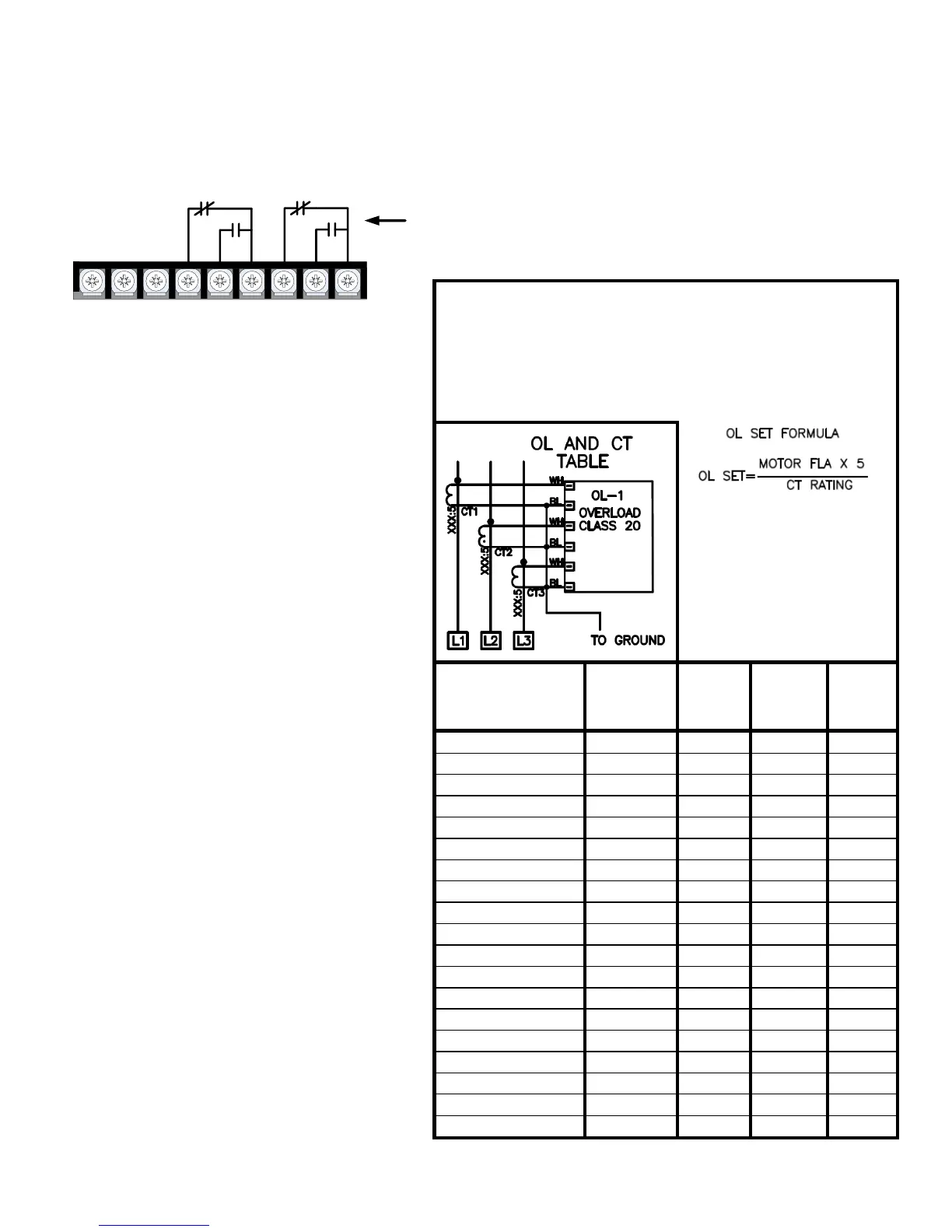
The VMX-B unit offers 2 Form-C (N.O and N.C.) “RUN” contacts located on the customer terminal strip, terminals 4
(NC), 5 (NO), 6 (Common), and terminals 7 (NC), 8 (NO) 9 (Common). These contacts reflect a successful RUN
command in “SOFT” or “X-LINE” mode, and should be used for any required “Run / Running” status outputs.
VMX2 Auxiliary Contacts
(TB2 of Soft Starter)
OVERLOAD RELAY OPERATION
WHEN IN HAND (H) POSITION: USER MUST RESET OL
(BY PUSHING GREEN BUTTON)
WHEN IN AUTO (A) POSITION: RELAY WILL
AUTOMATICALLY RESET AFTER TRIPPING
NOTE: YELLOW
OVERLOAD DIAL MUST BE
SET IN ACCORDANCE
WITH THE MOTOR “FULL
LOAD AMPS” PER MOTOR
NAME PLATE DATA
YELLOW OVERLOAD
ADJUSTMENT DIAL
VMX-B
MODEL NUMBER
CT
RATING
XXX:5
5
6
VMX-B-21-YY-4
18-25A
22
25
VMX-B-27-YY-4
28-40A
34
40
VMX-B-40-YY-4
34-50A
42
50
VMX-B-45-YY-4
50:5
50
60
VMX-B-55-YY-4
75:5
75
90
VMX-B-68-YY-4
75:5
75
90
VMX-B-96-YY-4
100:5
100
120
VMX-B-125-YY-4
120:5
120
144
VMX-B-156-YY-4
200:5
200
240
VMX-B-220-YY-4
200:5
200
240
VMX-B-230-YY-4
250:5
250
300
VMX-B-248-YY-4
300:5
300
360
VMX-B-400-YY-4
400:5
400
480
VMX-B-480-YY-4
500:5
500
600
VMX-B-600-YY-4
500:5
500
600
VMX-B-690-YY-4
700:5
700
840
VMX-B-800-YY-4
700:5
700
840
VMX-B-960-YY-4
1000:5
1000
1200
VMX-B-1080-YY-4
1200:5
1200
N/A
There are 3 programmable Aux contacts
available on TB2 of the VMX2 soft start (2
form-C and 1 form-A). The function of these
contacts are labeled on the wiring diagrams,
but can be changed in the VMX2
programming. Note however, that the
contacts may not function properly when
operating in the X-LINE mode. (see
description below).
X-LINE Operation:
VMX-B packages are supplied with a SOFT/X-
LINE selector switch, located on the TCB3000
PCB that allows the operator to select Full
Voltage operation of the motor via the bypass
contactor for emergency operation when the
soft start may be inoperable.
When operated in the X-LINE mode full
start/stop control is maintained, and the “Run
Status Output Contacts” will function correctly.
During X-LINE operation, the motor will be
protected by the external Bi-Metal overload
relay which must be set according to the motor
FLA and the Current transformer ratio of the
unit.
Important:
Motor FLA and Service Factor must be
entered prior to a start attempt see next
section on how to set Motor FLA and
Service Factor parameters.

1 2 3 4 5 6 7 8 9
Customer Terminals TBC on TCB3000 PCB
Run Status
Output Contacts
See page 3.
TCB3000 Terminal Control Board

Related product manuals