9 REV-02 100418
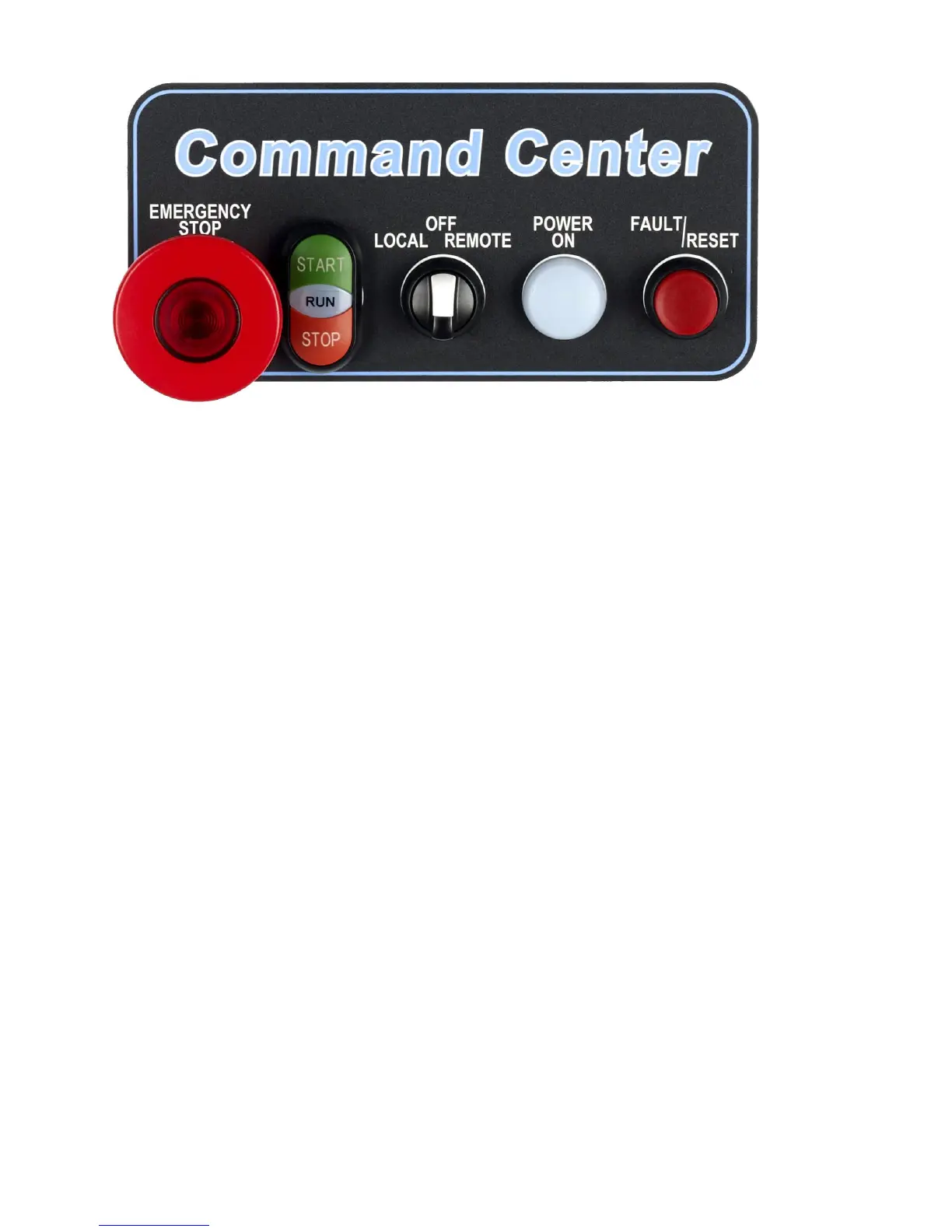
VMX-B Door Mounted Operators
Illuminated E-Stop Pushbutton:
Removes control power from all circuits and VMX2 soft start.
Push to activate, twist and pull to release.
Button Lights when E-stop is pressed.
Start/Stop Pushbutton and Run Light Assembly:
Provides Start/Stop control in "Local" mode.
Provides "Motor Running" indication in all operating modes.
Local/Off/Remote Selector:
Local" selects door mounted Start/Stop control.
Remote" selects Start/Stop control from customer supplied signals at terminals 1-3 on TBC.
Off' Turns motor off.
Power ON Light:
Indicates presence of 120VAC control power, derived from main (L1 & L2) line voltages.
Fault Light/Reset Pushbutton:
When lit, indicates that the unit has tripped, and requires "Reset".
In "Soft" (normal) mode, the "trip" will be displayed on the VMX2 keypad (inside), and will reset
upon activation of the reset pushbutton.
In "X-Iine" mode, the light indicates that the X-line overload inside the panel is tripped, and must be
reset manually by pressing the (green) reset key on the overload itself. Then the unit can be reset,
using the pushbutton on the door.
Note: If the green reset key on the X-line overload is turned to the "A" (auto) position, the O/L relay will
reset itself after the required cooldown, after that the unit can be reset by pushing the reset pushbutton
without opening the enclosure door.



 To Next Page