-
+
MA20-1
2
1
3
4
5
6
7
8
1
2
3
5
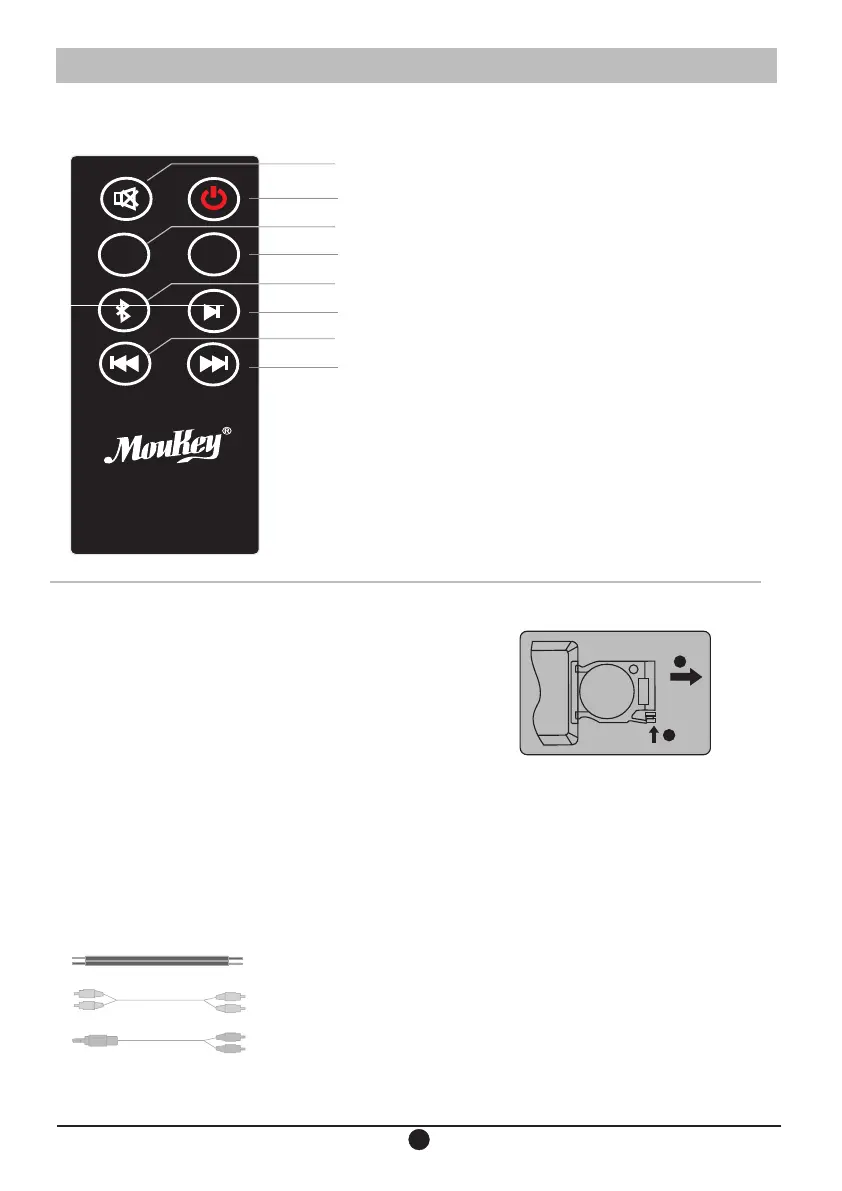
Battery loading:
Please refer to the illustration to open the battery compartment,
insert the CR 2025 battery and close the compartment
Note:
1, Do not place the remote control in places that are hot and humid.
2, Do not charge the batteries,
3. Remove the batteries when unused for long period of time.
4. The battery should not be exposed to excessive heat such as
direct sun, fire or similar.
5, Danger of explosion if battery is incorrectly replaced, Replace only
with the same or equivalent type.
+
+
1
2
OPEN
Function explanation:
1.Mute button: Press once to mute, press again
to resume playback.
2.Power button: Press once to shut down. And
the machine enters the standby state; Press again
to turn on, the machine enters normal working state.
3. Volume reduction: press lightly or press the
volume for a while to decrease volume continuously.
4. Volume up: Tap or press the volume for a while
to increase volume continuously.
5. Bluetooth selection button: Press the machine
to enter the bluetooth state, the side indicator will
be blue. If the bluetooth is not connected, the blue
indicator flashes that reminds the customer to
connect to the bluetooth.
6.Play pause button: Press once to pause, press
again to resume playback.
7.Previous song: Click the previous song on the
machine to play.
8. Next song: Click the machine to play
the next song.
1: 2.5 meters 0.75 square transparent line 1PCS
2: 1.5 meters lotus head line 1PCS
3: 1.5m 3.5mm to RCA cable 1PCS
Speaker


 To Next Page