8
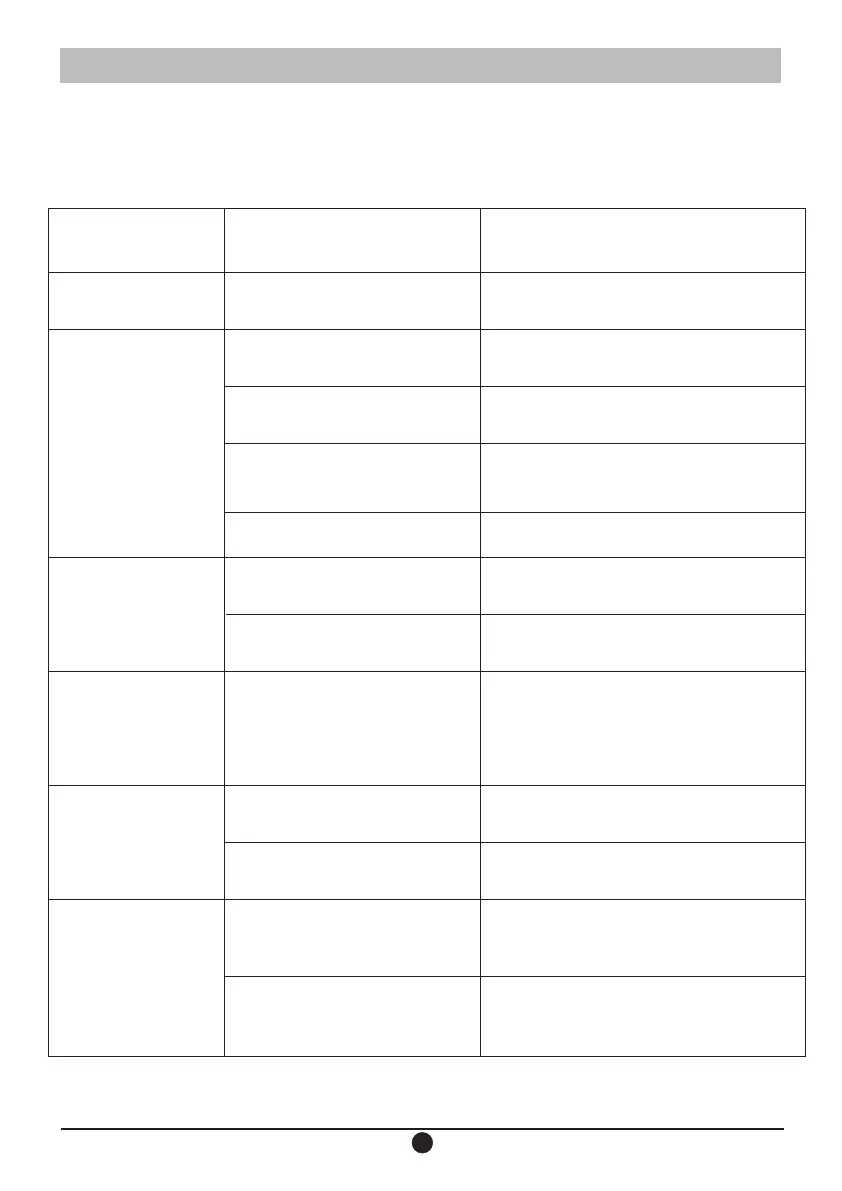
Simple trouble shooting:
*Sometimes something wrong may be caused by other devices, please
check other devices or the using of power supply equipment.
问题 检查 解决方法
没有电源
请连接电源线插头到AC电源插座
连接好设备没有
声音或声音小
连接设备的设定是否正确 请正确的设定设备的音源和音量
连接线是否正确
请正确的连接连接线
音量是否设定在正确的位置 请顺时针调节音量旋钮到合适的位置
电源是否开启
请将本装置后板开关拔到“1”的位置
POWER指示灯未亮
电源是否开启
请将本装置后板开关拔到“1”的位置
系统是否处于待机状态 重新开关机或按一下遥控器的电源按键
只有一只扬声器系
统有声音
信号输入线是否连接好 重新接好输入线
遥控器无作用
遥控器电池是否插入正常
重新并正确地插入电池
遥控器电池是否正常
重新更换新的电池
电源线是否连接正确
声音失真
音量是否设到正确位置
请反时针方向旋转本装置侧盒的
VOLUME旋钮来降低音量
从连接设备来的输入电平
是否正确
请正确的调节连接设备的输出电平
Problem
Inspection
Solution
No power
Whether the device is
connected
Please connect the power
cord plug to the AC power outlet
Whether the
device is
connected
No sound or
low sound
Is the setting of the conn-
ecting device correct
Please set the sound source and volume
of the device correctly
Whether the connection
line is correct
Please connect the cable properly
Is the volume setting in
the correct position
Please adjust the volume knob
clockwise to the appropriate
position
Whether the power is on
Please pull the switch on the rear
panel of this device to the "1" position
Power indicator
doesn’t light up
Whether the power is on
Please pull the switch on the rear
panel of this device to the "1" position
Whether the system is
stand by
Turn on, turn off again or press the
power button of the remote control
Only one speaker
system produces
sound
Whether the signal input line
is connected properly
Connect the audio cable again
The remote control
does not work
Is the remote control battery
inserted properly
Re-insert the battery properly
Is the remote control battery
can be used properly
Replace with new battery
Is the volume setting
to be the correct
position
Please turn the VOLUME knob on the
side of the device counterclockwise to
decrease the volume
Is the input level from the
connected device properly?
Please adjust the output level of
the connected device properly
Is the volume adjusted to the
correct position
Speaker


 To Next Page
 Loading...