EasyManua.ls Logo

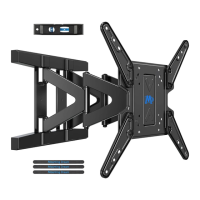
Mounting Dream MD2285-XL - User Manual

Default Icon
18 pages
Print Icon
To Next Page IconTo Next Page
Loading...
MD2285-XL INSTALLATION INSTRUCTION
If you have any questions, please contact us via customerservice@mountingdream.com
or call us at telephone (626) 604-9048 (USA) Mon - Fri 10am - 6pm (Pacific time).
For more information, please visit our website:www.mountingdreamonline.com
(
B2
)
42"~90"
Max:800x400mm/32x16"
Min:200x100mm/8x4"
Für die Installationsanweisungen auf Deutsch, siehe Seite 10~11.
Pour l'instruction en Français, veuillez vous reporter à la page 12~13.
Para las instrucciones de la instalación en Español, favor vea la página 14~15.
Per le Istruzioni in Italiano, vedi pagina 16~17.
TV
1 2
x3
x1

Other manuals for Mounting Dream MD2285-XL

Question and Answer IconNeed help?

Do you have a question about the Mounting Dream MD2285-XL and is the answer not in the manual?

Summary

Step 1: Attach Brackets to TV

Select TV Screws

Choose the correct screws for attaching TV brackets to the television.

Spacer Requirement Check

Determine if spacers are necessary for the TV bracket installation process.

Step 2: Attach Wall Plate to Wall

Wood Stud Installation

Install the wall plate securely into wood studs for proper mounting.

Step 2 B: Solid Concrete Wall Installation

Step 3: Hang and Secure TV to Wall Plate

Step 4: Adjustments

TV Leveling Adjustment

Adjust the TV for level using leveling bolts on the rear TV plate.

TV Tilt Angle Adjustment

Adjust the TV tilt angle using the handle and tilting bolt to desired position.

Product Dimensions

Mounting Dream MD2285-XL Specifications

General IconGeneral
BrandMounting Dream
ModelMD2285-XL
Product TypeTV Wall Mount
CategoryRacks & Stands
ColorBlack
MaterialSteel
Weight Capacity132 lbs
VESA Compatibility200x100mm to 600x400mm
Level AdjustmentYes
Installation Tools IncludedYes
Compatible DevicesFlat-panel TVs
Mounting TypeWall
Tilt Range+5°/-15°
Warranty10 years

Related product manuals