EasyManua.ls Logo

Mounting Dream MD2801-M - User Manual

Mounting Dream MD2801-M
21 pages
Print Icon
To Next Page IconTo Next Page
Loading...
Max:400x400mm/16x16"
Min:100x100mm/4x4"
x3 x1
TV
1 2
(C1)
MD2801-M INSTALLATION INSTRUCTION
Für die Installationsanweisungen auf Deutsch, siehe Seite 13~14.
Pour l'instruction en Français, veuillez vous reporter à la page 15~16.
Para las instrucciones de la instalación en Español, favor vea la página 17~18.
Per le Istruzioni in Italiano, vedi pagina 19~20.
Question and Answer IconNeed help?

Do you have a question about the Mounting Dream MD2801-M and is the answer not in the manual?

Overview

This document provides installation instructions and specifications for the Mounting Dream MD2801-M TV wall mount.

Function Description:

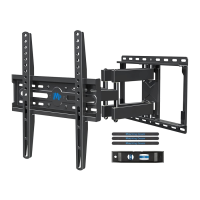
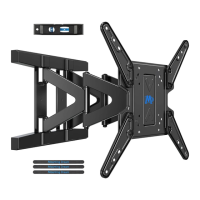
The MD2801-M is a full-motion TV wall mount designed to securely hold a television to a wall, allowing for various adjustments to optimize viewing angles. It is suitable for installation on wood stud walls and solid concrete walls, but explicitly not for drywall alone. The mount features an articulating arm that allows the TV to be extended, swiveled, and tilted.

Important Technical Specifications:

  • VESA Compatibility: The mount supports VESA patterns ranging from a minimum of 100x100mm (4x4") to a maximum of 400x400mm (16x16"). This ensures compatibility with a wide range of TV sizes and models.
  • Weight Capacity: The mount can support TVs (including accessories) weighing up to 88 LBS (40 KG). It is crucial that the wall itself can support at least five times the combined weight of the TV and the mount for safety.
  • Mount Dimensions:
    • Wall Plate Unit (folded): 328mm (width) x 436mm (height)
    • Maximum Extension from Wall: 435mm
    • Minimum Distance from Wall: 41mm
  • Adjustments:
    • Leveling Adjustment: ±4° (adjustable by loosening two leveling bolts on the rear of the TV plate).
    • Tilting Angle Adjustment: +3° to -15° (adjustable by loosening two tilting bolts).
    • Swivel Angle: ±45° (indicated in product dimensions, allowing for left and right movement).
  • Hardware Included:
    • Allen Key (02) x1
    • Lag Bolts M7x55mm (01) x4
    • Extended Arm Screws: M6x8mm (03) x8
    • TV Screws: M4x12mm (a) x4, M4x30mm (d) x4, M6x12mm (b) x4, M6x35mm (e) x4, M8x25mm (c) x4, M8x45mm (f) x4
    • Spacers: M6x17mm (g) x4, M8x22mm (h) x4, 10mm (i) x4, 2.5mm (j) x8
    • Washers: M4 (k) x4, M6 (l) x4
    • Wall Plate Unit (04) x1
    • Extended Arm (05) x2, (06) x2 (these are likely the same component, just referenced differently for left/right or top/bottom)
    • Security Screws (07) (referenced in Step 3, but not explicitly listed with a quantity in the hardware section, though visually present in the diagram)
    • Cable Management Velcro (referenced in Step 5, but not explicitly listed with a quantity in the hardware section, though visually present in the diagram)
  • Tools (Not Included): Band Tape, Pencil, Screwdriver, Electrodrill, Socket Wrench 1/2"(13mm), Stud Finder, Awl, 5/32"(4mm) Wood Drill Bit, 3/8"(10mm) Masonry Drill Bit, Hammer.

Usage Features:

  • Pre-Installation Check: The manual emphasizes a critical pre-installation check to confirm TV VESA compatibility and weight, as well as the wall type.
  • Two-Piece Wall Plate: The wall plate unit (04) is designed to be disassembled into two pieces (wall plate and TV plate) for easier installation.
  • Configurable Extended Arms: The extended arms (05, 06) can be assembled in various configurations to match different VESA patterns, as illustrated in the "Choose Configuration" section.
  • Spacer Options: The mount provides multiple spacer sizes (g, h, i, j) and screws (a-f) to ensure proper fit with different TV back designs, including those with curved or irregular surfaces. A specific tip is given for combining M6(e) or M8(c/f) screws with 2.5mm spacer (j), requiring removal of the inner circle of the spacer.
  • Wall Type Specific Installation: Detailed instructions are provided for both wood stud and solid concrete wall installations, including specific drill bit sizes and warnings.
  • Safety Features:
    • Lag Bolt Tightening: All four lag bolts (01) must be firmly tightened to prevent unwanted movement of the wall plate assembly.
    • Bolt Head Orientation: For safety, the bolt heads must keep "UP" during the wall plate installation step to prevent the TV from falling.
    • Wall Plate Installation Integrity Test: Before hanging the TV, users are instructed to conduct an "integrity test" of the wall plate installation.
    • Security Screws: After hanging the TV, security screws (07) are used to secure the TV plate to the wall plate, preventing accidental dislodgement.
    • Two-Person Installation: For safety, it is recommended that two people perform the step of hanging and securing the TV.
  • Cable Management: The mount includes Velcro straps for organizing cables, contributing to a neat and tidy appearance.

Maintenance Features:

  • Adjustability: The leveling and tilting adjustments allow for post-installation fine-tuning, which can be considered a form of maintenance to ensure optimal viewing.
  • Durability: The product is designed for robust installation, with warnings against improper use or installation that could lead to damage or injury. While not explicitly stated as a maintenance feature, proper installation contributes to the longevity and stability of the mount.
  • Parts Availability: The manual implies that concrete anchors, if needed, can be obtained via Amazon, suggesting a degree of support for replacement or additional parts.

Mounting Dream MD2801-M Specifications

General IconGeneral
BrandMounting Dream
ModelMD2801-M
CategoryRacks & Stands
LanguageEnglish

Related product manuals