ASSEMBLY STEPS
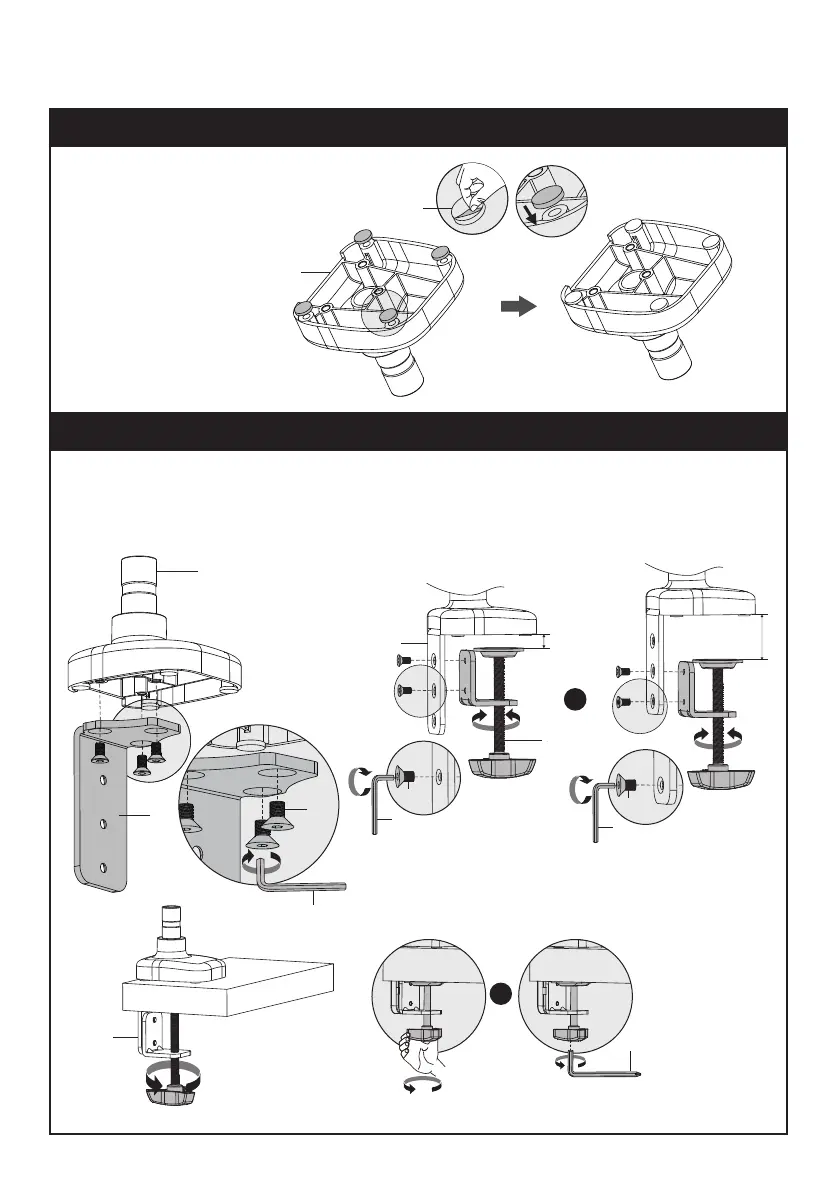
STEP 2: Clamp Installation or Grommet Base Installation
STEP 1: Apply Pads to the Base Bottom
02
OPTION A: Clamp Installation
Mount Bracket (E) to Base Bottom (C) with Bolts (G). Bolts could be tightened by the 4mm Allen Key (O).
Similarly, attach Clamp (F) to Bracket (E) with Bolts (G) and 4mm Allen Key (O).
Adjust the Clamp width to t with desk. Secure stand to desktop by tightening Clamp (F) or by Allen key (P).
G
O
O
G
10-60mm
10-90mm
F
E
F
C
E
G
O
OR
H
C
Apply pads (H) to the base
bottom to avoid desk scratches.
P
OR


 To Next Page