10
1. Turn On/O
4. Pause/Sleep Mode
5. Do Not Disturb Mode
2. Start Cleaning
Press and hold the button for 3 seconds to turn on the robot.
Once the power indicator turns solid white, the robot is in standby
mode. To turn o the robot, press and hold the button for 3
seconds when the robot is not moving. Turning o the robot will
end the current cleaning task.
3. Cleaning Mode
MOVAL600RobotVacuumandMopCleaner has four cleaning
modes: Quiet, Standard, Strong and Turbo. The default mode is
Standard. You can specify the cleaning mode in the Mi Home/
Xiaomi Home app.
Pausing: Press any button to pause the robot during cleaning.
Sleep Mode: The robot will automatically enter Sleep Mode after
10 minutes of inactivity, then the power and charging indicators
will go o. To wake up the robot, press any button.
Do Not Disturb Mode prevents the robot from automatically
starting cleaning tasks, and the power indicator remains o. You
can enable Do Not Disturb Mode or modify its hours in the app.
(The mode is on by default from 22:00 to 08:00.)
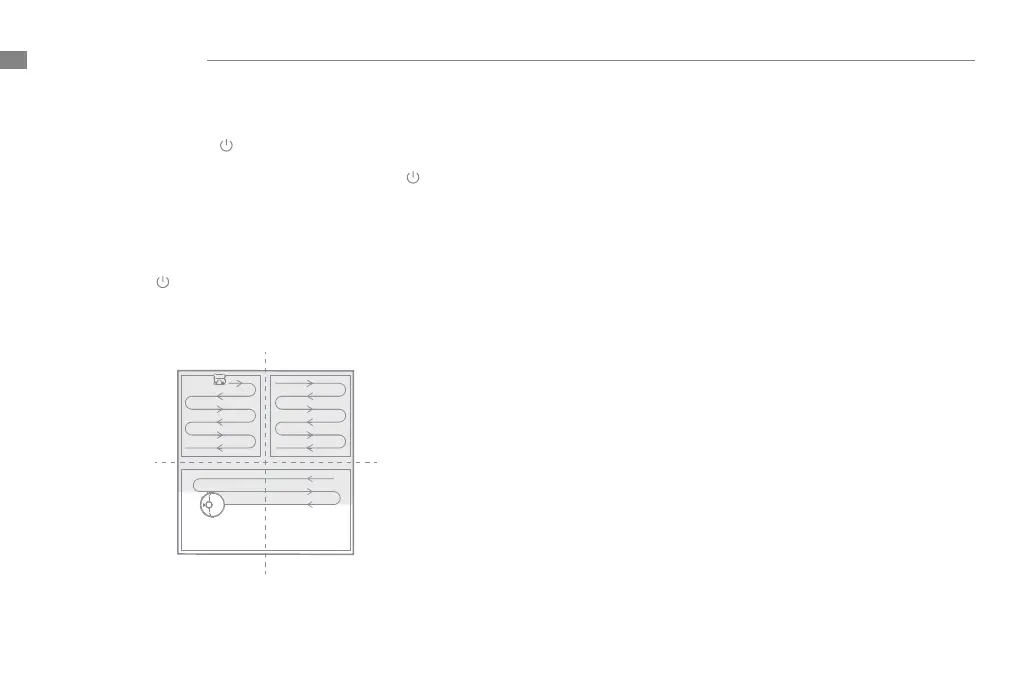
Press the button briey to turn on the robot. Upon activation,
the robot will accurately map out a route, methodically clean
each room in an S-shaped pattern, then nish by cleaning along
the edges and walls to ensure a thorough job.
Note: If the battery is too low, the robot will automatically return to the dock
to charge. It will resume unfinished cleaning tasks after charging to the
necessary battery level.(The breakpoint continuous cleaning function must
be enabled on the app in advance.)
Note:
• The robot will turn o automatically if left in Sleep Mode for more than 12
hours.
• When the robot is paused, placing it onto the charging dock will end the
current cleaning task.
Note:
• Scheduled cleaning tasks will still be carried out during the DND period.
• The robot will continue cleaning after the DND period ends.
How to Use
EN


 To Next Page