16
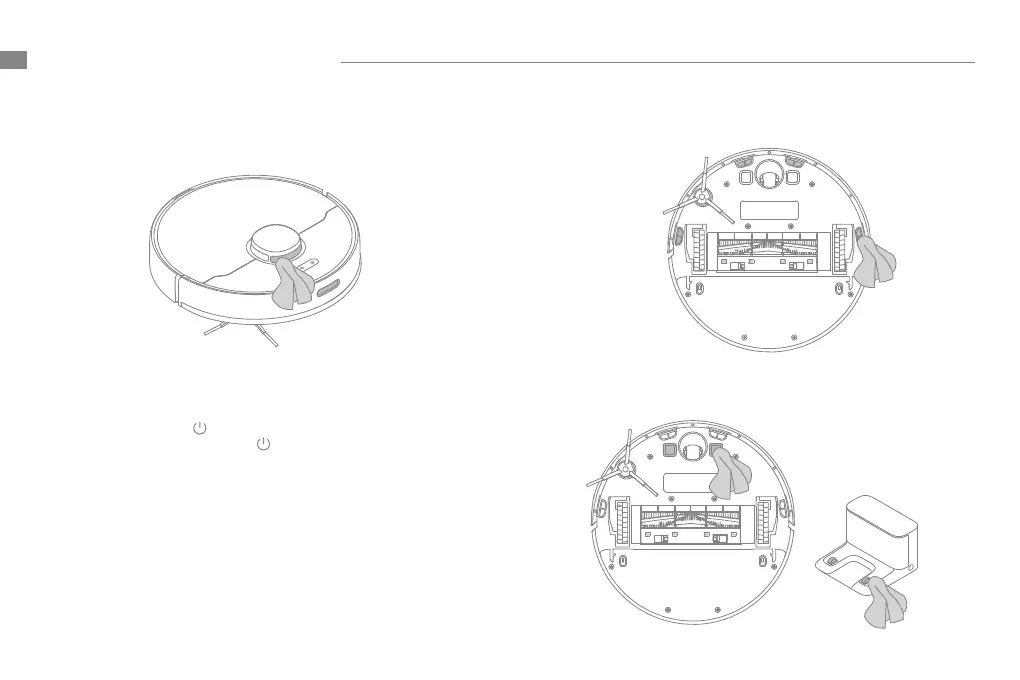
Clean the LDS Laser Sensor/Returning-to-dock Sensor
Clean the Charging Contact
Clean the Cli Sensor
Note: Wet cloths can damage sensitive elements within the robot and charging dock. Please use dry rags for cleaning.
Battery
The robot contains a high-performance lithium-ion battery
pack. Please ensure that it remains well-charged for daily use to
maintain optimal battery performance. If the robot is not used for
an extended period of time, turn it o and put it away. To prevent
damage from over-discharging, the robot should be recharged at
least once every three months.
Robot Restarting
If the robot stops responding or cannot be turned o, press and
hold down the button for 10 seconds to forcefully turn it o.
Then press and hold the button for 3 seconds to turn the robot
on.
Routine Maintenance
EN


 To Next Page