EasyManua.ls Logo

Movacolor MCTC - Production Screens: Extrusion Mode

Movacolor MCTC
71 pages
Print Icon
To Next Page IconTo Next Page
To Previous Page IconTo Previous Page
Loading...
17
MCTC manual
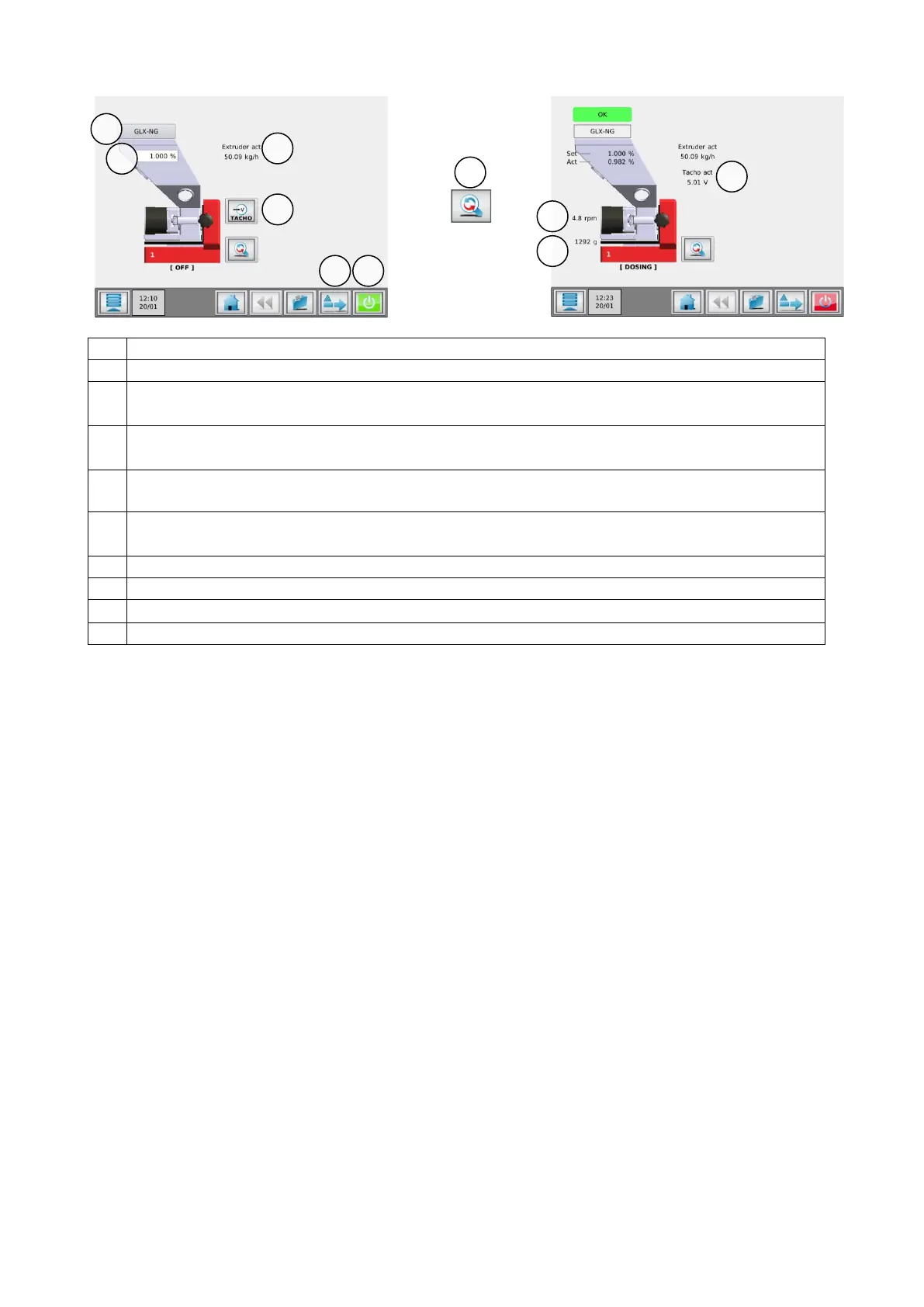
3.4.2 Extrusion mode
1.
Material selection button. Through this button the material can be stored during production.
2.
Percentage of additive to be dosed in relation to the set extruder capacity.
3.
Capacity of the extruder. Used for calculating the additive to be dosed. To be set by the user when
the controller is in EXT RELAY mode.
4.
Tacho ratio button. Here you can link the applied voltage to a extruder capacity (only in EXT
TACHO mode)
5.
Tools menu. In this menu different settings can be made to the system. Check the
“MCTC_Manual_General” for more detailed information.
6.
Start/Stop button. When the button is colored green, the system is OFF (safe). In red condition
the system is ON.
7.
Toggle button. With this button you can toggle between the normal and the detailed view.
8.
Actual RPM.
9.
Actual Hopper weight.
10.
Actual tacho voltage.
2
3
4
6
7