3.8.4 Recipe editor screen
From the horizontal menu bar, press the recipe button:
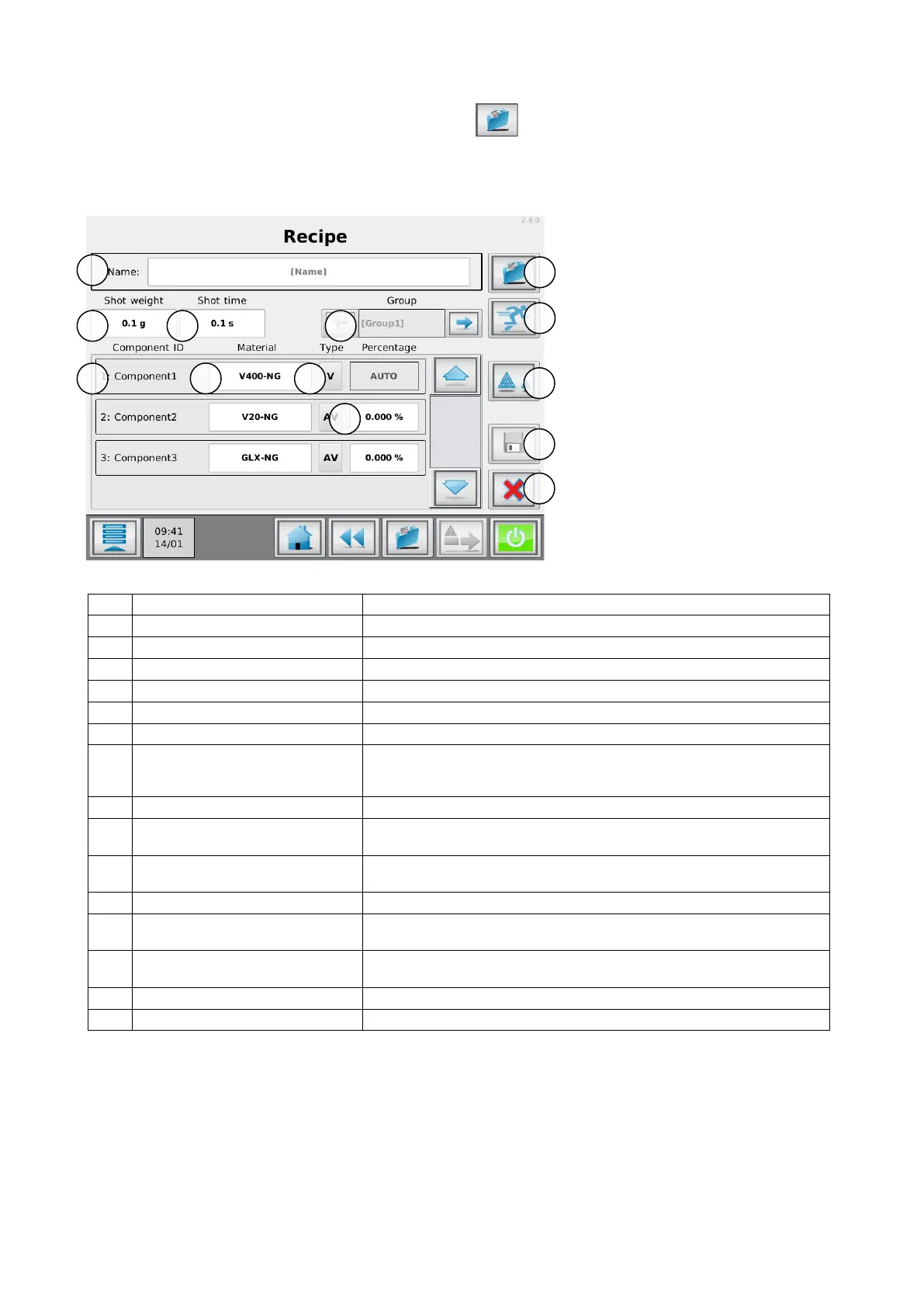
The Recipe editor screen will appear:
Image is for reference only and can be different depending on the system configuration.
Enter desired recipe name.
Extruder throughput kg/h.
Component name (can be set in configuration menu).
Pre-learned material curve
Select the pre-learned material curve per component.
In case of no pre-learned materials it is recommended to select the Movacolor
default material file.
Material/component function
how the material should be treated, regrind, virgin, additive.
Enter dosing percentage per component.
To disable a component (OFF), set the dosing percentage to 0%.
Select the current group to be edited.
Only visible when more than one group configured.
Search and select existing recipes
Start “quick start” wizard
Only visible for single group configurations.
Select the dosing order for available components
Only available when a MCHybrid is configured.
Save the recipe and load as active recipe.
leave this screen discarding all changes.


 To Next Page