10
Advanced features of the FS version of the PYTHON III
These modes are useful tools, but many officers have not been exposed to them so they require
more explanation. Please don’t tackle these until you have a few hours of practice using the
PYTHON III in the conventional modes. A detailed explanation of these and more information on
modes is contained in the Operational concerns of the fastest and same direction mode
section.
Fastest mode
When the PYTHON III is in stationary or opposite-direction moving mode, fastest mode is
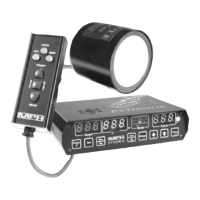
available by pressing the FAST key, which is located in the upper right hand corner of the
remote control. This will cause the middle display window to be labeled as FAST. The unit
will remain in fastest mode until the fastest button is pressed again or until a target speed is
locked in.
The middle speed window will display the speed of the fastest target, while the normal target
window continues to display the strongest target. If the strongest target is the fastest target
within the range of the PYTHON III, the fastest window will be filled with underscores.
The Doppler audio and the mode window will continue to track the strongest target when the
radar is in fastest mode.
Locking a target while the PYTHON III is in fastest mode will lock the strongest target and
the radar will immediately exit the fastest mode. The PYTHON III will not allow the locking
of the speed that is displayed in the fastest window.
Same direction mode
Same direction moving radars like the PYTHON III have two major differences from
opposite direction moving radar.
First, vehicles traveling the same or very near the same speed (under 3 mph) as patrol can not
detected by the PYTHON III as targets. The speed differential is very small, and so is the
Doppler shift. A radar can not easily separate such targets from the reflections of stationary
objects like the windshield or hood ornament. Please keep this fact in mind, because the
vehicle nearest you may not be the target displayed by the PYTHON III if it's speed is within
3 mph of your patrol speed.
Second, the radar cannot distinguish if the targeted vehicle is moving faster or slower than the
patrol vehicle. Because of this, you must judge whether the vehicle is traveling faster or
slower than the patrol vehicle and you must communicate this to the PYTHON III. If the
target is traveling faster than you are, press the FAST button until the Fast indicator is
displayed under the Lock/Fastest target window and the radar will calculate the correct
speed. If you don't press the button, the radar will assume that the target vehicle is moving
slower than you are and the Fast indicator is not lit.


 To Next Page