This document is an operation manual for the DFO - DFI Series of laboratory equipment manufactured by MRC Laboratory Equipment. The device appears to be an oven or incubator, based on the visual representation and operational descriptions.
Function Description
The DFO - DFI Series device is designed for various laboratory applications requiring controlled temperature environments. It can operate in two primary modes: "Continuous mode" for constant temperature maintenance and "Timer mode" for timed operations. The core function involves heating and maintaining a set temperature within its chamber, suitable for drying, heat treatment, or incubation, provided the materials do not release combustible or toxic vapors.
Important Technical Specifications
While specific numerical technical specifications like temperature range, chamber volume, or power consumption are not explicitly listed in the provided pages, several operational and safety-related specifications can be inferred:
- Electrical Supply: The device operates on a single-phase A.C. supply. It can be configured for Live to Neutral non-reversible, Live to Neutral reversible, or Live to Live connections. The manual details connection for 1-phase supply with L1 (Brown wire to live), N/L2 (Blue wire to neutral), and PE (Green/Yellow wire to earth/ground). It supports USA 200-240V connections, with L1 connecting to one power conductor and L2 to the other.
- Fusing: The supply should be fused at a size equal to or higher than the current on the product's rating label. Internal fuses are also fitted in factory-fitted mains cables.
- Ventilation: Requires at least 150 mm of free space around the back and sides for heat dissipation. Models with protruding fan motor housings require these housings to be in an area of good ventilation. All cooling vents and fans (if fitted) must be clear of obstruction.
- Temperature Control: Utilizes a BrainChild C62 controller. The controller displays both the Process Value (PV), which is the current temperature, and the Set Value (SV), which is the target temperature. It includes indicators for Over-Heat Temperature (ALM 123), heater activation (OUT 12), Manual Mode (MANU), Communication (COMM), Auto-tuning (TUNE), and Lock ( ).
- Safety Features:
- Over-Heat Temperature Indicator: Lights up when the actual temperature exceeds the set temperature by 5°C and turns off the heater.
- Door Switch (optional): If fitted, isolates heating elements and the circulation fan when the door is opened.
- Earth (Ground) Connection: The supply MUST incorporate an earth (ground) connection.
- Explosive Vapours Warning: Unless equipped with a stoving and curing option, the device is not suitable for applications releasing combustible or explosive vapors.
- Atmospheres: If an optional gas inlet is fitted, it is labeled "INERT GAS ONLY," indicating suitability for inert or oxidizing gases, but not combustible or toxic gases.
Usage Features
- Unpacking and Handling:
- Remove shelves and runners from packaging first.
- Lift by the base, not the door or projecting parts.
- Requires two or more people for carrying.
- Carefully remove all internal and external packing materials, avoiding damage to insulation.
- Siting and Setting Up:
- Place on a level, stable, non-flammable surface in a well-ventilated area, away from other heat sources.
- Ensure the mounting surface is stable and free from movement or vibrations.
- The height of the mounting surface should prevent operator strain during loading/unloading.
- Maintain at least 150 mm free space around the back and sides.
- Ensure quick access to the power switch or electrical disconnect.
- Temperature Setting (Continuous Mode):
- Set the front switch to "CONTINUOUS."
- Turn on the controller/power switch.
- Use the "up" ( ) and "down" ( ) arrows on the controller to increase or decrease the set temperature (SV).
- Temperature Setting (Timer Mode):
- Set the front switch to "TIMER."
- Turn on the controller/power switch.
- Use the "up" ( ) and "down" ( ) arrows to set the desired temperature.
- Press the "setting" ( ) button twice. The PV display will show "t.MR" and the SV display will show the current timer value (e.g., 1.0 for 60 seconds).
- Use the "up" ( ) and "down" ( ) arrows to adjust the time. The timer starts counting down once the set temperature is reached.
- Controller Interface:
- The BrainChild C62 controller features a digital display for PV and SV, along with various indicator lamps for operational status and warnings.
- Buttons include "setting" ( ), "up" ( ), "down" ( ), and "Revert/STOP/Restart Timer" (R).
Maintenance Features
- Qualified Personnel: Maintenance procedures, especially those involving electrical components, must only be performed by electrically qualified personnel due to the risk of fatal injury (DANGER! ELECTRIC SHOCK).
- Electrical Connections: Connection to the main supply should be performed by a qualified electrician.
- High Temperature Gloves: It is highly recommended to use high-temperature gloves when working with the oven.
- Accessibility: The product's electrical access panel may need to be temporarily removed for connections. The plug or isolating switch should be accessible, easy to remove, and within reach.

 Need help?
 General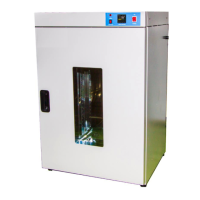

 To Next Page