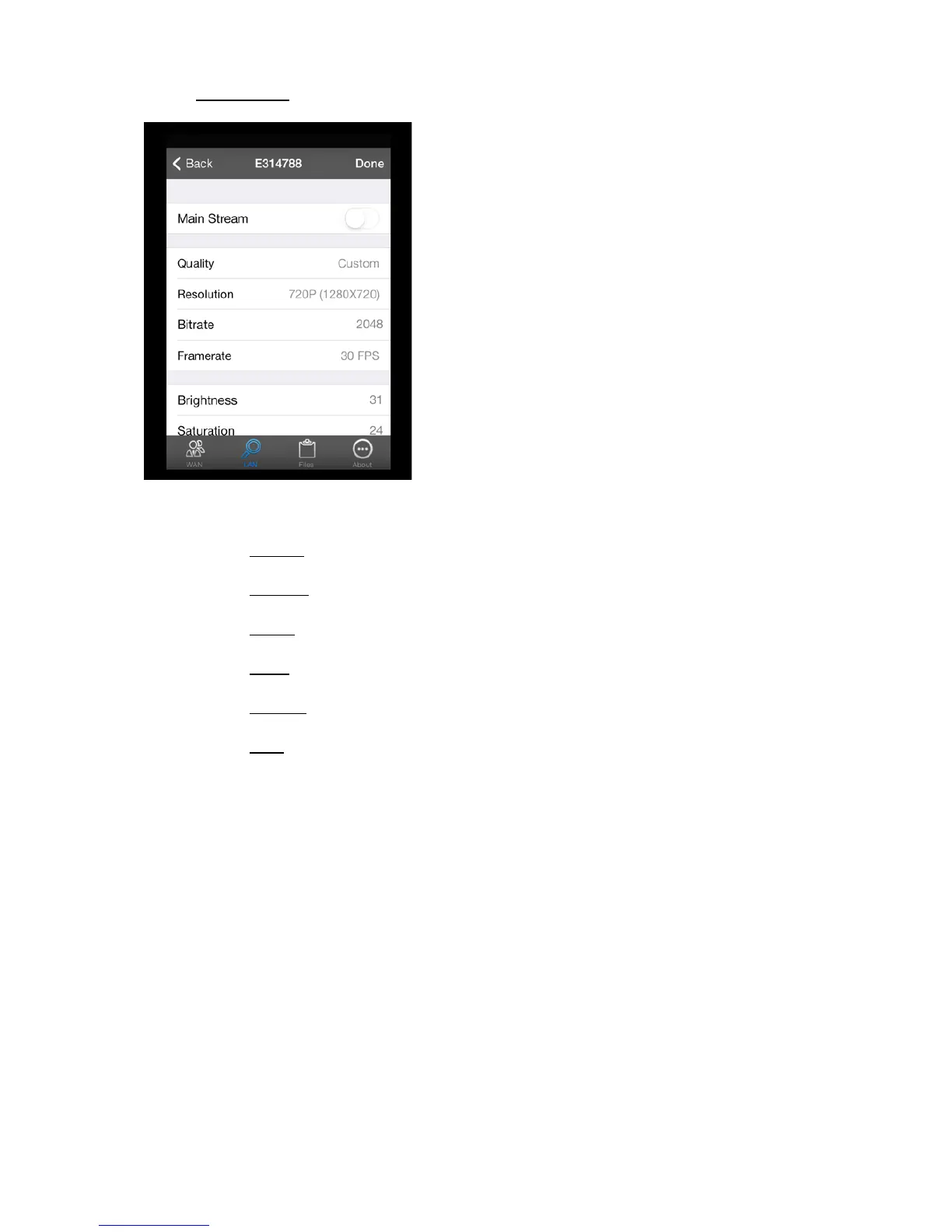
4.2.1.3. Video Settings
In the video settings menu you can change following settings:
Quality: To change the quality of the images from the camera you can choose between
o Custom: With the option “custom” you can change the resolution, bitrate and
framerate yourself.
o Excellent: the IP camera will have a resolution of 640X480, a bitrate of 200 and a
framerate of 15 FPS.
o Better: the IP camera will have a resolution of 640x480, a bitrate of 150 and a
framerate of 12 FPS.
o Good: the IP camera will have a resolution of 640x480, a bitrate of 100 and a
framerate of 10 FPS.
o Normal: the IP camera will have a resolution of 640x480, a bitrate of 64 and a
framerate of 8 FPS.
o Low: the IP camera will have a resolution of 320x240, a bitrate of 64 and a framerate
of 6 FPS.
Press “Done” to confirm your choise. Press “done” again to save the settings.
NOTE: For more informtion about resolution, bitrate and framerate see “terminology”. The best
quality you can have is “custom”, a resolution of 720P 1280x720, a bitrate of 2000 and a framerate of
30 FPS. Know that this requires a high internet connection and that your provider can charge you
with high costs if you work through you mobile network.
Resolution: you can change the resolution of the images according to your own needs. For
more information about resolution see “terminology”.
Bitrate: you can change the bitrate only in “custom” mode. For more information about
bitrate see “terminology”.
Framerate: you can change the amount of frames according to your own needs. For more
information about resolution see “terminology”.
Brightness: to change the brightness of the IP camera you can put in the range you want.
Saturation: to change the saturation of the IP camera you can put in the range you want.
11


 To Next Page