"!
WARNING
Before wiring the Ultima X Series Gas Monitors, disconnect power source
supplying the monitor; otherwise, electrical shock could occur.
• The Ultima X Series Gas Monitor must be disassembled for
relay wiring
• The following procedure must be performed:
1. Remove the Ultima X Series Gas Monitor cover.
2. Pull on the wiring plugs to disconnect the connectors on the
exposed board.
NOTE: Observe connector locations for later re-insertion.
3. Route customer-supplied cable into the enclosure and
connect to the appropriate wiring plugs.
4. Identify each conductor of the cable to enable proper
connection at the control equipment.
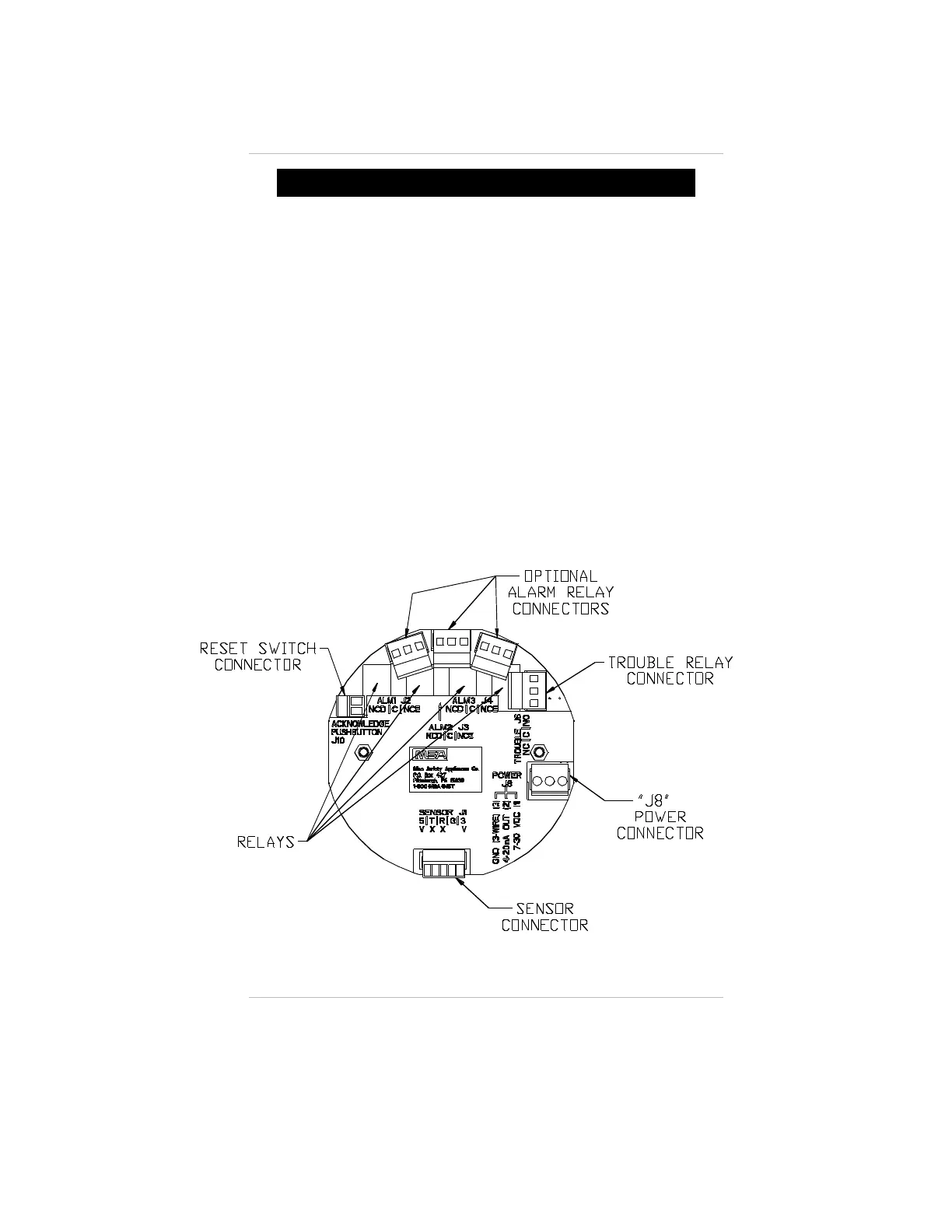
5. If installing a RESET push-button:
a. Route a two-conductor cable to terminal block J10
(FIGURE A-6).
Figure A-6.
Relay Printed Circuit Board
Appendix A, Internal Relay Option
A-11



 To Next Page