3-21
BIOS Setup
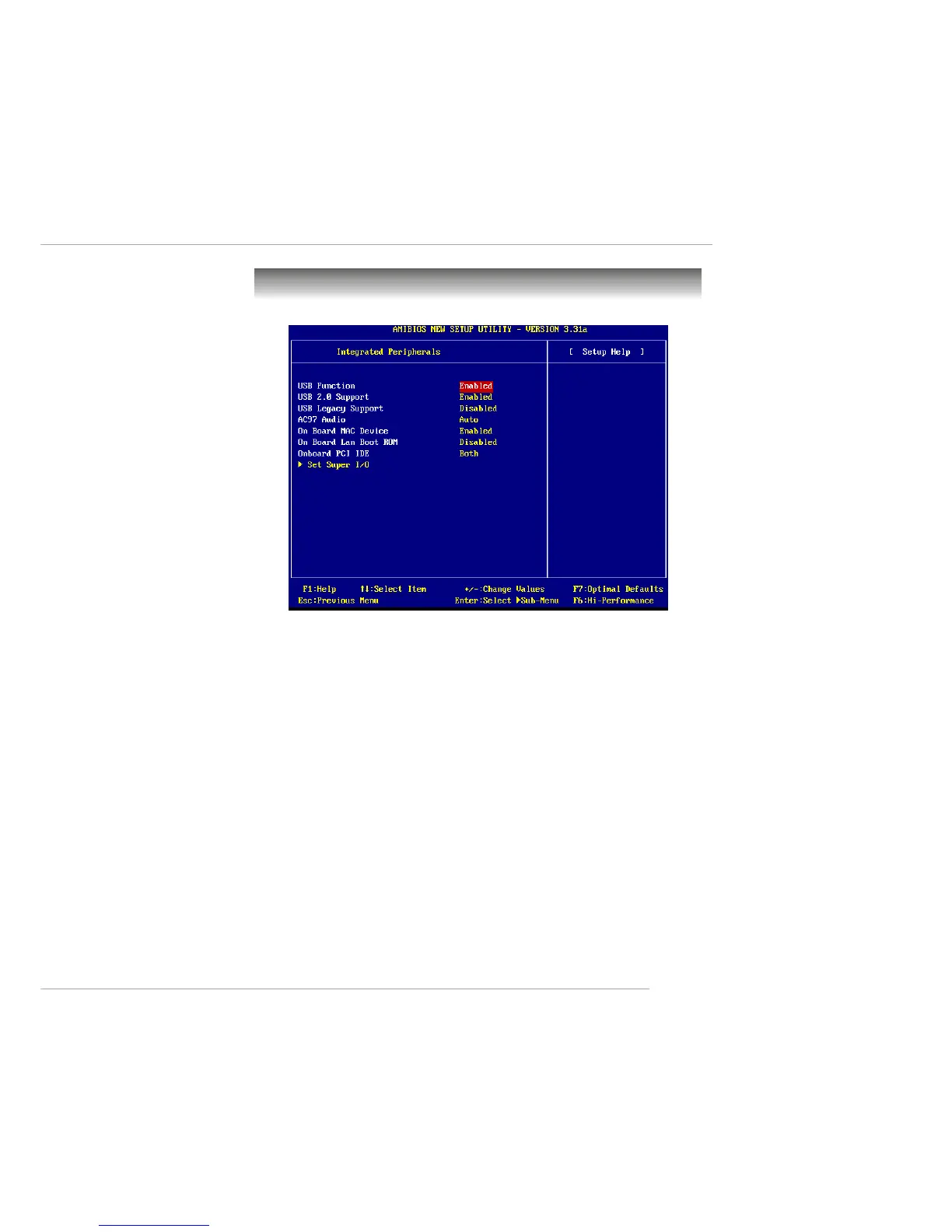
Integrated Peripherals
USB Function
This setting is used to enable/disable the onboard USB controllers. Setting
options: Enabled, Disabled.
USB 2.0 Support
This setting disables/enables the support for USB 2.0 technology. USB 2.0
technology increases data transfer rate up to a maximum throughput of
480Mbps, which is 40 times faster than USB 1.1 and is ideal for connecting
high-speed USB interface peripherals such as USB HDD, digital cameras,
MP3 players, printers, modems and the like. Setting options: Disabled,
Enabled.
USB Legacy Support
This setting is used to enable/disable the BIOS support for USB devices under
conventional operating systems (DOS and etc.) that do not have built-in USB
drivers.
AC’97 Audio
This item is used to enable or disable the onboard AC’97 (Audio Codec’97)
feature. Selecting Auto allows the mainboard to detect whether an audio de-


 To Next Page