3-16
MS-7005 Micro ATX Mainboard
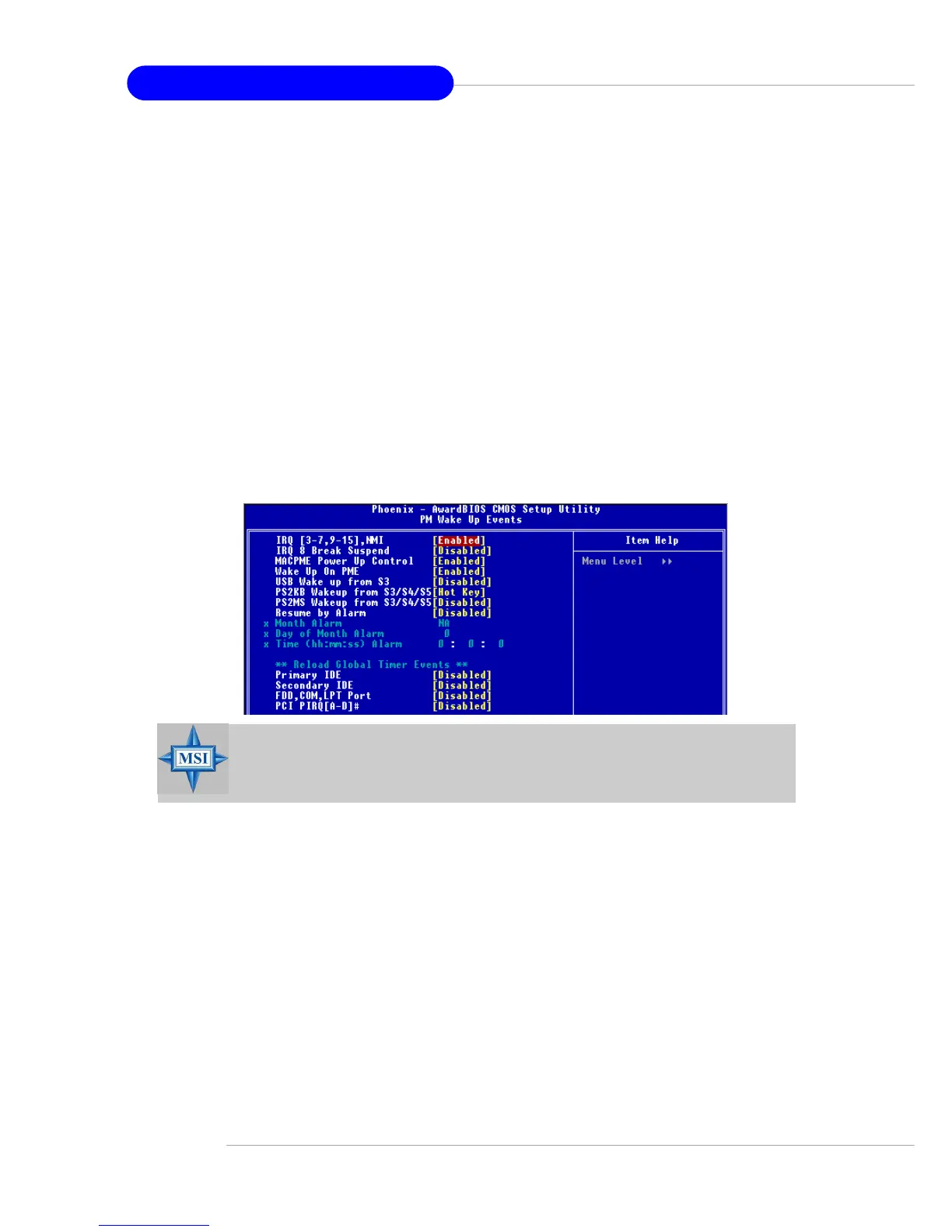
IRQ [3-7, 9-15], NMI; IRQ 8 Break Suspend
These fields specify whether the system will be awakened from power saving
modes when activity or input signal of the specified hardware peripheral or
component is detected.
MACPME Power Up Control
These fields specify whether the system will be awakened from power saving
modes when activity or input signal of onboard LAN is detected only.
Wake Up On PME, USB Wakeup From S3
These fields specify whether the system will be awakened from power saving
modes when activity or input signal of the specified hardware peripheral or
component is detected.
Power Button Function
This feature allows users to configure the Power Button function. Settings are:
Power Off The power button functions as a normal power-on/-off
button.
Suspend When you press the power button, the computer enters
the suspend/sleep mode, but if the button is pressed for
more than four seconds, the computer is turned off.
After AC Power Lost
This item specifies whether your system will reboot after a power failure or interrupt
occurs. Available settings are:
Power Off Leaves the computer in the power off state.
Power On Leaves the computer in power on state.
Last State Restores the system to the status before power failure or
interrupt occurred.
PM Wake Up Events
Press <Enter> and the following sub-menu appears:
MSI Reminds You...
S3-related functions described in this section are available only
when your BIOS supports S3 sleep mode.


 To Next Page
 Loading...