3-22
BIOS Setup
▍
MS-7576
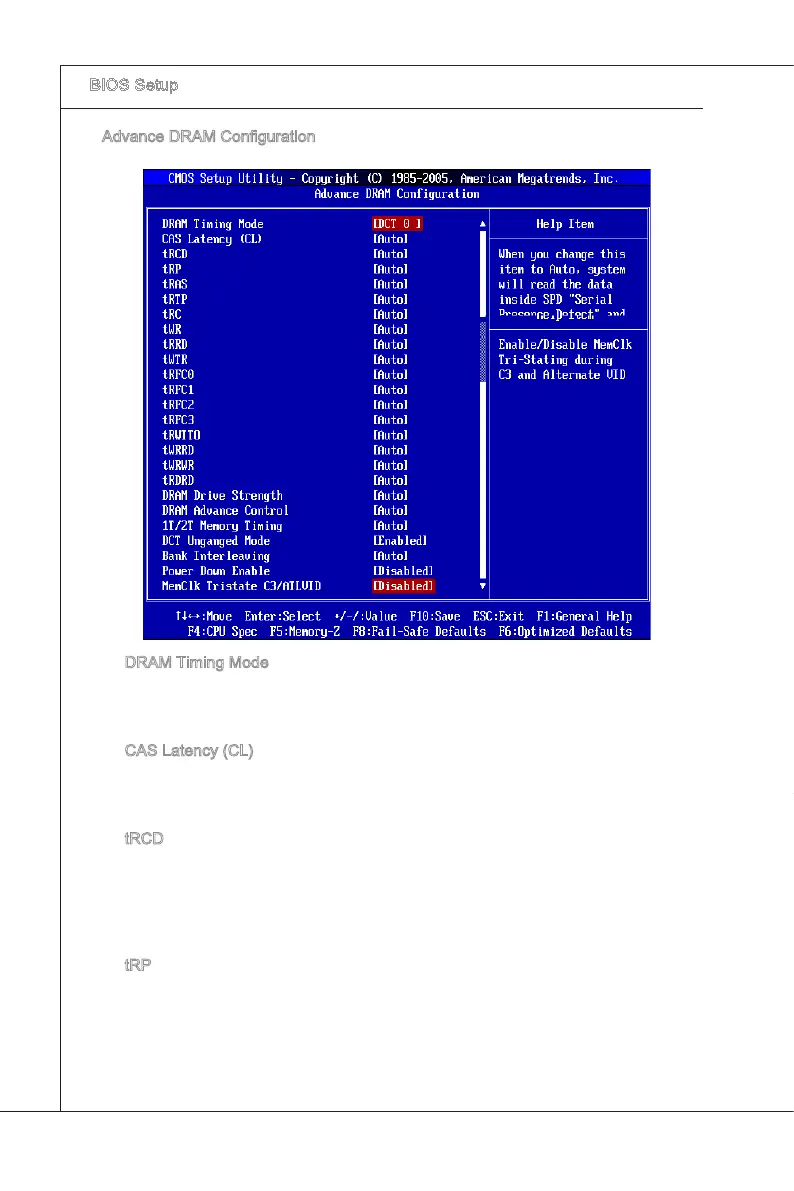
Advance DRAM Conguraton
Press <Enter> to enter the sub-menu and the followng screen appears.
DRAM Tmng Mode
Ths eld has the capacty to automatcally detect all of the DRAM tmng. If you set
ths eld to [DCT 0], [DCT 1] or [Both], some elds wll appear and selectable. DCT
0 controls channel A and DCT1 controls channel B.
CAS Latency (CL)
When the DRAM Tmng Mode sets to [DCT 0], [DCT1] or [Both], the eld s adjust
-
able. Ths controls the CAS latency, whch determnes the tmng delay (n clock
cycles) before SDRAM starts a read command after recevng t.
tRCD
When the DRAM Tmng Mode sets to [DCT 0], [DCT1] or [Both], the eld s adjust
-
able. When DRAM s refreshed, both rows and columns are addressed separately.
Ths setup tem allows you to determne the tmng of the transton from RAS (row
address strobe) to CAS (column address strobe). The less the clock cycles, the
faster the DRAM performance.
tRP
When the DRAM Tmng Mode sets to [DCT 0], [DCT1] or [Both], the eld s adjust
-
able. Ths settng controls the number of cycles for Row Address Strobe (RAS) to
be allowed to precharge. If nsucent tme s allowed for the RAS to accumulate ts
charge before DRAM refresh may be ncomplete and DRAM may fal to retan data.
Ths tem apples only when synchronous DRAM s nstalled n the system.
▶
▶
▶
▶
▶


 To Next Page