A-2
Realtek Audo
▍
inStaLLing the reaLtek hd audio driver
You need to nstall the HD audo drver for Realtek audo codec to functon properly
before you can get access to 2-, 4-, 6-, 8- channel or 7.1+2 channel audo operatons.
Follow the procedures descrbed below to nstall the drvers for derent operatng sys-
tems.
Installaton for Wndows
®
XP
For Wndows
®
XP, you must nstall Wndows
®
XP Servce Pack3 or later before nstallng
the drver.
The followng llustratons are based on Wndows
®
XP envronment and could look
slghtly derent f you nstall the drvers n derent operatng systems.
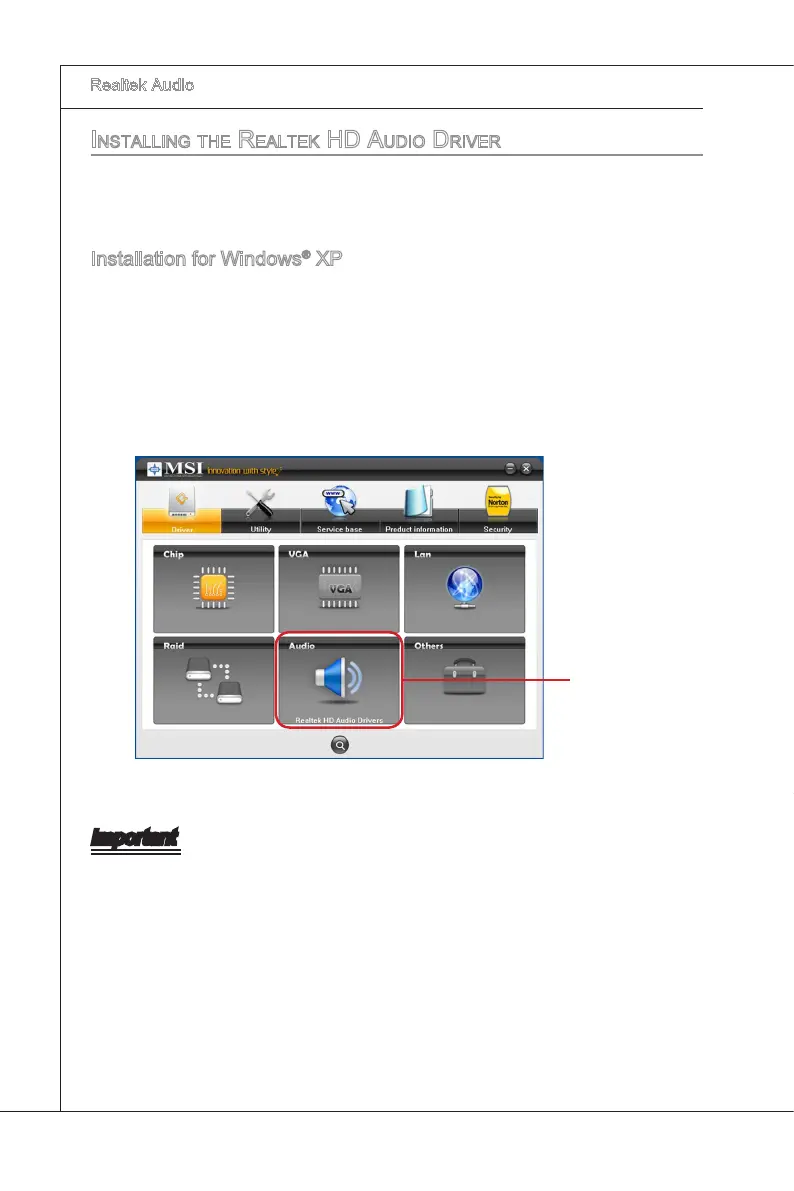
Insert the applcaton DVD nto the DVD-ROM drve. The setup screen wll automat
-
cally appear.
Clck Realtek HD Audo Drvers button.
1.
2.
Important
The HD Audo Conguraton software utlty s under contnuous update to enhance au-
do applcatons. Hence, the program screens shown here n ths secton may be slghtly
derent from the latest software utlty and shall be held for reference only.
Clck here


 To Next Page