B-4
SB710 RAID
▍
MS-7576
Dene LD (Creatng RAID)
The selecton of the RAID conguraton should be based upon factors ncludng perfor
-
mance, data securty, and the number of drves avalable. It s best to carefully consder
the long-term role of the system and plan the data storage strategy. RAID sets can be
created ether automatcally, or to allow the greatest exblty, manually.
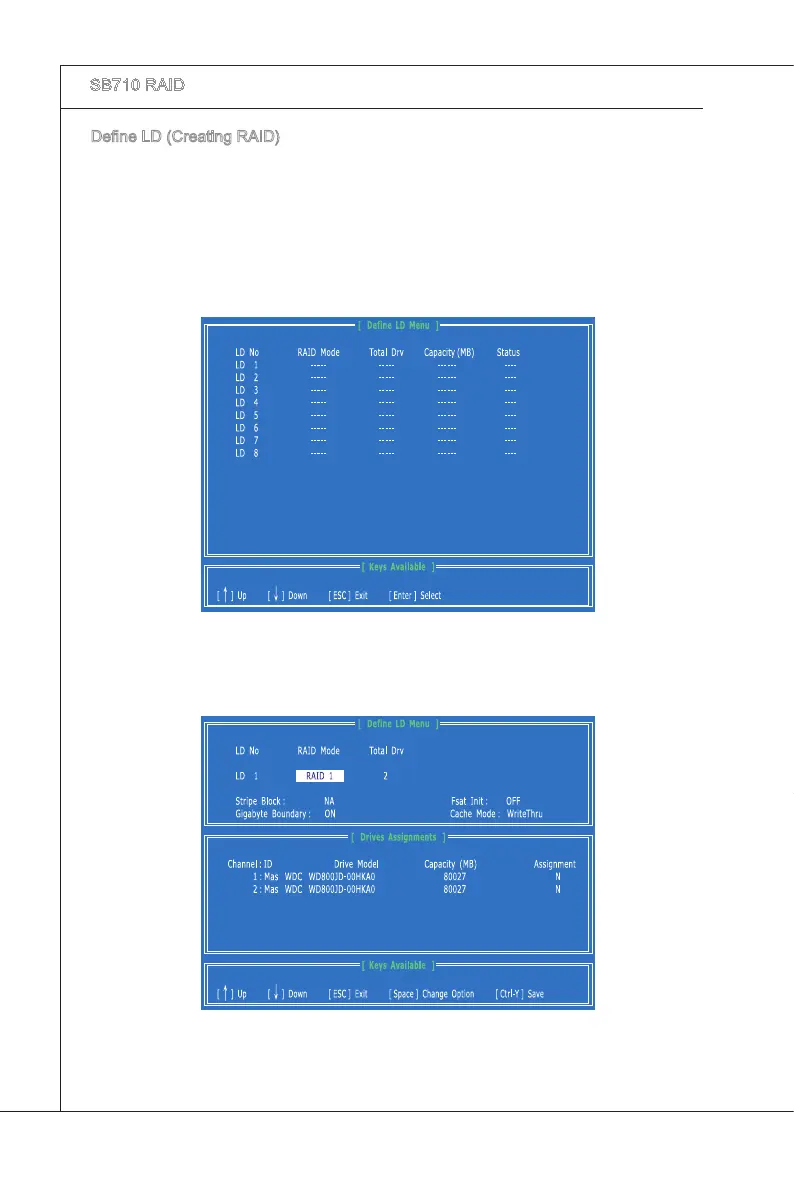
Press 2 on the Man Menu screen to enter the Dene LD Menu.
Press the arrow keys to hghlght an logcal drve number you want to dene and
press Enter to select t.
1.
2.
On the next screen, use the space key to choose a RAID mode (RAID 0/ 1/ 10) and
use the arrow key to move to the “Drves Assgnments” wndow.
3.


 To Next Page