Restore On AC Power Loss
This item species whether your system will reboot after a power failure or interrupt
occurs. Settings are:
[O] Always leaves the computer in the power o state.
[On] Always leaves the computer in the power on state.
[Last State] Restore the system to the status before power failure or interrupt
occurred.
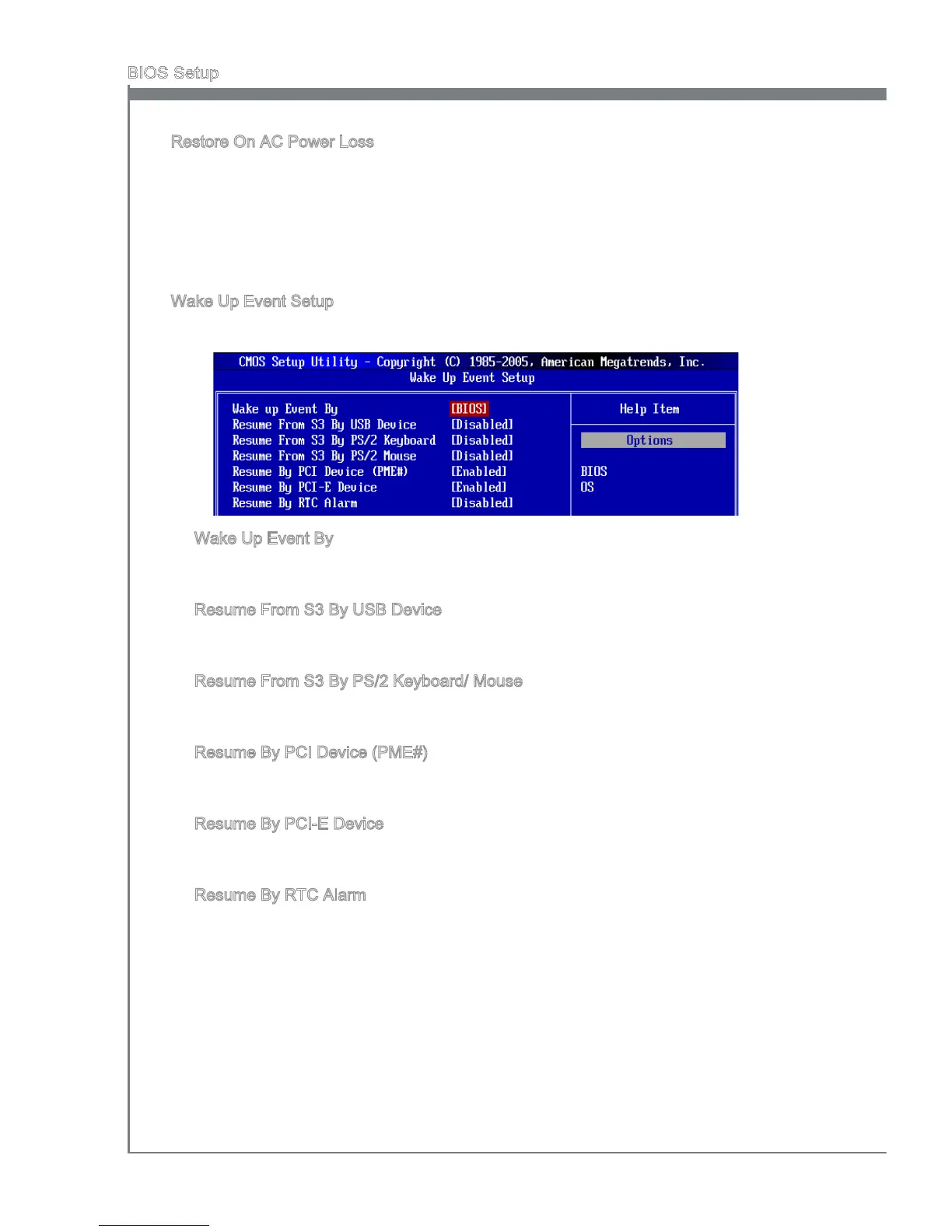
Wake Up Event Setup
Press <Enter> and the following sub-menu appears.
Wake Up Event By
Setting to [BIOS] activates the following elds, and use the following elds to set the
wake up events. Setting to [OS], the wake up events will be dened by OS.
Resume From S3 By USB Device
The item allows the activity of the USB device to wake up the system from S3 (Sus-
pend to RAM) sleep state.
Resume From S3 By PS/2 Keyboard/ Mouse
This setting determines whether the system will be awakened from what power
saving modes when input signal of the PS/2 keyboard/ mouse is detected.
Resume By PCI Device (PME#)
When set to [Enabled], the feature allows your system to be awakened from the
power saving modes through any event on PME (Power Management Event).
Resume By PCI-E Device
When set to [Enabled], the feature allows your system to be awakened from the
power saving modes through any event on PCIE device.
Resume By RTC Alarm
The eld is used to enable or disable the feature of booting up the system on a
scheduled time/date.
▶
▶
▶
▶
▶
▶
▶
▶



 To Next Page